76
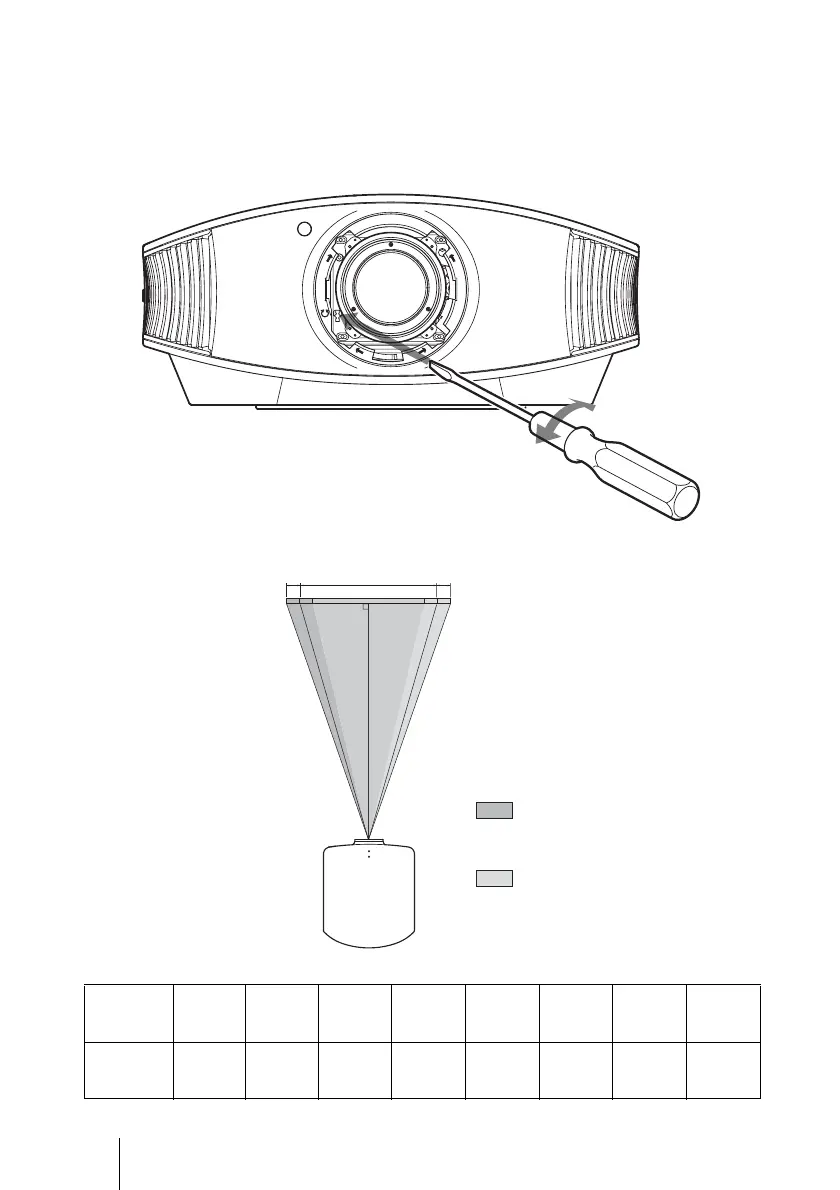
3 Insert a flat-blade screwdriver into the lens adjustment groove located at
the left bottom (when the projector projects the image when placed on
the floor, on a desk, etc.), and turn it in the direction in which you want
to move the lens.
If you turn it to the left, the lens moves to the left, and if you turn it to the right, the
lens moves to the right. (The range of movement is approximately ± 1mm.)
When using the 16:9 screen
Image
projection
size (inch)
40 60 80 100 120 150 180 200
Fine
adjustment
level (mm)
60 90 120 150 180 225 270 300
Picture position when
moving the picture the
maximum distance to the
left.
Picture position when
moving the picture the
maximum distance to the
right.
Fine adjustment level Fine adjustment level
Top view


 To Next Page