15
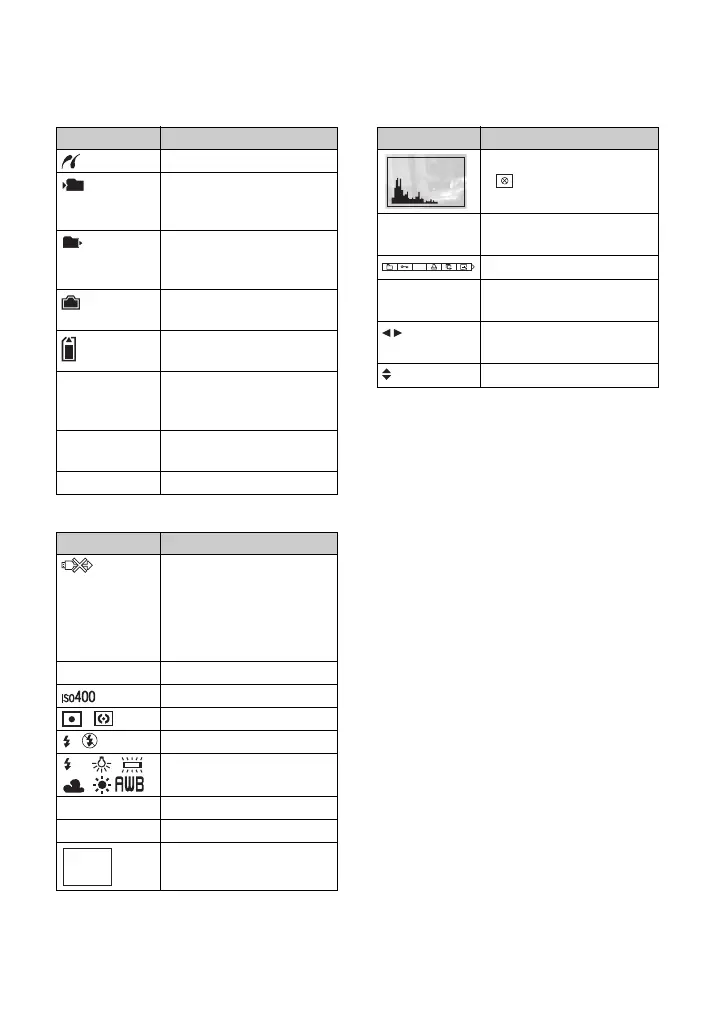
Indicators on the screen
C
D
E
Display Indication
PictBridge connecting (84)
Recording folder (55)
• This does not appear when
using internal memory.
Playback folder (43)
• This does not appear when
using internal memory.
Remaining internal
memory capacity
Remaining “Memory
Stick” capacity
8/8 12/12 Image number/Number of
images recorded in selected
folder
C:32:00 Self-diagnosis display
(100)
00:00:12 Counter
Display Indication
PictBridge connecting (86)
• Do not disconnect the cable
for multi-use terminal
(DSC-W55)/USB cable
(DSC-W35), while the icon
is displayed.
+2.0EV Exposure Value (23)
ISO number (37)
Metering mode (35)
Flash
White balance
(36)
500 Shutter speed
F3.5 Aperture value
Playback image
101
101
WB
Display Indication
Histogram (16, 23)
• appears when histogram
display is disabled.
2007 1 1
9:30 AM
Recorded date/time of the
playback image
Menu
(30)
z PAUSE
z PLAY
Playing back Multi Burst
images in series
(39)
BACK/
NEXT
Select images
VOLUME
Adjust volume
DPOF









 To Next Page