Sony KV-SW21M80 Group O29 (GB, FR, AR)_2-653-742-11 (1)
10
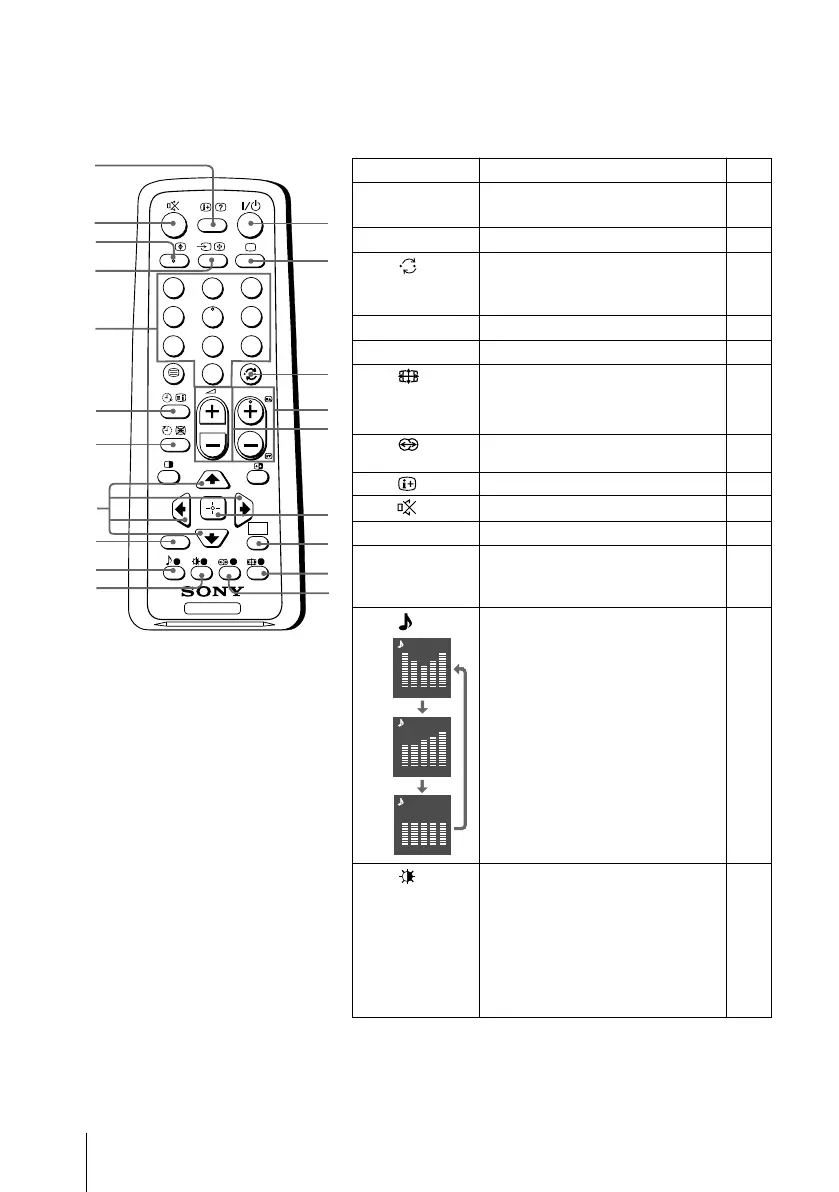
x Using the remote control and basic
functions
TV
1
2
3
4
6
7
8
9
0
5
PROG
A/B
1
2
3
7
4
5
qj
qk
qa
qd
qf
qh
RETURN
WEGA
GATE
6
8
9
0
w;
ql
qg
qs
Button Description Page
1 ?/1 Turn off temporarily or turn on –
the TV.
2 a Display the TV program. –
3 Jump to last program number –
that has been watched for at
least five seconds.
4 PROG +/–
Select program number.
–
5 2 +/– Adjust volume. –
8
Change the picture size:
–
“On” (16:9 wide-mode), “Off”.
9 Select surround mode options: 15
“On”, “Simulated”, “Off”.
0 Display on-screen information. –
qa Mute the sound. –
qd t Select TV or video input. 8
qf 0 – 9
Input numbers. For program –
numbers 10 and above, enter the
second digit within two seconds.
ql Select sound mode options 15
with a 5-Band Graphic
Equalizer display:
“Dynamic”, “Standard”,
“Custom”*.
*
When the “Custom” mode is
selected, you can receive the last
adjusted sound settings from the
“Sound Adjustment” option in
the menu.
w;
Select picture mode options: 14
“Vivid”, “Standard”, “Custom”*.
* When the “Custom” mode is
selected, you can receive the last
adjusted picture settings from the
“Picture Adjustment” option in
the menu.
Dynamic
100 300 1k 3k 8k
100 300 1k 3k 8k
Custom
100 300 1k 3k 8k
Standard
(KV-SW21M81/
SW21M80 only)
01GB06AVD-AFRTun.p65 8/11/05, 4:29 AM10
Black






 To Next Page