Sony KV-SW21M80 Group O29 (GB, FR, AR)_2-653-742-11 (1)
13
x “Settings” Adjustment
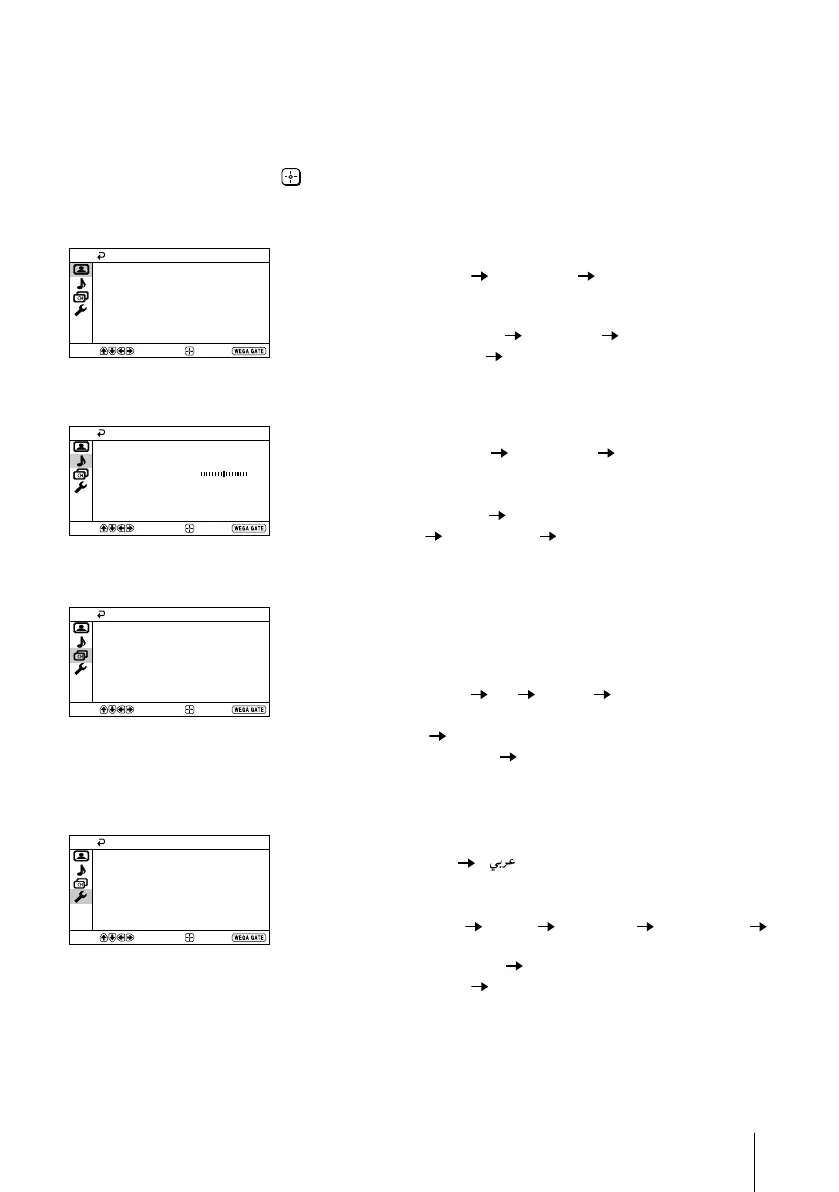
You are able to change the settings of your TV from “Settings” in
WEGA GATE menu.
Press WEGA GATE button to display WEGA GATE menu. Press V or v to select
“Settings” and press
.
The following is an overview of the items that can be adjusted.
Confirm
End
Picture
Color Temperature: Cool
Picture Adjustment
Picture Mode: Vivid
Intelligent Picture: On
Select
”Picture” (see page 14)
“Picture Mode”: “Vivid” “Standard” “Custom”
“Picture Adjustment”: “Picture”, “Brightness”, “Color”, “Hue”,
“Sharpness”, “Reset”
“Color Temperature”: “Cool” “Neutral” “Warm”
“Intelligent Picture”: “On” “Off”
Confirm
End
Sound
Sound Adjustment
Sound Mode: Dynamic
Select
Balance
Intelligent Volume:
Surround: Off
Off
”Sound” (see page 15)
“Sound Mode”: “Dynamic” “Standard” “Custom”
“Sound Adjustment”: “Adjust”, “Reset”
“Balance”
“Intelligent Volume”: “On” “Off”
“Surround”: “On” “Simulated” “Off”
Confirm
End
Channel Setup
Select
Manual Program
Auto Program
Program Sorting/Edit
”Channel Setup” (see page 16)
“Auto Program”
“Manual Program”
“Program”: “00” - “99”
“TV System”: “B/G” “I” “D/K” “M”
“VHF Low”/“VHF High”/“UHF”
“Fine”: “Auto” “Manual”
“Signal Booster”: “Auto” “Off”
“Program Sorting/Edit”
Confirm
End
Setup
Select
Picture Rotation
Language:
Video Label
Color System:
Wake Up Timer Beep:
Auto
Factory Settings
On
English
”Setup” (see page 18)
“Language”: “English” “ ” (Arabic)
“Picture Rotation” (KV-SW21M81 only)
“Video Label”: “Video Input”, “Label”
“Color System”: “Auto” “PAL” “SECAM” “NTSC3.58”
“NTSC4.43”
“Wake Up Timer Beep”: “On” “Off”
“Factory Settings”: “Yes” “No”
Note
• When a feature is dimmed in the menu, it is not selectable.
01GB06AVD-AFRTun.p65 8/11/05, 4:29 AM13
Black






 To Next Page