4
Sony KV-SW21M80 Group O29 (GB, FR, AR)_2-653-742-11 (1)
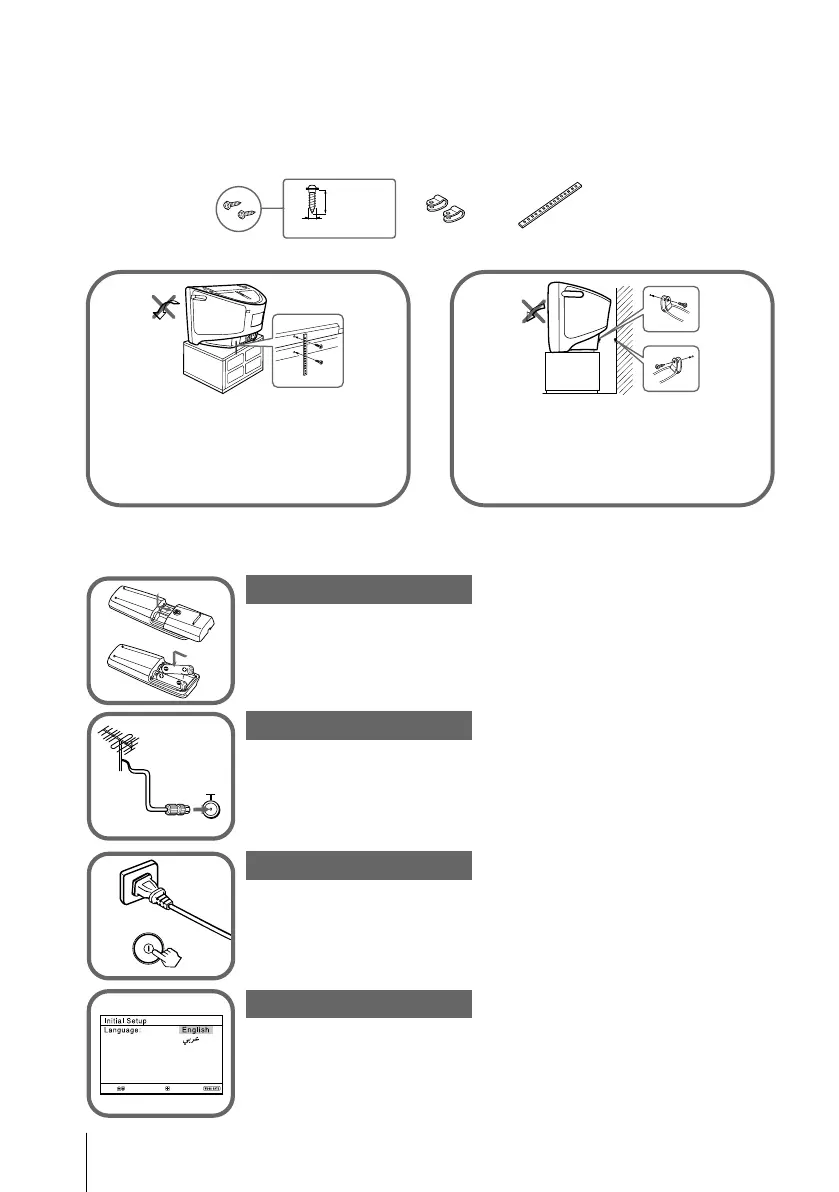
Insert the batteries (supplied) into the remote.
Note
•Do not use old or different types of batteries together.
Connect the antenna cable (not supplied) to 8
(antenna input) at the rear of the TV.
Tip
•You can also connect your TV to other optional components (see page 8).
Plug in the power cord, then press ! on the TV to turn it on.
Note
•The 1 (standby) indicator flashes green for a few seconds when
turning on the TV. This does not indicate a malfunction.
Set up the TV by following the instructions of the “Initial
Setup” menu (see page 5).
or
Screw the band to the TV stand and
to the provided hole at the rear of
your TV.
(1) Put a cord or chain through the
clamps.
(2)
Screw one clamp to a wall or pillar
and the other clamp to the provided
hole at the rear of your TV.
End
Select
Confirm
b
Step 1
Step 2
Step 3
Step 4
x Securing the TV
To prevent the TV from falling, use the supplied screws, clamps and band to
secure the TV. Use only the supplied screws. Use of other screws may damage
the TV.
20 mm
3.8 mm
screws
clamps band
x Getting Started
b
01GB04INS-AFRTun.p65 8/11/05, 4:28 AM4
Black






 To Next Page