Sony KV-SW21M80 Group O29 (GB, FR, AR)_2-653-742-11 (1)
12
01
02
03
04
05
TV
Confirm
Select
End
External Inputs
Confirm
Select
End
Video 1
1
2
DVD
Video 2
Confirm
End
Picture
Color Temperature: Cool
Picture Adjustment
Picture Mode: Vivid
Intelligent Picture: On
Select
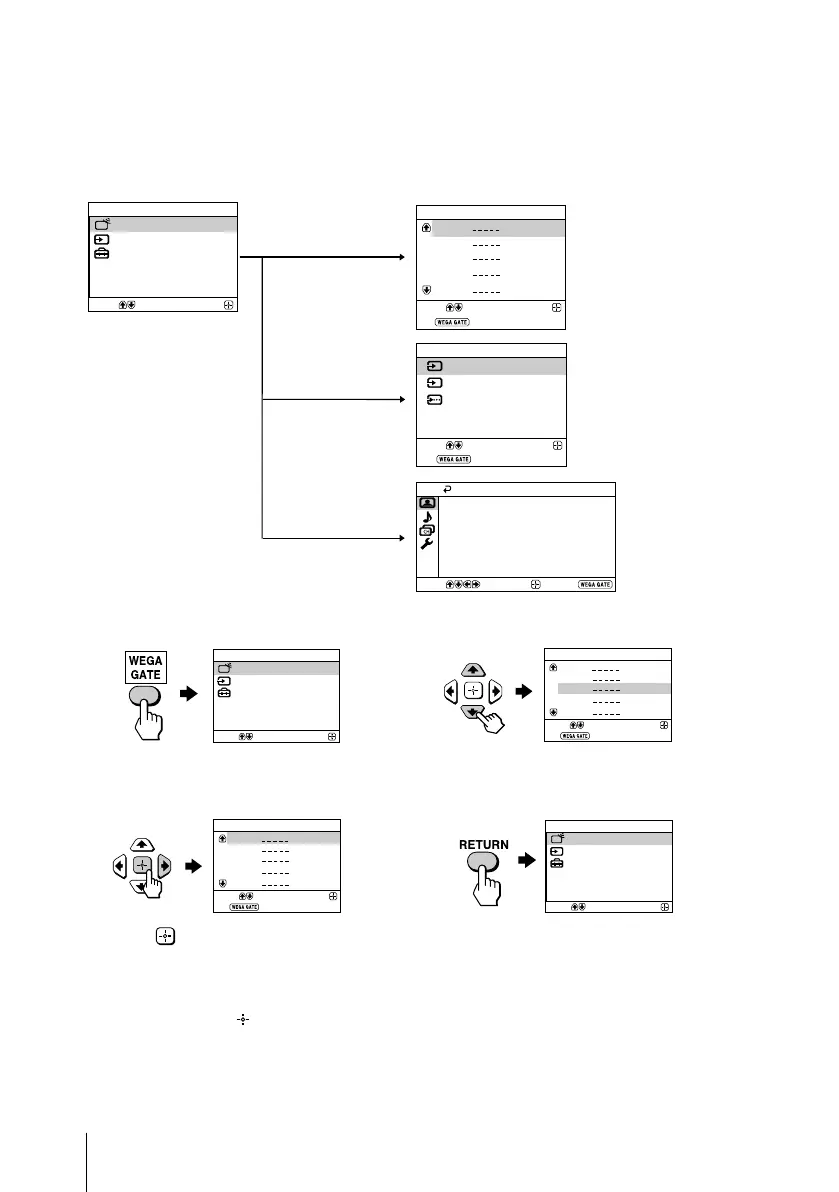
x Introducing the WEGA GATE
navigator
WEGA GATE is a gateway that allows you access to preset TV channels,
connected external inputs and “Settings” menu.
watch the preset TV
channels (see page 5)
select the inputs for the
connected equipment
(see page 8)
change the settings
of your TV (see
page 13)
How to use WEGA GATE
(1) Press WEGA GATE to display or cancel
the WEGA GATE menu.
Confirm
Select
WEGA GATE
Settings
External Inputs
TV
(3) Press V or v to select the desired item.
(4) Press RETURN to move to the previous
level.
(2) Press (or b) to confirm your selection
or go to the next level.
“TV”
“External Inputs”
“Settings”
Confirm
Select
WEGA GATE
Settings
External Inputs
TV
Confirm
Select
WEGA GATE
Settings
External Inputs
TV
01
02
03
04
05
TV
Confirm
Select
End
01
02
03
04
05
TV
Confirm
Select
End
Tip
• The WEGA GATE, and V,v,B,b buttons on the top control panel can also be used for the
operations above.
01GB06AVD-AFRTun.p65 8/11/05, 4:29 AM12
Black






 To Next Page