EasyManua.ls Logo

Sony WM-D6 - Page 5

Sony WM-D6
32 pages
Print Icon
To Next Page IconTo Next Page
To Previous Page IconTo Previous Page
Loading...
oo
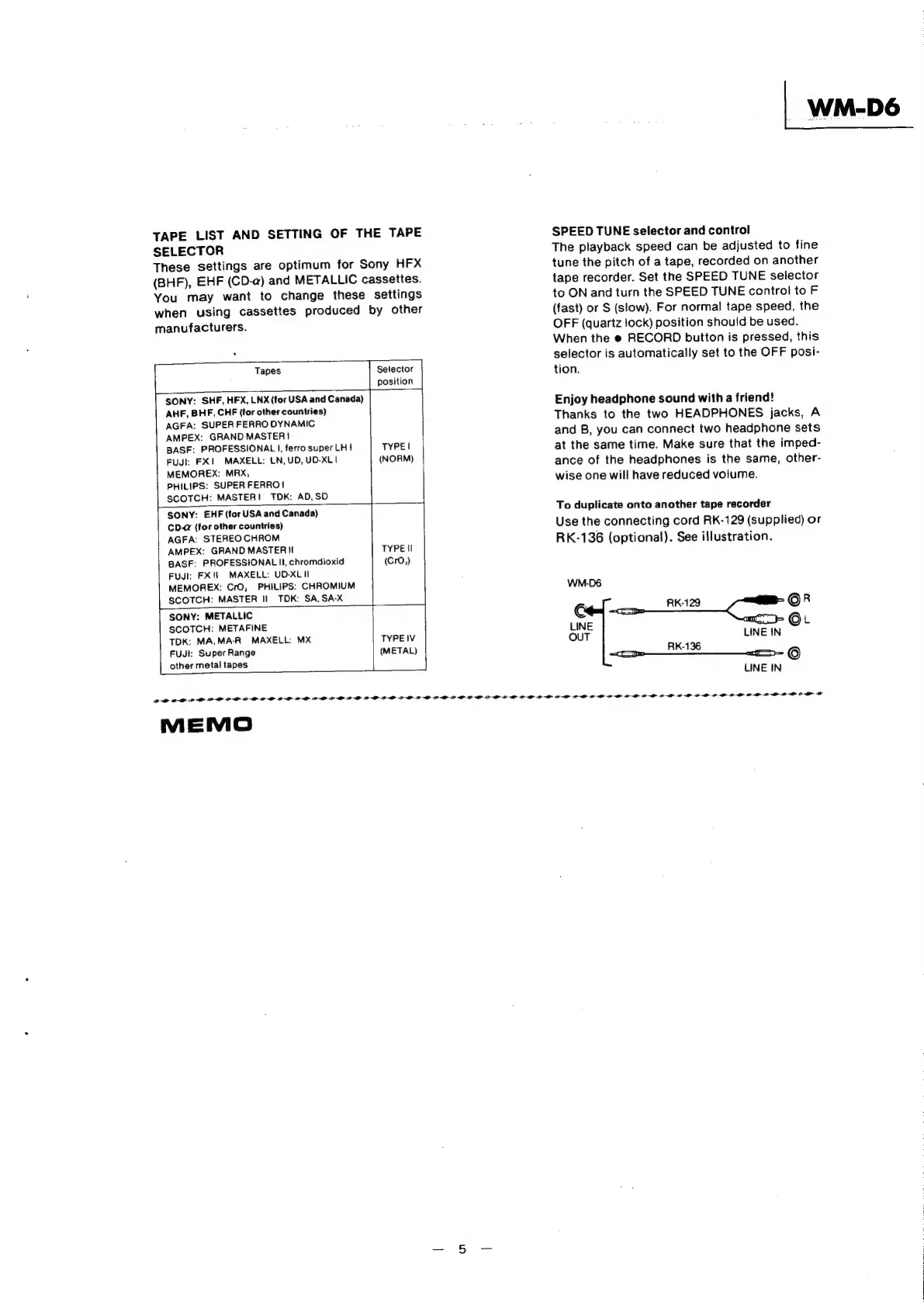
TAPE
LIST
AND
SETTING
OF
THE
TAPE
SELECTOR
These
settings
are
optimum
for
Sony
HFX
(BHF),
EHF
(CD-a)
and
METALLIC
cassettes.
You
may
want
to
change
these
settings
when
using
cassettes
produced
by
other
manufacturers.
]
Selector
|
position
Tapes
SONY:
SHF,
HFX,
LNX
(for
USA
and
Canada)
AHF,
BHF,
CHF
(for
other
countries)
AGFA:
SUPER
FERRO
DYNAMIC
AMPEX:
GRAND
MASTER}
BASF:
PROFESSIONAL
I,
ferro
super
LH!
TYPE!
FUJI:
FX
MAXELL:
LN,
UD,
UD-XL1
(NORM)
MEMOREX:
MRX,
PHILIPS:
SUPER
FERRO!
SCOTCH:
MASTER!
TOK:
AD,SD
SONY:
EHF
(for
USA
and
Canada)
CD.@
(for
other
countries)
AGFA:
STEREO
CHROM
AMPEX:
GRAND
MASTER]
TYPE|I
BASF:
PROFESSIONAL
Il,
chromdioxid
(CrO,)
Fuul:
FX
MAXELL:
UD-XLII
MEMOREX:
CrO,
PHILIPS:
CHROMIUM
SCOTCH:
MASTER
II
TOK:
SA,SA-X
SONY:
METALLIC
SCOTCH:
METAFINE
TDK:
MA,MA-R
MAXELL:
MX
TYPE
IV
FUJI:
Super
Range
(METAL)
other
metal
tapes
MEMO
SPEED
TUNE
selector
and
control
The
playback
speed
can
be
adjusted
to
fine
tune
the
pitch
of
a
tape,
recorded
on
another
tape
recorder.
Set
the
SPEED
TUNE
selector
to
ON
and
turn
the
SPEED
TUNE
control
to
F
(fast)
or
S
(slow).
For
normal
tape
speed,
the
OFF
(quartz
!ock)
position
should
be
used.
When
the
e
RECORD
button
is
pressed,
this
selector
is
automatically
set
to
the
OFF
posi-
tion.
Enjoy
headphone
sound
with
a
friend!
Thanks
to
the
two
HEADPHONES
jacks,
A
and
B,
you
can
connect
two
headphone
sets
at
the
same
time.
Make
sure
that
the
imped-
ance
of
the
headphones
is
the
same,
other-
wise
one
will
have
reduced
volume.
To
duplicate
onto
another
tape
recorder
Use
the
connecting
cord
RK-129
(supplied)
or
RK-136
(optional).
See
illustration.
WM.-D6
RK-129
OR
(oun
our
LINE
IN
RK-136
LINE
IN
LLP
LILLIA
LLL
LLL
LA
LALLA
LLL
LA
LN
LAL
PLL
LL
LL
LLL
ALL
PLP
OL
LAP
OP
A
A

Related product manuals