EasyManua.ls Logo

Sony WM-D6 - Page 6

Sony WM-D6
32 pages
Print Icon
To Next Page IconTo Next Page
To Previous Page IconTo Previous Page
Loading...
WM-D6
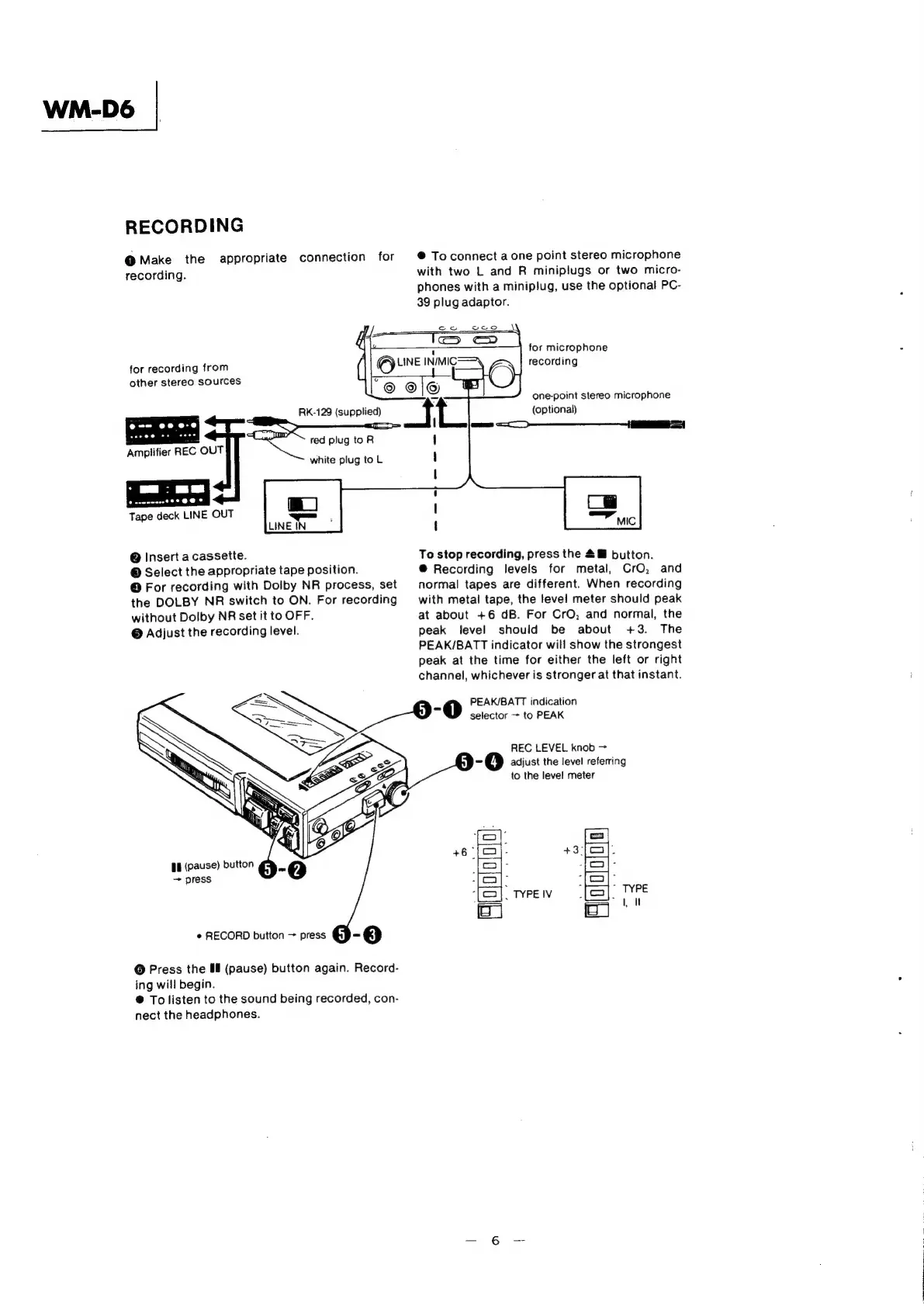
RECORDING
O
Make
the
appropriate
connection
for
recording.
@
To
connect
a
one
point
stereo
microphone
with
two
L
and
R
miniplugs
or
two
micro-
phones
with
a
miniplug,
use
the
optional
PC-
39
plug
adaptor.
ow
veo
for
recording
from
other
stereo
sources
red
plug
toR
Amplifier
REC
OUT
white
plug
to
L
Tape
deck
LINE
OUT
@
Insert
a
cassette.
©
Select
the
appropriate
tape
position.
@
For
recording
with
Dolby
NR
process,
set
the
DOLBY
NR
switch
to
ON.
For
recording
without
Dolby
NR
set
it
to
OFF.
@
Adjust
the
recording
level.
¢
RECORD
button
>
press
©
Press
the
#9
(pause)
button
again.
Record-
ing
will
begin.
®@
To
listen
to
the
sound
being
recorded,
con-
nect
the
headphones.
=
eS
&
;
for
microphone
recording
one-point
stereo
microphone
(optional)
To
stop
recording,
press
the
2@
button.
@
Recording
levels
for
metal,
CrO,
and
normal
tapes
are
different.
When
recording
with
metal
tape,
the
level
meter
should
peak
at
about
+6
dB.
For
CrO,
and
normal,
the
peak
level
should
be
about
+3.
The
PEAK/BATT
indicator
will
show
the
strongest
peak
at
the
time
for
either
the
left
or
right
channel,
whichever
is
stronger
at
that
instant.
PEAK/BATT
indication
5
0
selector
~
to
PEAK
REC
LEVEL
knob
>
=
adjust
the
level
referring
to
the
level
meter