EasyManua.ls Logo

Sony XM-C2000 - Before Installation

Sony XM-C2000
9 pages
Print Icon
To Next Page IconTo Next Page
To Previous Page IconTo Previous Page
Loading...
Installation
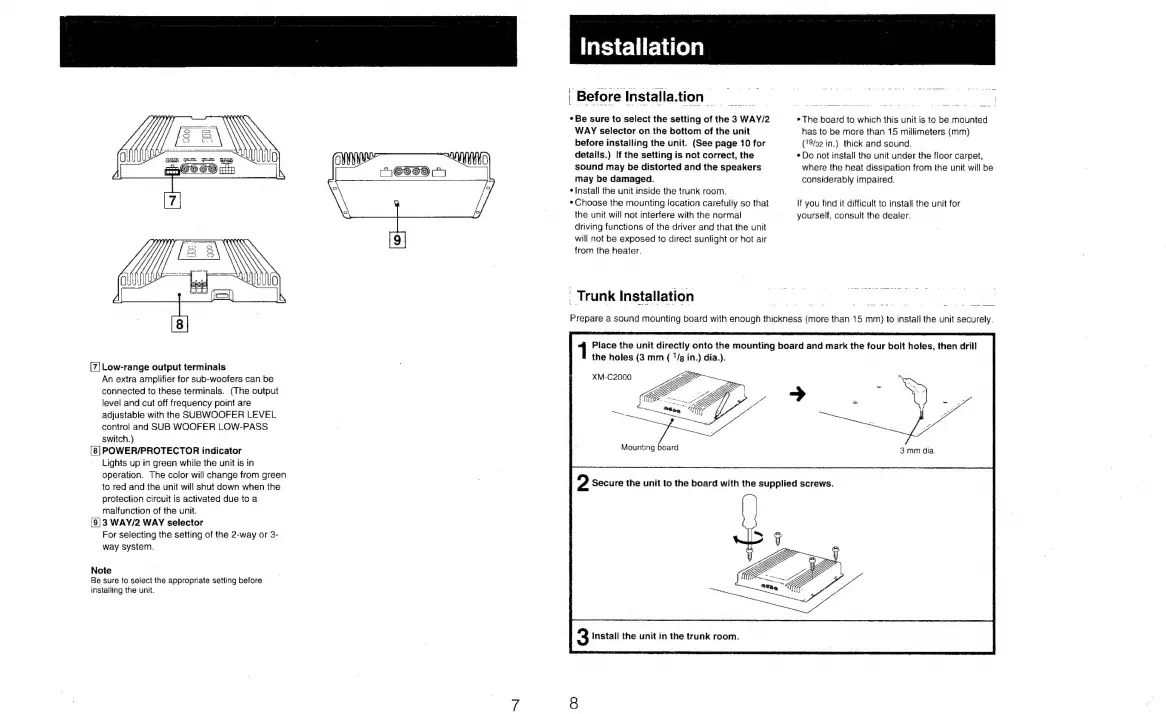
Low-range
output
terminals
An
extra
amplifier
for
sub-woofers
can
be
connected
to
these
terminals.
(The
output
level
and
cut
off
frequency
point
are
adjustable
with
the
SUBWOOFER
LEVEL
control
and
SUB
WOOFER
LOW-PASS
switch.)
POWER/PROTECTOR
indicator
Lights
up
in
green
while
the
unit
is
in
operation.
The
color
will
change
from
green
to
red
and
the
unit
will
shut
down when
the
protection
circuit
is
activated
due
to
a
malfunction
of
the
unit.
3
WAY/2
WAY
selector
For
selecting
the
setting
of
the
2-way
or
3-
way
system.
wo
Note
Be
sure
to
select
the
appropriate
setting
before
installing
the
unit.
'
Before
Installa.tion
*
Be
sure
to
select
the
setting
of
the
3
WAY/2
WAY
selector
on
the
bottom
of
the
unit
before
installing
the
unit.
(See
page
10
for
details.)
If
the
setting
is
not
correct,
the
sound
may
be
distorted
and
the
speakers
may
be
damaged.
¢
Install
the
unit
inside
the
trunk
room.
*
Choose
the
mounting
location
carefully
so
that
the
unit
will
not
interfere
with
the
normal
driving
functions
of
the
driver
and
that
the
unit
will
not
be
exposed
to
direct
sunlight
or
hot
air
from
the
heater.
_
Trunk
Installation
*
The
board
to
which
this
unit
is
to
be
mounted
has
to
be
more
than
15
millimeters
(mm)
{19/32
in.)
thick
and
sound.
*
Do
not
install
the
unit
under
the
floor
carpet,
where
the
heat
dissipation
from
the
unit
will
be
considerably
impaired.
If
you
find
it
difficult
to
instal!
the
unit
for
yourself,
consult
the
dealer.
Prepare
a
sound
mounting
board
with
enough
thickness
(more
than
15
mm)
to
install
the
unit
securely.
Place
the
unit
directly
onto
the
mounting
board
and
mark
the
four
bolt
holes,
then
drill
the
holes
(3
mm
(
1/g
in.)
dia.).
XM-C2000
3mm
dia.

Related product manuals