EasyManua.ls Logo

Sony XM-C2000 - Crossover Frequencies

Sony XM-C2000
9 pages
Print Icon
To Previous Page IconTo Previous Page
Loading...
»
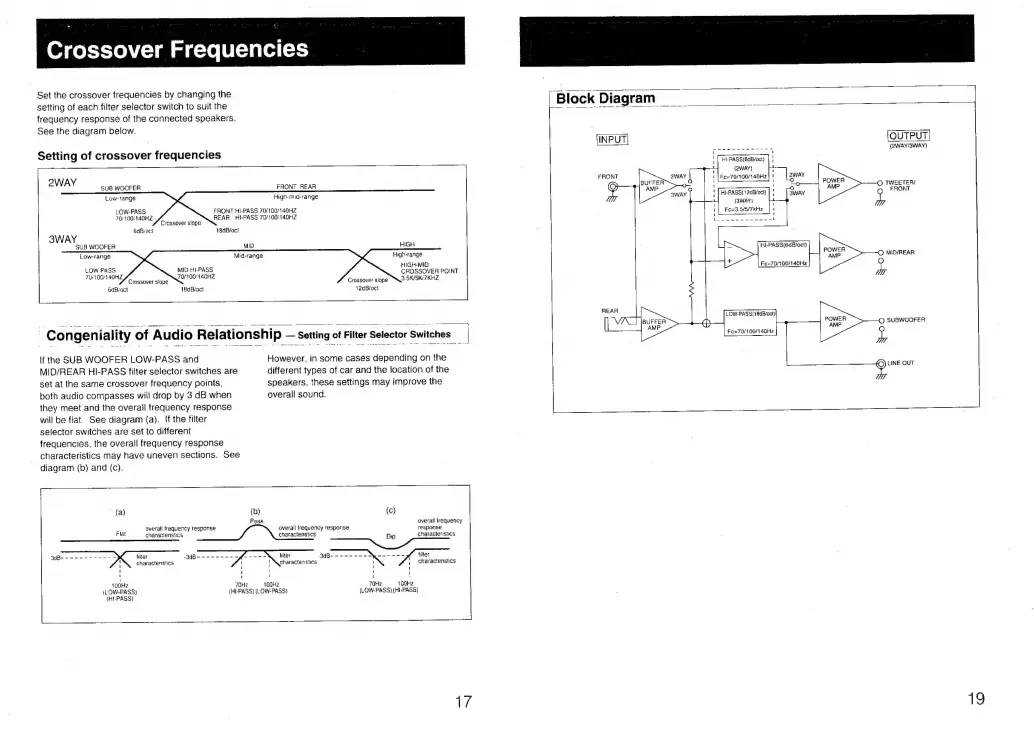
Crossover
Frequencies
Set
the
crossover
frequencies
by
changing
the
setting
of
each
filter
selector
switch
to
suit
the
frequency
response
of
the
connected
speakers.
See
the
diagram
below.
Setting
of
crossover
frequencies
2WAY
SUB
WOOFER
FRONT
REAR
High-mid-range
Low-range
LOW-PASS
FRONT
HI-PASS
70/100/140HZ
70:
100/140HZ
REAR
HI-PASS
70/100/140HZ
Crossover
slope
6dBroct
18dB/oct
SWAY
SUB
WOOFER
MID
HIGH
Low-range
Mid-range
High-range
HIGH-MID
LOW-PASS
MID
HI-PASS
70/1
00/140HZ
70/100'140HZ
Cee
Crossover
slope
Crossover
slope
6dBroct
18dBioct
12dBioct
Congeniality
of
Audio
Relationship
setting
of
Filter
Selector
Switches
_|
If
the
SUB
WOOFER
LOW-PASS
and
However,
in
some
cases
depending
on
the
MID/REAR
HI-PASS
filter
selector
switches
are
different
types
of
car
and
the
location
of
the
set
at
the
same
crossover
frequency
points,
speakers,
these
settings
may
improve
the
both
audio
compasses
will
drop
by
3
dB
when
overall
sound.
they
meet
and
the
overail
frequency
response
will
be
flat.
See
diagram
(a).
!f
the
filter
selector
switches
are
set
to
different
frequencies,
the
overall
frequency
response
characteristics
may
have
uneven
sections.
See
diagram
(b)
and
(c).
-
»
(a)
{b)
(c)
Peak
overall
frequency
overall
frequency
response
overall
lrequency
response response
Flat
charactenstics
charactenstics
Dip
characteristics
ether
ee
hiter
-3dB-
~
------
ee
-----
filter
characteristics
|
characteristics
1
hiter
charactenstics
!
i
1 1
'
1
i
{
1
1
'
'
!
-
100HZ
70Hz
100Hz
70Hz
100Hz
iLOW-PASS)
(HI-PASS)
(LOW-PASS)
(LOW-PASS)
({HI-PASS)
{HJ-PASS}
ye
|
Block
Diagram
(INPUT|
HI-PASS(12cB/ocl)
(SWAY)
Fe=3.5/5/7kKHz
HI-PASS(6dB/oct)
Fo=70/300/140Hz
(2WAY/BWAY)
©
TWEETER
2
FRONT
©
MID/REAR
by
©
SUBWOOFER
pe
peal
OUT
19

Related product manuals