6
ZS-S2iP
SECTION 2
GENERAL
This section is extracted
from instruction manual.
• BASIC OPERATIONS
V
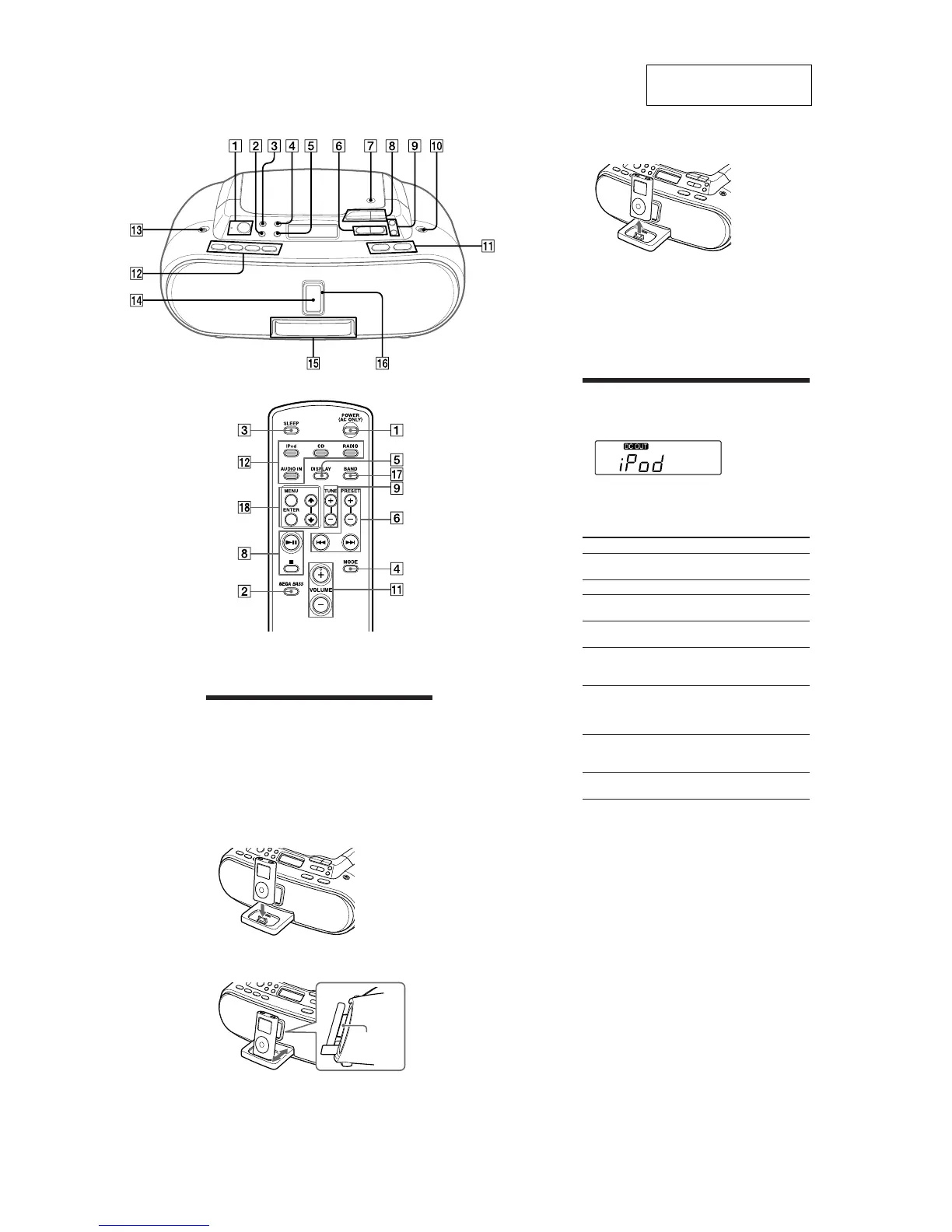
VOLUME + qa have a tactile dot.
OLUME +
qa
and u
8
have a tactile dot.
Playing the iPod
1
2
Press iPod
qs
(direct power-on).
“DC OUT” appears in the display (AC only).
Press
u
8
.
The iPod begins to play.
You can operate the connected iPod by the unit or the
iPod buttons.
To Press
Pause playback
u
8
To resume play, press it again.
Stop playback
x
8
Go to the next
track
>
6
Go back to the
previous track
.
6
Locate a point
while listening to
the sound
>
(forward) or
.
(backward)
6
while playing and hold it until
you find the point.
Locate a point
while observing
on the iPod
display
>
(forward) or
.
(backward)
6
in pause and hold it until you
Select a menu Press MENU and
find the point.
M
or
m
qk
on the
remote to select a menu, and then
press ENTER
qk
.
Go back to the
previous menu
Press MENU
qk
on the remote.
Notes
• You may use the universal adaptor supplied with your iPod for a
more customized fit. The iPod may be docked without the use of an
adaptor.
• If you connect the iPod when another function is in use, the
function will change to iPod automatically.
• Apple’s iPod Universal Dock Adapter (not supplied) can be used
with this unit.
• To use an iPod, refer to the user’s guide of your iPod.
• Before disconnecting the iPod, pause playback.
To use the unit as a battery charger (AC
only)
You can use the unit as a battery charger. The charging
status appears in the iPod display. For details, see the
user’s guide of your iPod.
On copyrights
• iPod is a trademark of Apple Inc., registered in the U.S.
and other countries.
• All other trademarks and registered trademarks are
of their respective holders. In this manual, ™ and ®
marks are not specified.
Opening/closing the Sliding Tray
Setting the iPod
1
Press the PUSH OPEN/CLOSE button qf.
The Sliding Tray
qg
is ejected half way.
2
Pull the Sliding Tray
qg
all the way out.
3
4
5
Attach the iPod Universal Dock Adapter if
necessary (not supplied).
Place your iPod on the Sliding Tray
qg.
Push in and adjust the Sliding Tray
qg
so that the
iPod fits on the Back Support
qh.
Back
Support
Closing the Sliding Tray
1
Remove the iPod
Push the Sliding Tray
qg
until it clicks.
3
2
Press the PUSH OPEN/CLOSE button
qf
.
4
Push the Sliding Tray
qg
into the unit.
Notes
• Do not carry the unit with an iPod set on the connector. Doing so
may cause a malfunction.
• Be sure to store the Sliding Tray
qg
before moving the unit.


 To Next Page