Sorensen DCS Series 1kW and 1.2kW Supplies Installation and Operation
M362500-01 Rev H 2-19
2.11.1 Programming With External Voltage Sources
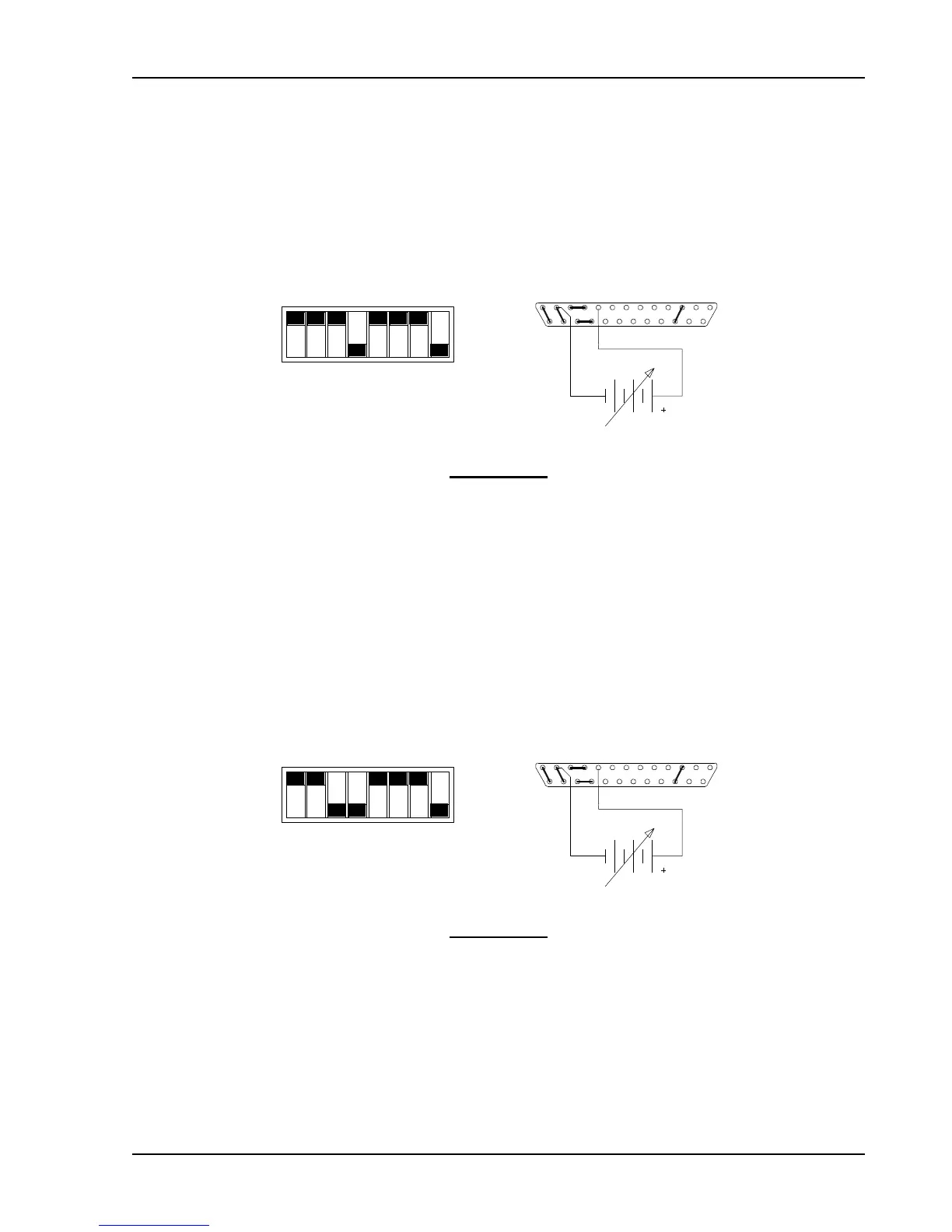
The output voltage can be programmed using either a 0-5 Vdc or 0-10 Vdc external voltage
source. To program the output voltage with a 0-5 Vdc source, set switch SW1-3 open (default
factory setting) and remove the jumpers connecting pins 8 to 9 and 20 to 21 on connector J3.
Connect the external source between pins 9 (positive) and 12 (return). Varying the external
voltage from 0-5V will cause the output to vary from 0-100% of rated output.
SW1-1
SW1-2
SW1-3
SW1-4
SW1-5
SW1-6
SW1-7
SW1-8
CLOSED
CONNECTOR J3
0-5V
1312
25
9 1
14
SWITCH SW1
OPEN
Switch SW1
Switch SW1 and Connector J3 Configuration
for 0-5V Programming of the Output Voltage
(J3 sense line, OVP and current control jumpers shown set for local operation)
For programming with a 0-10 Vdc source, close switch SW1-3 and replace the 0-5V source with
a 0-10V source.
SW1-1
SW1-2
SW1-3
SW1-4
SW1-5
SW1-6
SW1-7
SW1-8
CLOSED
CONNECTOR J3
0-10V
1312
25
9 1
14
SWITCH SW1
OPEN
Switch SW1
Switch SW1 and Connector J3 Configuration
for 0-10V Programming of the Output Voltage
(J3 sense line, OVP and current control jumpers shown set for local operation)



 To Next Page