Power
PowerPower
Power
Amplifier
AmplifierAmplifier
Amplifier
710
710710
710
User Manual
Page 11
4.3
4.34.3
4.3 Rear
RearRear
Rear panel
panel panel
panel of the
of the of the
of the power
power power
power amplifier 710
amplifier 710amplifier 710
amplifier 710
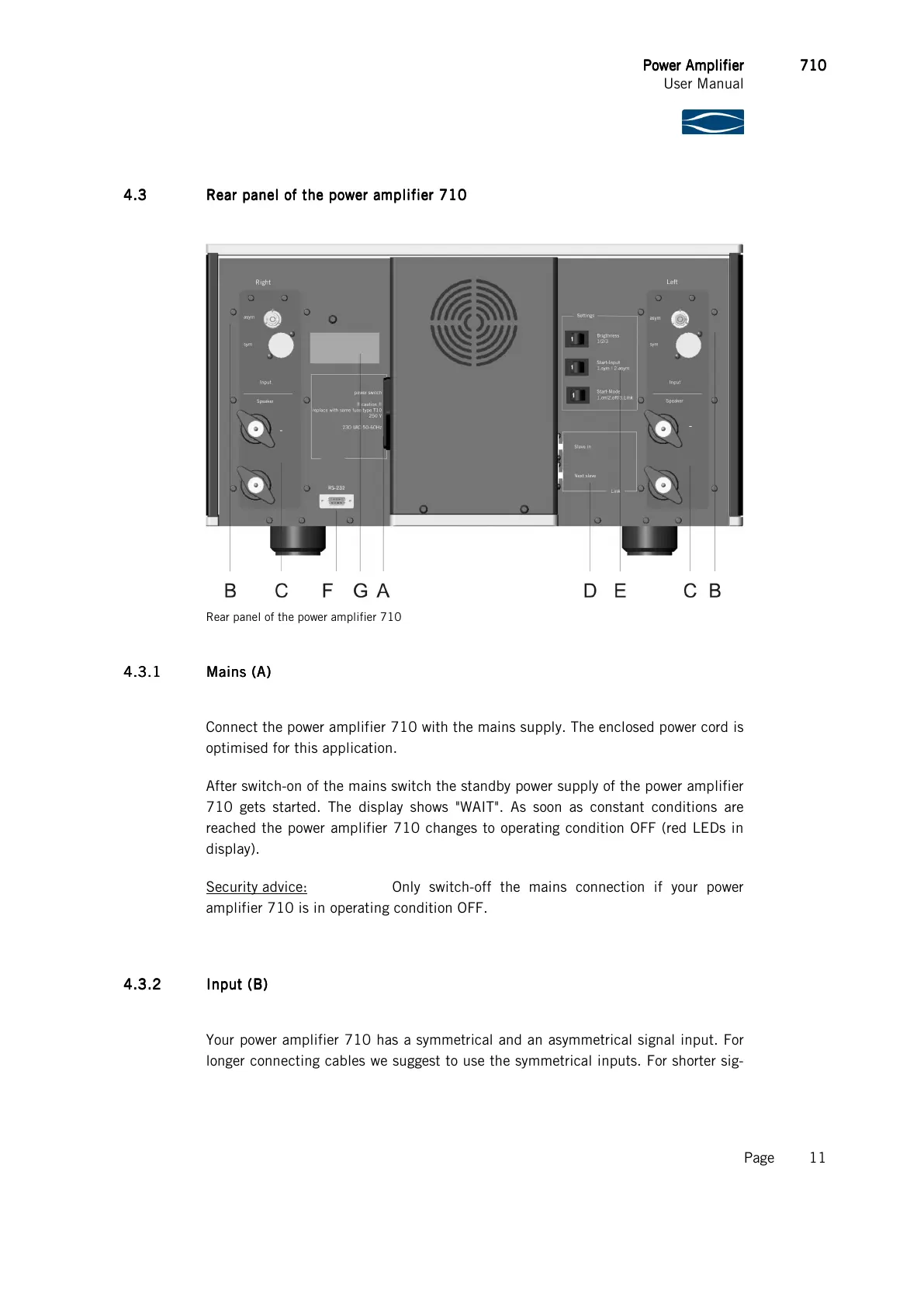
Rear panel of the power amplifier 710
4.3.1
4.3.14.3.1
4.3.1 Mains
MainsMains
Mains (A)
(A) (A)
(A)
Connect the power amplifier 710 with the mains supply. The enclosed power cord is
optimised for this application.
After switch-on of the mains switch the standby power supply of the power amplifier
710 gets started. The display shows "WAIT". As soon as constant conditions are
reached the power amplifier 710 changes to operating condition OFF (red LEDs in
display).
Security advice: Only switch-off the mains connection if your power
amplifier 710 is in operating condition OFF.
4.3.2
4.3.24.3.2
4.3.2 Input (B)
Input (B)Input (B)
Input (B)
Your power amplifier 710 has a symmetrical and an asymmetrical signal input. For
longer connecting cables we suggest to use the symmetrical inputs. For shorter sig-



 To Next Page