Need help?
Do you have a question about the Sound Devices usbpre and is the answer not in the manual?
Details the audio quality specifications, including dynamic range and frequency bandwidth.
Lists compatibility with Windows and Mac OS, including ASIO 2.0 support.
Provides detailed technical specifications for frequency response, THD+N, input/output levels, and impedance.
Lists the minimum Windows operating systems required for USBPre functionality.
Specifies requirements for compatible audio software, including ASIO support.
Lists the minimum Mac OS versions required for USBPre functionality.
Specifies requirements for compatible audio software, including ASIO support.
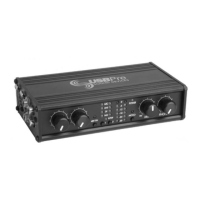
Adjusts input gain levels for analog sources. Gain control affects only analog inputs.
Selects the source for headphone monitoring: analog, computer audio, or a mix.
Active-balanced XLR inputs for low-impedance microphone signals.
Coaxial digital connectors for S/PDIF audio transfer and connection.
A 15 dB pad for microphone inputs to prevent overloading.
Installs standard Windows USB class drivers for general audio applications.
Installs ASIO drivers for low-latency audio connections with ASIO-compatible software.
Provides steps to remove the USBPre software and drivers from the computer.
Explains how to set the USBPre as the default audio device in Windows.
Allows selection of input types (Mic, Line, DI, Tape, S/PDIF) for each channel.
Describes the system tray icon indicating the USBPre's connection status.
Sets the sample rate for incoming analog audio signals.
Controls the recording speed and system responsiveness for ASIO operations.
Guides users through installing the USBPre software and control panel on Mac OS.
Instructs on connecting the USBPre hardware to the Mac after software installation.
Selects the input type for each channel, including S/PDIF if available.
Indicates the currently selected record sample rate for the device.
Details the two input types (Mic In, Sound In) and their differences in Mac configuration files.
Covers S/PDIF input specifications, including bit depths and sample rates for Mac OS.
Describes S/PDIF output limitations and sample rate conversion in Mac OS Sound Manager.
Explains how to verify ASIO driver installation and access the ASIO control panel.
Explains how to define input channels as single, stereo, or S/PDIF.
Discusses valid sample rates and the importance of matching them to avoid distortion.
Describes the provision of 48V phantom power for condenser microphones.
Highlights the importance of sufficient RAM for audio applications.
Discusses hard disk requirements for multi-track recording and sustained throughput.
Advises deactivating power management features for optimal audio performance.
Details compatibility issues with older Windows versions and recommends upgrades.
Diagnoses power issues, suggesting checking USB port power and hub types.
Discusses common causes of audio clicks and dropouts related to USB implementation.
Guides on connecting a turntable, requiring a phono preamplifier for the Tape input.
Provides contact information for technical assistance and support.
Details compliance with FCC Part 15 Class B limits for digital devices.
Lists limitations on software transfer, modification, and distribution.
Disclaims warranties for the software product and limits liability.
 General
| Brand | Sound Devices |
|---|---|
| Model | usbpre |
| Category | Recording Equipment |
| Language | English |

 To Next Page