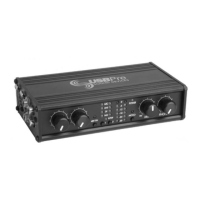
Powering:
USB bus powered, 3 stage soft-start meets
USB hot-plugging power requirements
5 V, 100 mA max current drawn during enu-
meration
5 V, 350 mA quiescent current from USB port
5 V, 500 mA max current from USB port
USBPre requires a full 500 mA USB port. The
USBPre will not be available if connected to a
passive USB connection or hub.
Dimensions (unpackaged):
4.3 cm x 18 cm x 10 cm (H x W x D)
1.7 in. x 7.25 in. x 4.25 in.
Weight:
0.5 kg
1.13 lbs.
Certifications:
Meets FCC Part 15 Class B
Complies with the requirements of European
Directive 89/336/EEC
Included Accessories:
USB Cable
USBPre software installation CD-ROM for
Mac OS and Windows OS
Rubber Feet
User Guide and
Technical Information
page 6SOUND DEVICES, LLC
The USBPre relies on the USB port of a Windows
PC for its interface to the computer. The USBPre
does not function without being connected to a
computer.
The requirements below outline the minimum con-
figurations acceptable for operation with Windows
computer systems and USBPre hardware.
Software applications used with the USBPre have
their own requirements that may be in addition to
the requirements of the USBPre. Consult your soft-
ware application’s documentation.
Operating System:
Windows 98 Second Edition
Windows 2000 SR-1
Windows Me
Windows XP (Home and Professional)
Processor:
Intel Pentium II/300 MHz or Intel Celeron/450
MHz minimum
(Cyrix processors not recommended)
RAM / System Bus Speed:
64 MB (128 MB with most software) / 66
MHz, 100 MHz recommended
Hard Drive:
5400 rpm, 7200 rpm mechanism
recommended
Sound Card:
None required
Audio Software:
Windows compatible audio software with
wave audio support.
Windows compatible audio software with
ASIO audio support.
Motherboard Chipset:
Intel strongly preferred, Via and ALI based
motherboards not recommended
USB Connection:
Full USB 1.1 compliance, single controller,
single hub
For Notebook Computer users:
For proper operation of the USBPre, turn
off all power management when using the
USBPre for audio recording. Power manage-
ment reduces processor speed, system bus
speed, spins down hard disks, shuts down
displays, or a combination of the above to
reduce current consumption and extend bat-
tery run time. The change in state from active
to power-saving mode can disrupt data on the
USB bus and cause unintended dropouts.
Note: Sound Devices cannot guarantee that a
given computer can be used satisfactorily with
the USBPre based exclusively on the fact that
it meets the above requirements.
System Requirements - Windows OS


 To Next Page