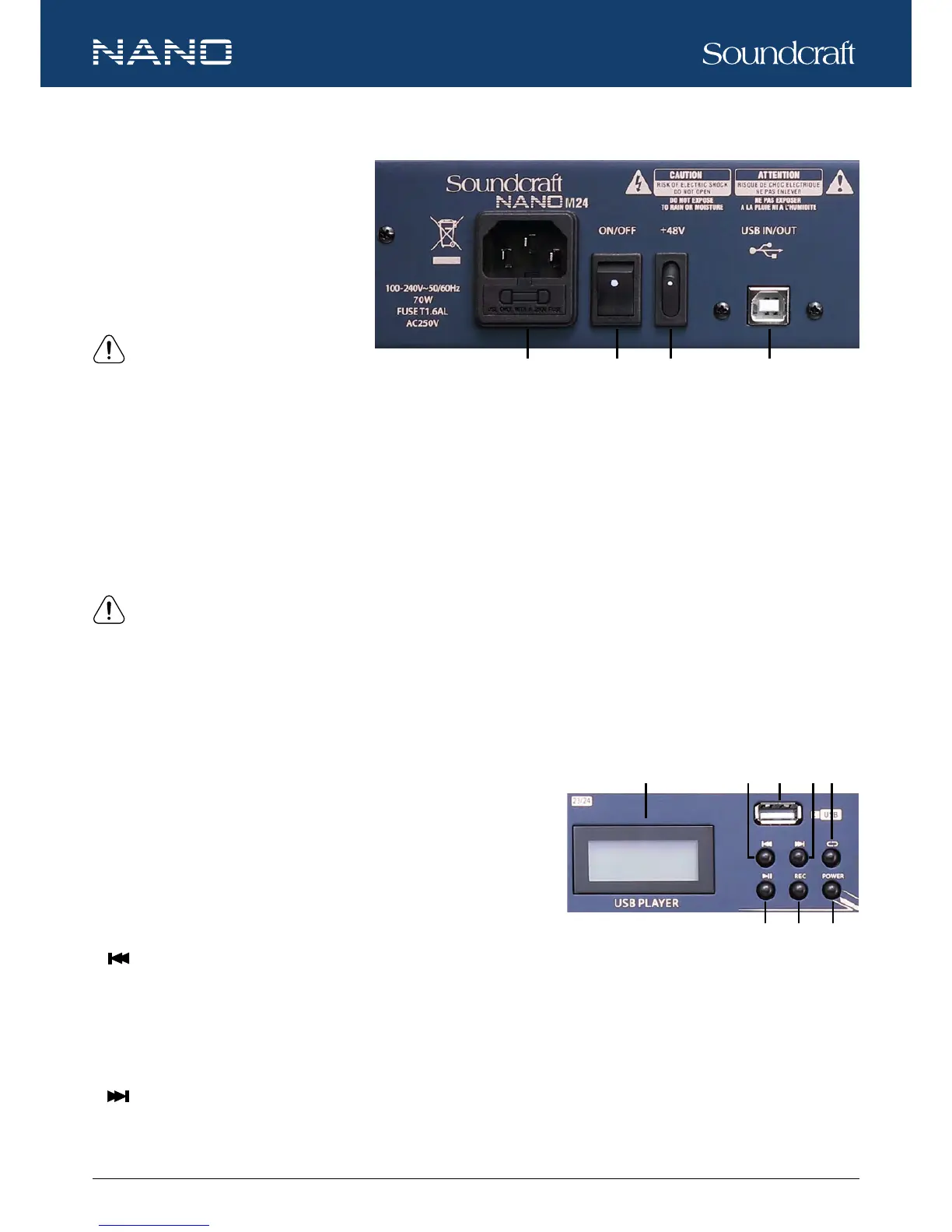
47. AC INPUT
Connect the mixer to the main AC with the
supplied AC cord. Please check the volt-
age available in your country and how the
voltage for your mixer is congured before
attempting to connect your mixer to the main
AC.
NOTE: Always replace the mains
fuse only with the correct value fuse,
as marked on the rear panel.
48. POWER SWITCH
This switch is used to turn on or off the main power of the mixer.
49. +48V PHANTOM POWER SWITCH
When the switch is turned on, +48V phantom power will be available to the XLR MIC inputs, to which professional condenser
microphones can be connected.
NOTE: ONLY connect condenser microphones with the +48V phantom power switched OFF, and ONLY switch on or off the
+48V phantom power with all output faders DOWN, to prevent damage to the mixer or external devices.
50. USB IN/OUT
This USB port is used to connect the mixer to work with a digital audio system or computer-based digital audio workstation for
playback or recording. When it is playback mode, it connects to the stereo channel of CH 13/14 of M16 or CH 21/22 of M24.
51. USB PLAYER
The USB PLAYER can be used to playback MP3 soundtracks from or record
MAIN MIX in MP3 format to a USB stick connected.
a. USB PORT
This USB port is used to connect a USB memory stick for playback and
recoding.
b.
PRE
When the USB player is in pause state, press this button will return to the previous track and remain the pause state. When the
player is in play state, press this button will return to the previous track and remain the play state. When the USB player is in play
state, press the button for 2 seconds, the player will switch to soundtracks in the previous media le stored in the USB memory;
press the button for more than 2 seconds, the player will switch among media les stored in the USB memory.
c.
NEXT
When the USB player is in pause state, press this button will go to the next track and remain the pause state. When the player is
in play state, press the button will go to the next track and remain the play state. When the USB player is in play state, press the
Controls and Features






 To Next Page