4
Identifying the Parts
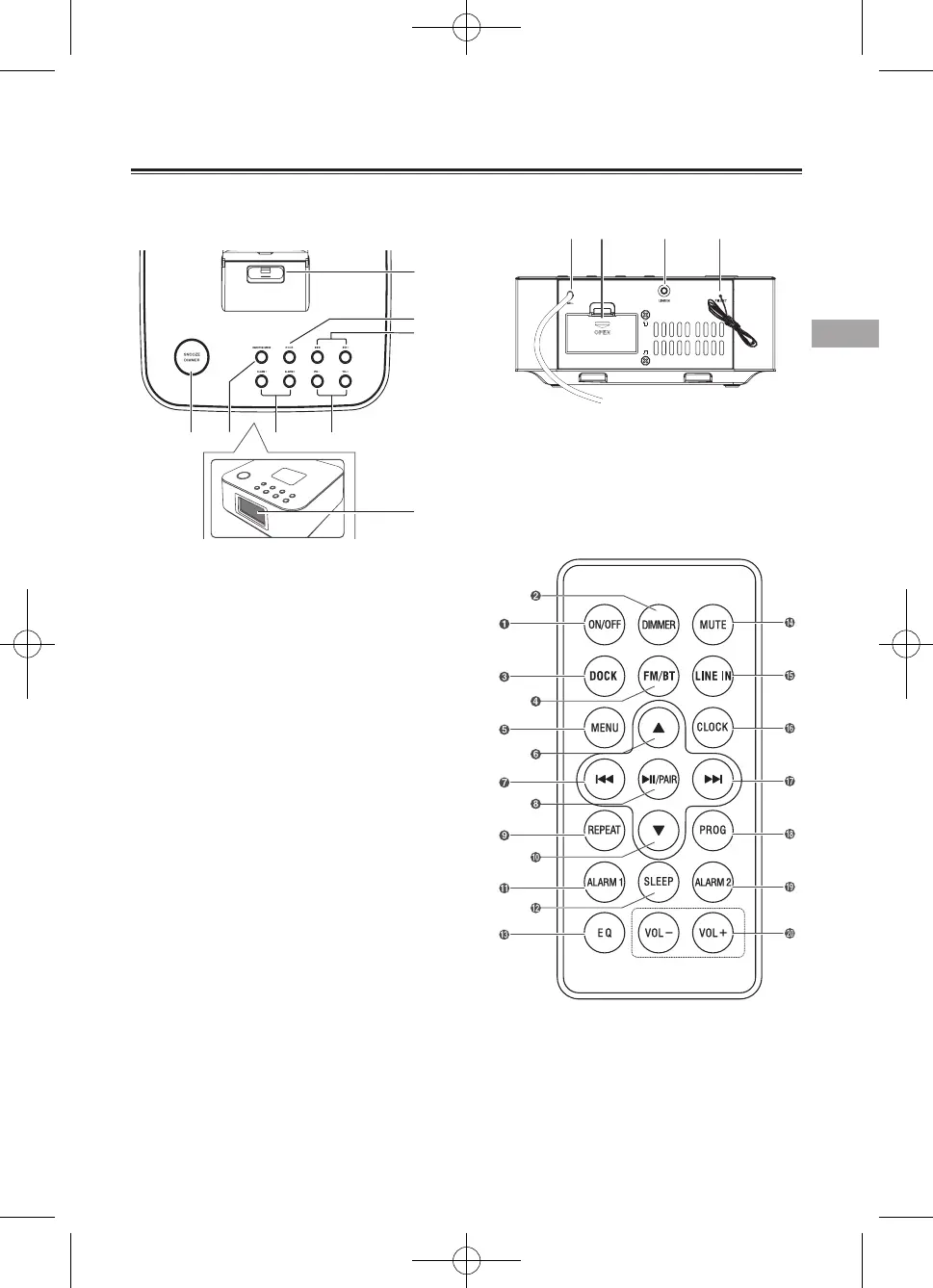
Rear View
1 AC Connect to power.
2 Battery Compartment
3 LINE IN
Connect to an external audio device.
4 FM ANT
Remote Control
1 ON/OFF
- Turn on or turn o unit.
2 DIMMER
- Adjust display brightness.
3 DOCK
- Select iPod/iPhone/iPad function.
Main Unit
Top View
1 SNOOZE/DIMMER
- Repeat the alarm.
- Adjust the display brightness.
- Enter into Time setup
2
ON/OFF/SOURCE
- Turn on or turn o the unit.
- Select the play function.
3
BF
/OK
- Start or pause play.
4
H
/
G
- Skip to previous/next audio le.
- Search radio stations manually.
- Press and hold this button to search radio
stations automatically.
5 ALARM 1/ALARM 2
- Set the alarm timer.
- View alarm settings.
6 VOLUME +/-
- Decrease or increase the volume level.
7 DOCK for iPod/iPhone/iPad
- Load an iPod/iPhone/iPad.
8 Display Panel
- Show the current status.



 To Next Page