8
Play from iPod/iPhone/iPad
iPod/iPhone/iPad Operation
Using the iPod/iPhone/iPad dock, you can use
the unit to play music les stored on your iPod/
iPhone/iPad.
Listen to the iPod/iPhone/iPad
YoucanenjoyaudiofromiPod/iPhone/iPad
through this unit.
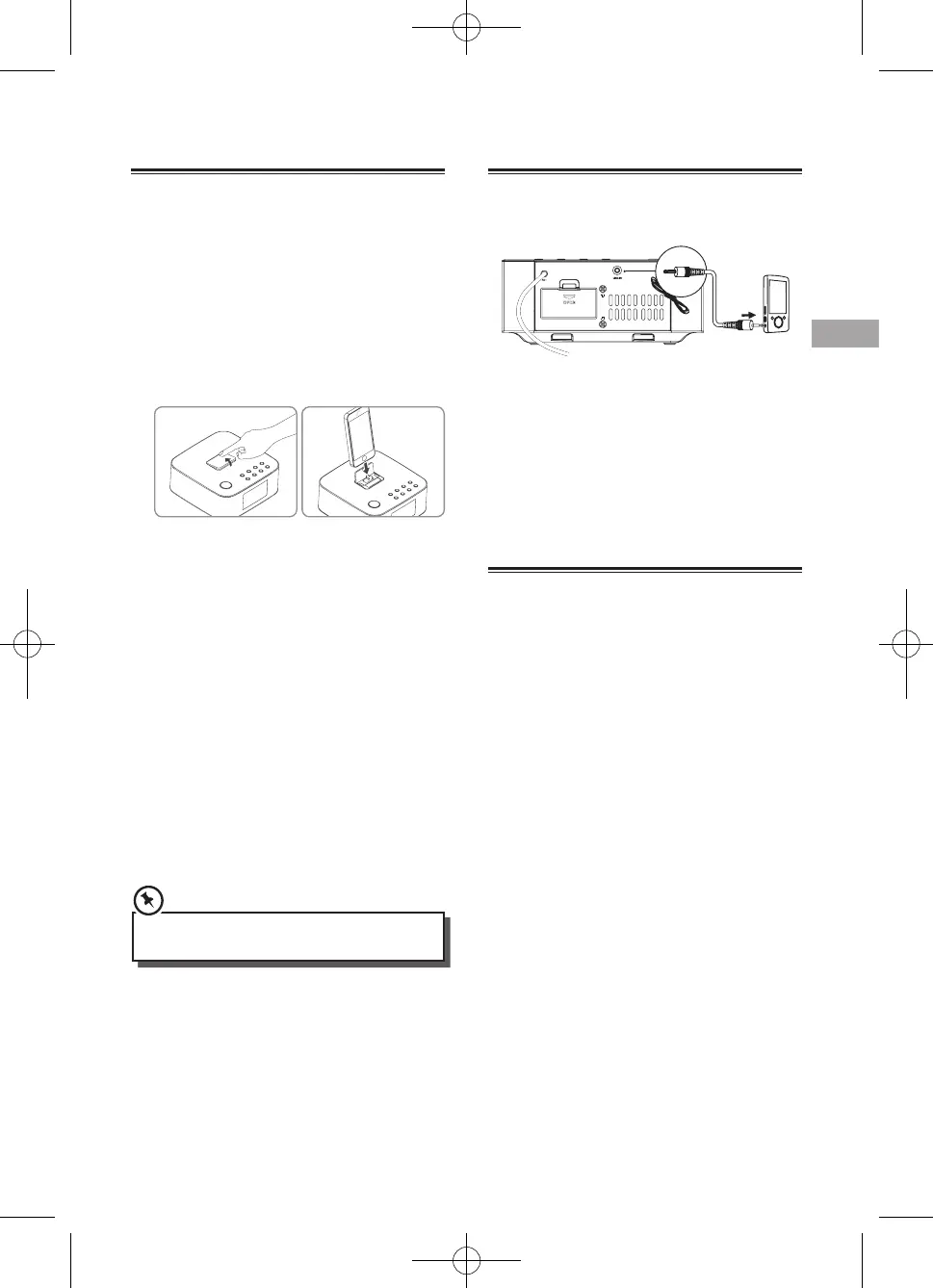
1. Press down docking cover of the unit to ip
the docking cover up.
2. Insert your iPod/iPhone/iPad into the iPod/
iPhone/iPad dock.
3 Press the DOCK button on remote control or
SOURCE button on top panel to select the
iPod/iPhone/iPad source.
Start to play the connected iPod/iPhone/iPad.
- To pause/resume play, press the
BF
button.
- To skip to a track, press the
H
/
G
buttons.
- To search during play: press and hold
H
/
G
buttons, then release to resume normal
play.
- To navigate the menu(only for iPod/iPhone,):
Press MENU button, then press
,
to select,
and press
BF
to conrm.
- To select repeat play options: press the
REPEAT button repeatedly to select a repeat
option play mode.
• Thisapparatusdoesnotsupporttoapple30-pin
models.
Charge the iPod/iPhone/iPad
The docked iPod/iPhone/iPad begins to charge
as soon as the unit is connected to AC power.
Play from an External Audio Device
Youcanlistentoanexternalaudiodevice
through this unit.
1 Connect the audio player.
Connect the LINE cable to the LINE IN socket
on the Rear of unit and to the headphone
socket on the audio player.
2 Press the LINE IN button to select the LINE
source.
3 Start to play on the audio player.
Play With Bluetooth Device
Youcanlistentomusicfromabluetooth-enabled
device via this player.
Pair Bluetooth-enabled Devices
Manually
The rst time you connect your bluetooth device
to this player, you need to pair your device to this
player.
Note:
- The operational range between this player
and a Bluetooth device is approximately 8
meters.
- Before you connect a Bluetooth device to this
unit, familiarize yourself with the Bluetooth
capabilities of the device.
- Compatibility with all Bluetooth devices is
not guaranteed.
- Any obstacle between this unit and a
Bluetooth device can reduce the operational
range.
- Keep this player away from any other
electronic device that may cause interference.
1. Turn on the Bluetooth function on your
device.
2. Switch player's source to bluetooth, Display
panel shows "BT", then shows "NO BT" (if no
bluetooth device is connected).



 To Next Page