
 Need help?
Do you have a question about the Soundstream Mobile Link Vision and is the answer not in the manual?
Controls device power and menu display.
Buttons for menu navigation and file selection.
Buttons for playback, stop, fast forward, rewind.
Accesses setup menus and selects media modes.
Configures general device settings.
Adjusts audio playback settings.
Configures video display parameters.
Customizes user preferences and settings.
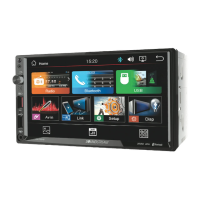
Connects smartphones for advanced features.
Illustrates smartphone connection types.
Selects display modes like Standard, Mild, User, Dynamic.
Sets color warmth (Medium, Warm, Cool, User).
Adjusts screen aspect ratio (16:9, Auto).
Manages video noise reduction levels (Middle, Off, Low, High).
Selects sound modes (Standard, Music, Movie, Sports, User).
Controls audio balance between left and right channels.
Enables or disables surround sound effects.
Adjusts audio frequencies for custom sound.
Chooses the on-screen display language.
Resets all settings to factory configuration.
Adjusts blending line settings.
Sets the display duration for on-screen messages.
Configures IR receiver and FM transmitter.
Cautions against operating with picture/sound issues or smoke.
Guidelines for safe vehicle installation and wiring.
Proper voltage usage and protection against shock.
Prohibits watching the unit while driving.
Avoids disassembly and ensures proper ventilation.
Advises moderate volume for hearing emergency signals.
Safe storage of remote and battery handling for children.
Warns about antenna placement causing accidents.
Details power input requirements and LCD screen size/resolution.
Lists supported media playback formats and input types.
Describes media inputs, remote control, and color choices.
Details the warranty period and coverage for the product.
Instructions for returning the product for service.
Lists conditions not covered by the product warranty.
Form for registering the product purchase.
Highlights main features like resolution, playback, and inputs.
Details A/V inputs, IR transmitter, and power specifications.
Includes FM transmitter, dome lamp, and color options.
Lists dimensions and operating voltage range.
 General
| Touchscreen | Yes |
|---|---|
| Bluetooth | Yes |
| Navigation | No |
| Apple CarPlay | Yes |
| Android Auto | Yes |
| USB Port | Yes |
| AUX Input | Yes |
| Screen Size | 7 inches |
| Compatible with | Android |









 To Next Page