16.AV IN
The Audio/Video source with RCA cable can
through the source unit to play the Audio/
Video. Plug the RCA to the corresponding
A/Vsocket.
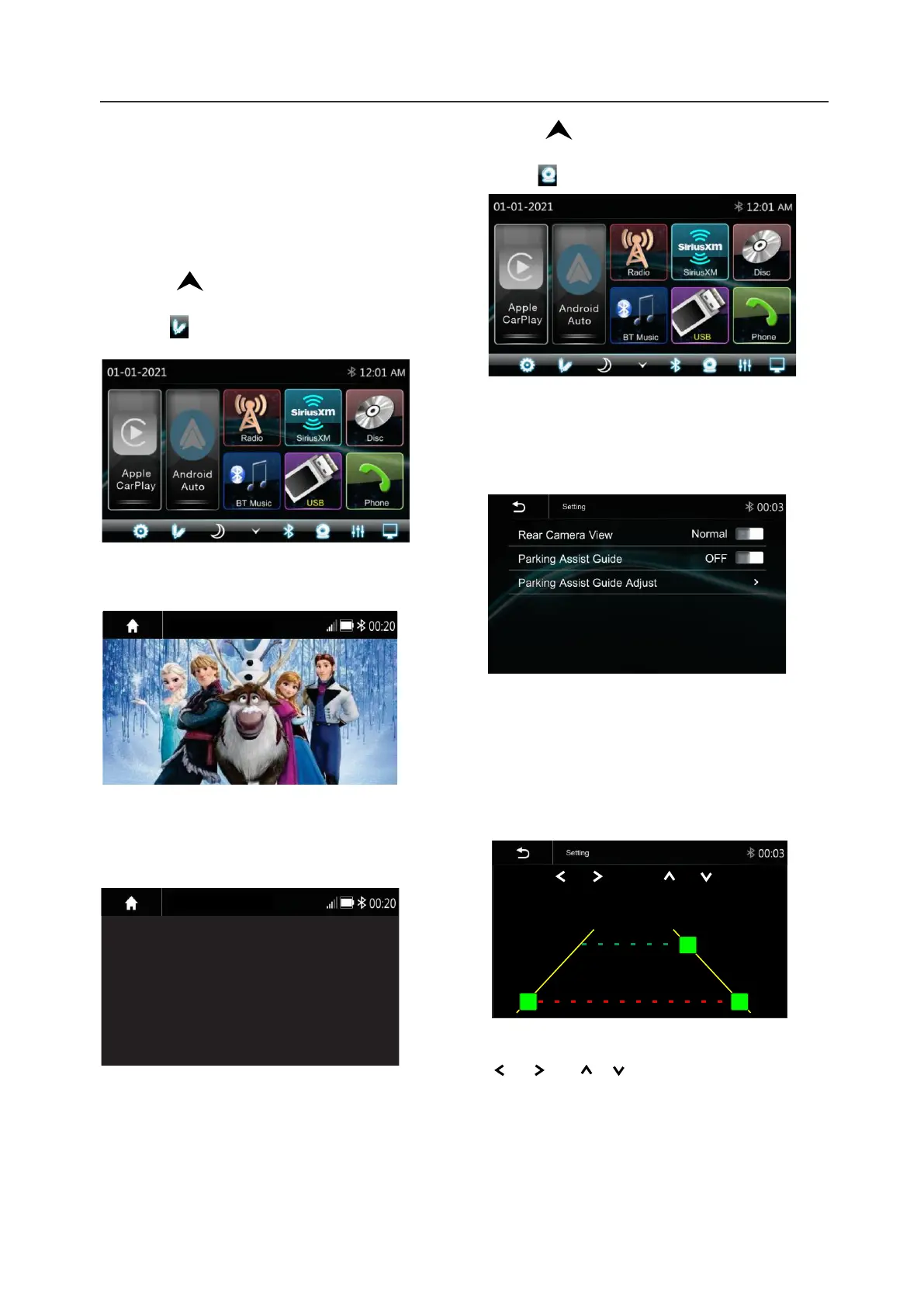
Touch the to pop up the function bars
and touch to view the playing Audio/Video.
The Audi and Video will via the RCA cable to
the source unit.
25
If there is no Video signal the below screen
will be shown:
17.Camera
There is a RCA socket for the Front camera
video signal to display on the Head unit.
The Reverse wire in High level (+12V) is
reverse; low level (ground or NC) is normal
AV IN
Camera
Touch the to pop up the function bars
and touch to view the playing Front camera.
Rear Camera Setting:
Touch Rear View Camera in the Setting
Menu to enter rear camera setting interface
as follow:
Rear Camera View: Normal/Reverse
Parking Assist Guide: On/Off
Parking Assist Guide Adjustment
Touch ">to enter Parking Assist Guide
Adjustment interface to show the below
screen:
Settings
2:05 AM
Select the adjust position and Touch
/ / / to adjust.
Touch Reset to resume the default
Parking Assist Line
RESET
AV IN
AV IN
No Video signal













 To Next Page