V220922
3
4
5
7
8
1
2
6
- 7 -
2
4
5
3
1
Fingerprint
Biometrics Device Access controller
Firmware Upgrade
EnrollTool Setting
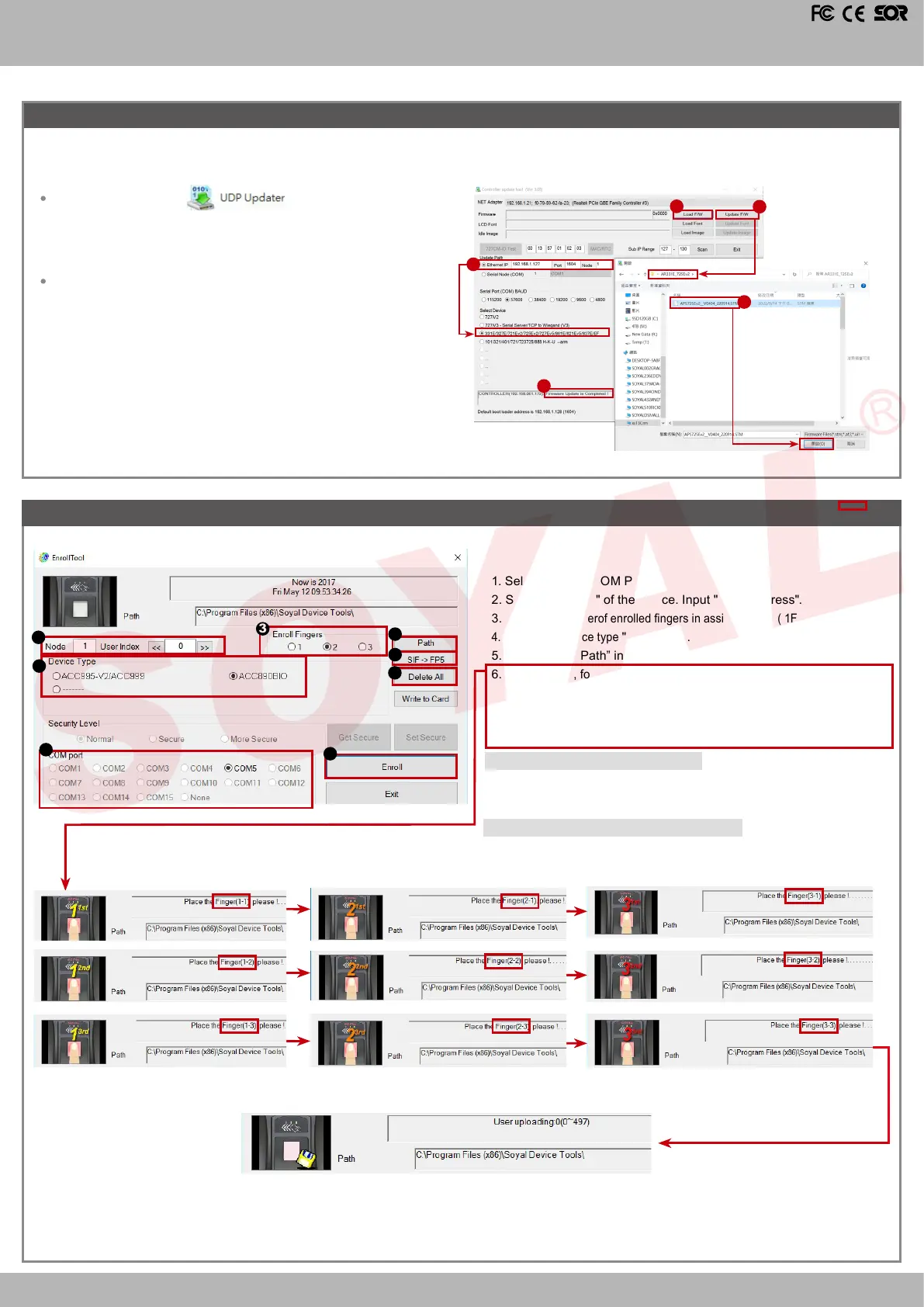
Get the upgrade software from SOYAL or our distributor and run “UdpUpdater” software
Update the rmware
[Please login the SOYAL web to download the new ISP Firmware.]
1. Input the Target Address and Port
2. [Load F/W] open the documents that have the new ISP Firmware
3. Click the new ISP Firmware and [Open] it
4. Click [Update Device] to start the rmware update
5. Till the screen shown [Firmware Update is Complete]
Execute the software
The software is Login the SOYAL web to downloads
Transfer ngerprint format V9 -> V5
7. Click "SIF→FP5 "
,
select old AR-331EF FP le format. SIF , the
system will automatically generate new single FP le format. FP5
into 701Server folder.FP5 into 701Server folder.
Deleting ngerprint database on the device
8. Click"Delete All" , all Fingerprint data from device will be deleted
completely.
1. Select correct "COM Port".
2. Select "Node ID" of the device. Input "User Address".
3.
Select the numberof enrolled ngers in assigned path ( 1FP or 2FP per User).
4. Select the device type
"
AR-331-EF
".
5. Select “Save Path” in which will save ngerprint data.
6.
Click “Enroll”, follow pop-up picture and Status bar to enroll FP as below:
Connect to Controller
—》
Place 1st nger 1st time to Finger sensor
—》
remove nger
—》
Place 1st nger 2nd time
—》
remove nge
—》
Place
2nd nger 1st time
—》
remove nger
—》
Place 2nd nger 1st time
—》
Save FP data to File
—》
Registration Completed.


 To Next Page