Ambulatory Blood Pressure Monitor 90217 Service Manual
4-8
Pressure Offset and Gain Adjustment
1 Adjust the pressure offset:
a From the Main Menu, select 5. SET 90217 GAIN AND OFFSET.
b Verify that the following screen appears:
c Verify that the mmHg value appearing at the bottom of the screen reads 0.0 ±0.3. If not,
readjust R49 (pressure offset adjustment) until the mmHg value at the bottom of the screen
reads 0.0 ±0.1.
2 Adjust the pressure gain:
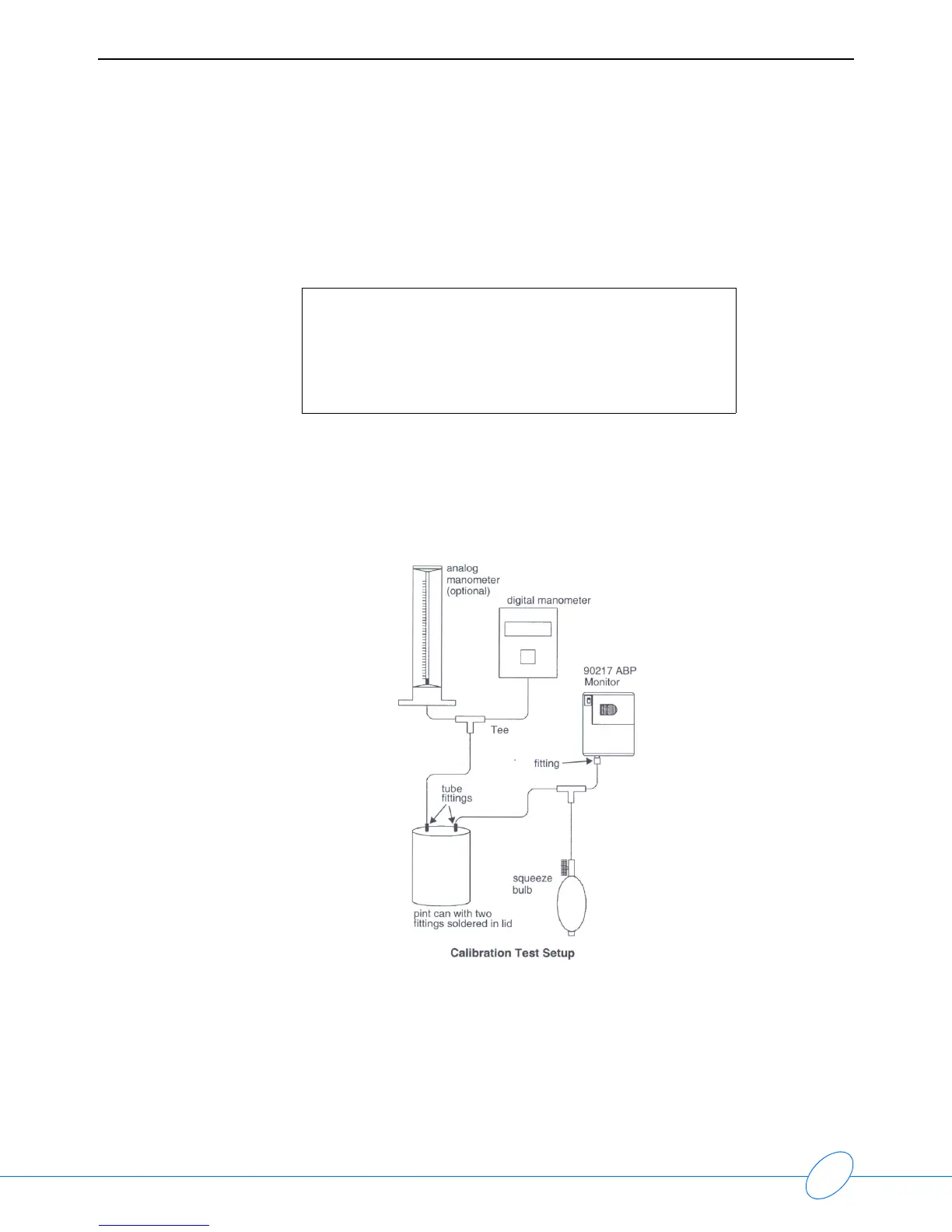
a Connect the sphygmomanometer test configuration to the 90217 monitor:
b Manually pump system pressure to 195 mmHg.
c Verify that the mmHg value appearing at the bottom of the screen reads 195 ±1.0. If not,
adjust R42 (pressure gain adjustment) until the mmHg value reads 195.
3 Repeat the offset and gain adjustments until no further adjustments are required to produce the
correct values.
90217 GAIN AND OFFSET ADJUSTMENT
1. Adjust offset pot for 00 with hose disconnected.
2. Adjust gain to match manometer at about 200 mmHg.
3. Due to interaction, repeat 1 and 2 as needed.
0.1 mmHg 20 counts



 To Next Page