20
ENITESPTCNTCNSJP KR
8.8. ENVIOLO AUTOMATIQ HUB, PEDAL PACE AND GEAR INDEX
With the enviolo AUTOMATiQ IGH system, you do not need to worry about shifting manually at all.
You set the target pedal pace at which you are most comfortable pedaling and the transmission is
controlled automatically, so you can always pedal at the same pace, even up or downhill.
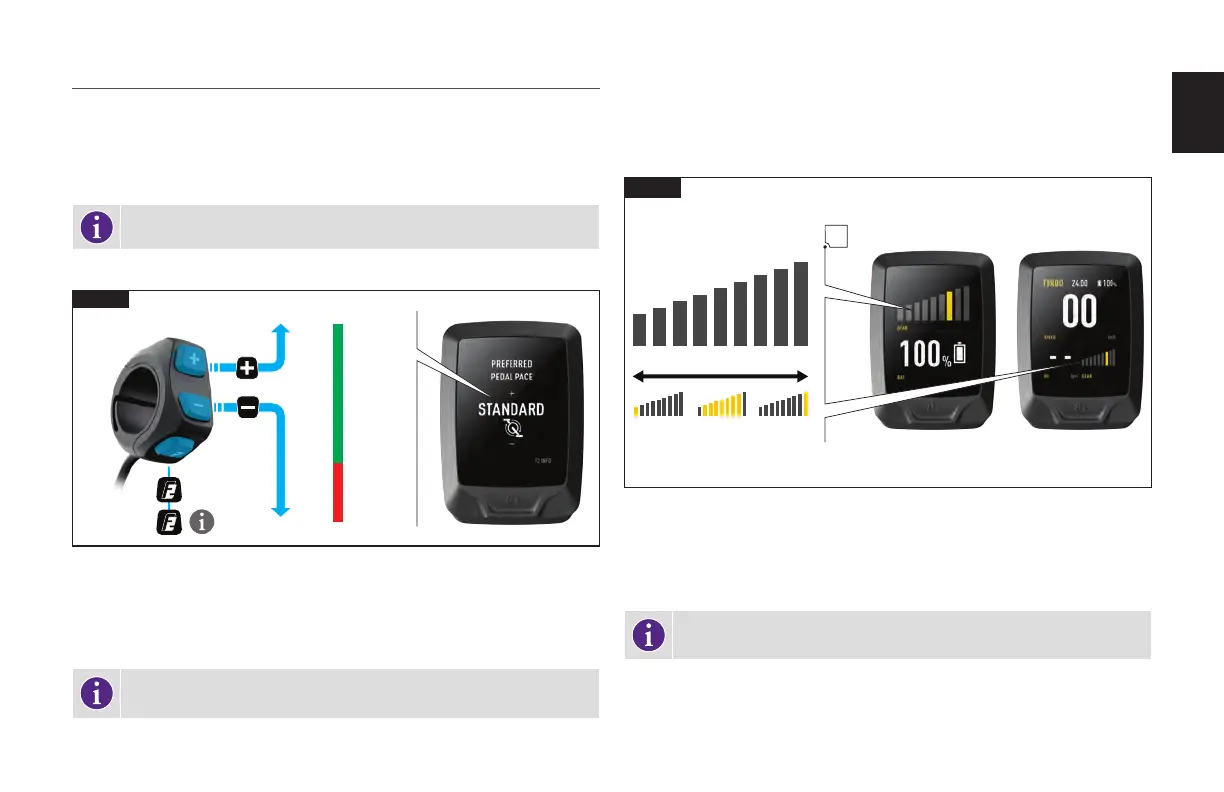
The pedal pace (cadence) of the enviolo IGH is adjusted with the handlebar remote and displayed on
the MasterMind TCD-w.
INFO: The preset cadence is set at 75 Rpm.
ADJUSTING PEDAL PACE
95
90
85
80
75
70
65
1
2
8.9
FASTEST
FASTER
FAST
STANDARD
SLOW
SLOWER
SLOWEST
Fig. 8.9
Short-pressing the F2 Button will activate the enviolo pedal adjustment. The level will
automatically be displayed on the MasterMind TCD-w.
Short-pressing the (+) button increases the desired pedal pace while short-pressing the (-)
button decreases the desired pedal pace.
INFO: The pedal pace page for the enviolo AUTOMATiQ IGH is displayed for 5
seconds after the last button push and will then revert to the previous layout.
GEAR INDEX
The enviolo AUTOMATiQ IGH system does not have an unlimited gear index and has upper
and lower limits. Once these limits have been reached, the bicycle will require more or less
effort to pedal the bicycle depending on the gradient. When the gradient is too steep, the
motor support and the enviolo IGH may not be able to support your desired pedal pace.
A
8.10
HIGH LOW
Fig. 8.10
For reference, the gear index can be displayed on the MasterMind TCD-w and can be
shown in a field on any customizable page of your display.
The colored bar on the graph will change according to the current gear index and show
when you have reached the gear limits.
INFO: To set up and customize the Gear index on the MasterMind TCD-w,
connect your bike to Mission control (Section 9).



 To Next Page