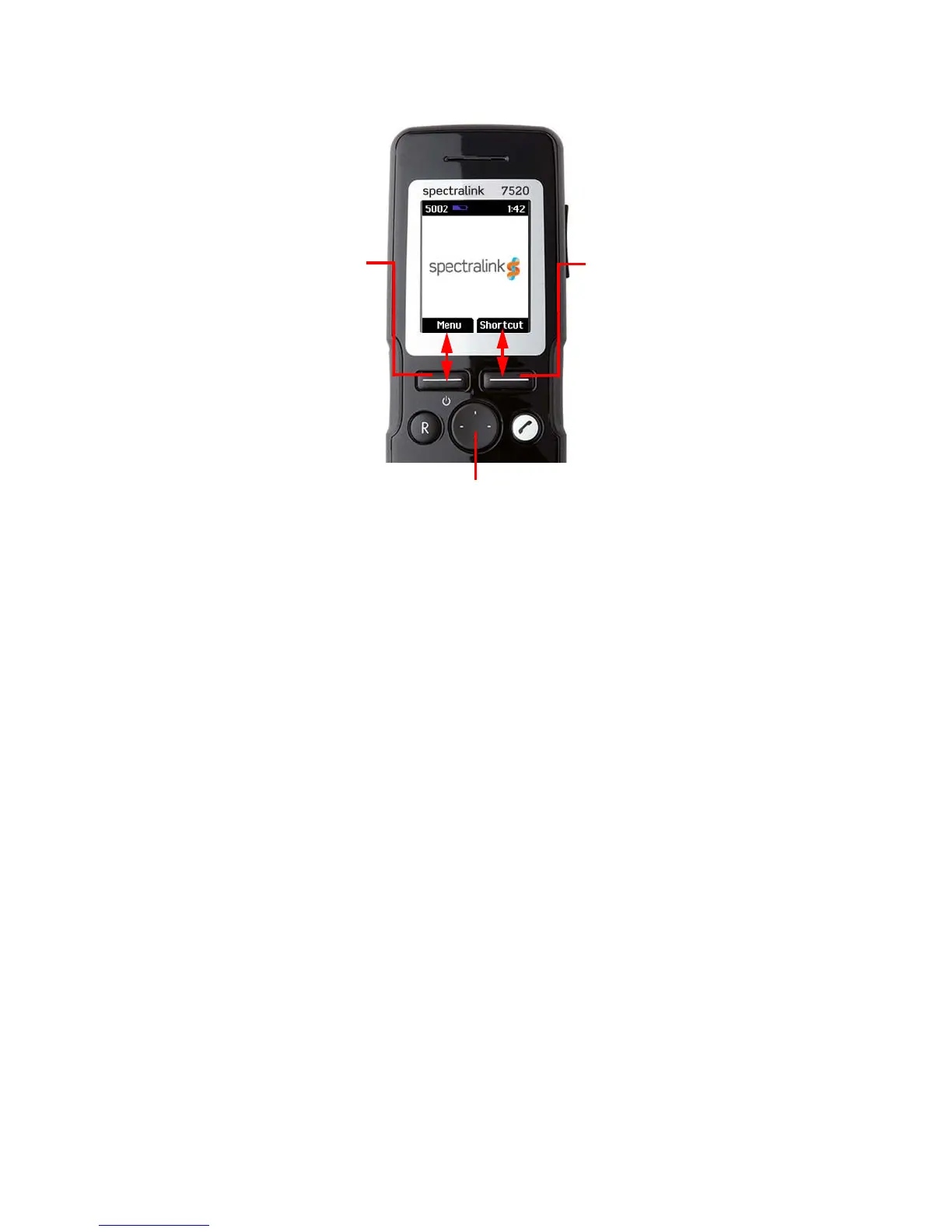
Spectralink 7520 and 7540 User Guide
14158600 Version 10.0
March, 2014 17
The handset also offers both personal and predefined shortcuts to selected functions in the menu.
Entering Main Menu
• To enter main menu press left softkey to activate Menu.
Scrolling Menus
• When in Menu, press top or bottom of navigation key to scroll up and down in menu.
Confirming Choices
• When in the relevant menu, press left softkey to confirm your choices. Various terms are
being used in the softkey text according to the context of the specific function.
Navigating Cursor
• When in the relevant menu, press left or right side of navigation key to move cursor from
side to side.
This is especially relevant when you are writing/editing words or entering/editing numbers and
want to delete a letter or digit.
• To delete, place the cursor behind letter or digit and press right softkey to activate Delete.
Four-Way Navigation Key
Use the key to move around in
menus. The four lines on the key
illustrate the directions you move
when pressing the key.
Right Softkey
Pressing right softkey
activates right softkey text.
Use right softkey to enter list
of personal shortcuts. When in
menu, use the key to return to
previous menu.
Left Softkey
Pressing left softkey
activates left softkey text.
Use left softkey to enter
main menu. When in
menu, use the key to
confirm your choices.



 To Next Page