3-6 Chapter 3: Configuring the Micro800 Expansion I/O 2085-OX32-SC Using CCW
User’s Manual Pub. 0300309-01 Rev. A
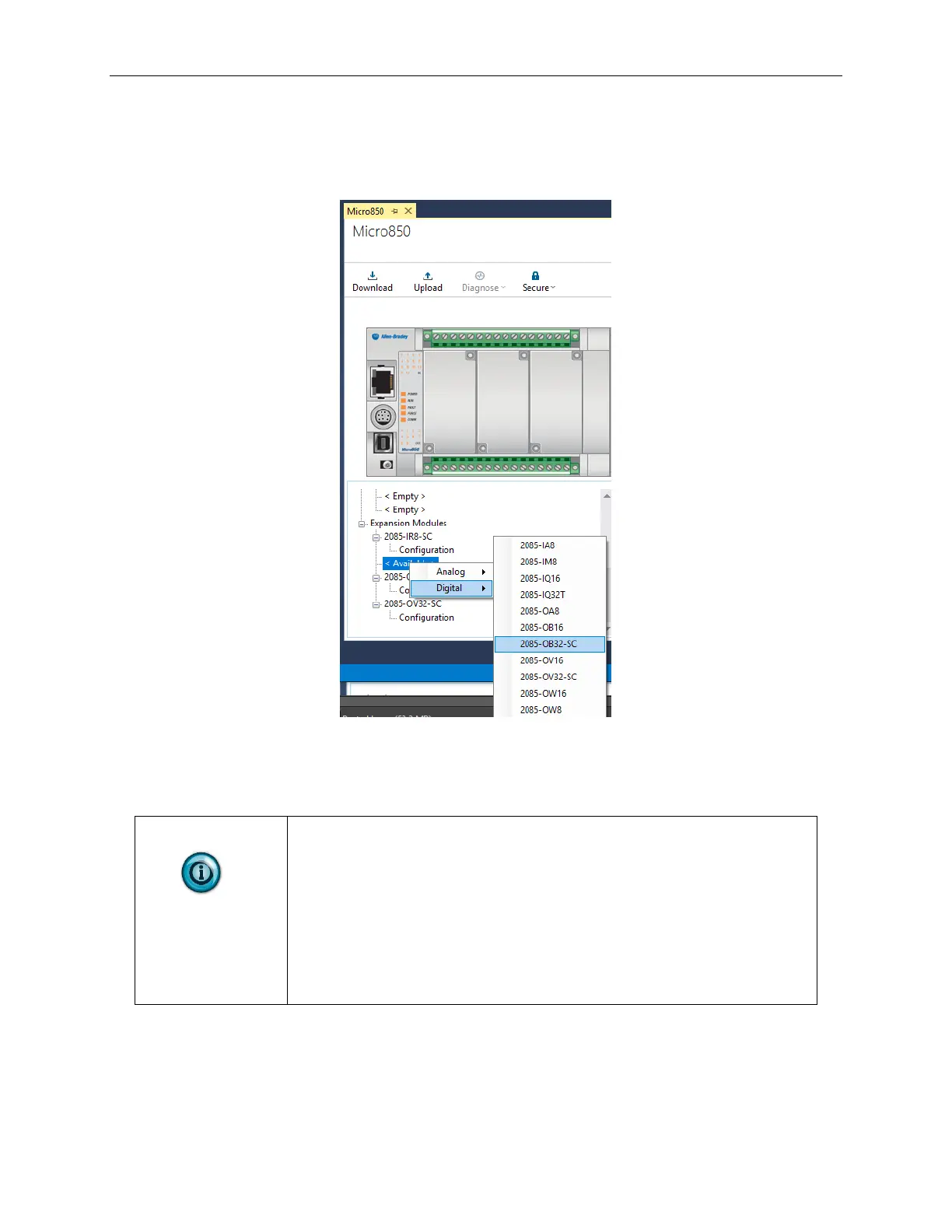
To add the module(s) to your project, and see the module variables on the CCW
tab:
1. From your CCW project, load the module AOP to a first Available slot
from the Expansion Modules drop-down list:
2. Once the module AOP is loaded, to view the associated variables, click
the Module Catalog Name option.
The same variables can also be found on the CCW Global Variables Tab.
Discrete output states can be written to Global Variables _IO_Xx_DO_yy,
where x represents the expansion slot number 1…3 for Micro850
controller and slot number 1…8 for Micro870 controller and yy represents
the channel number 00…31.
Discrete output states can be read from Global Variables _IO_Xx_ST_yy,
where x represents the expansion slot number 1…3 for Micro850
controller and slot number 1…8 for Micro870 controller and yy represents
the channel number 00…31. Additional information is provided in the
next section of this manual.



 To Next Page