PPM Receiver
PPM-SBUS
VCC-4V5
GND-GND
pps
T R G VC D
TX
BZ-251
GPS
TX
RX
GND
VCC
SCL
SDA
SDA
SCL
4V5
GND
TX3
RX3
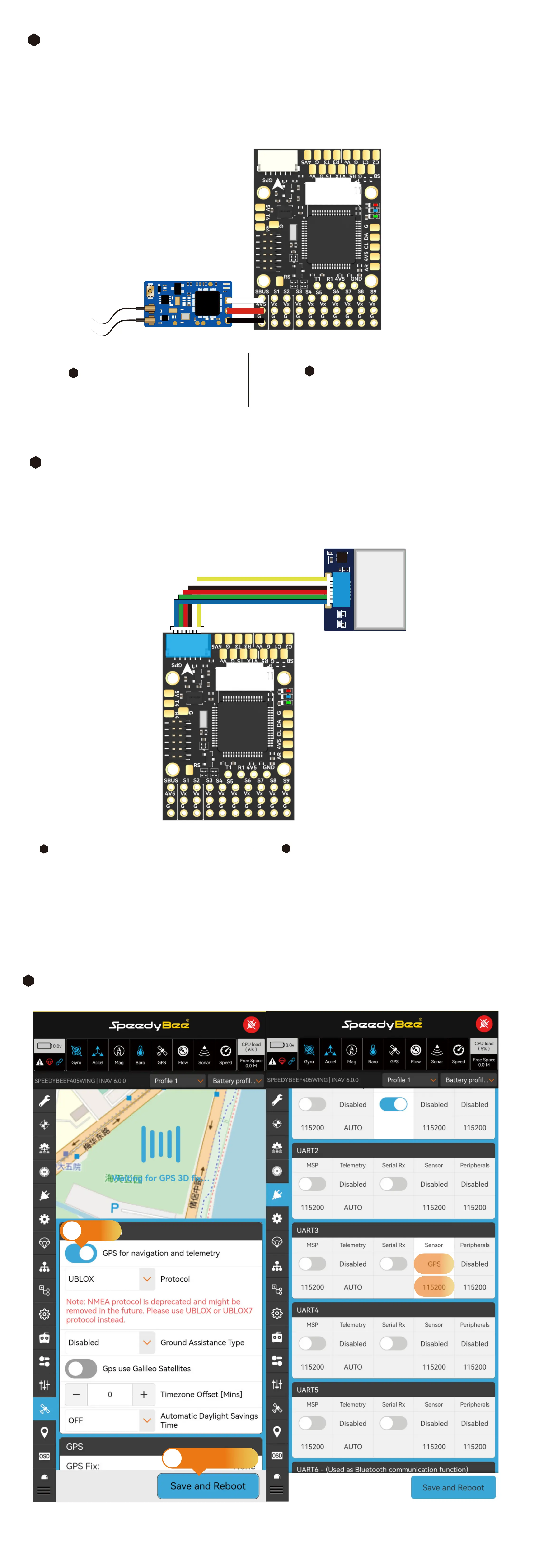
Hardware Connection:
Use a 3-pin Dupont male-to-male cable and plug it into the SBUS input pin header.
PPM receivers only suppoed in INAV 3.x and below.
PPM Receiver:
1
2
INAV Settings
INAV does not suppo
ArduPilot Settings
Detectable with default settings.
Hardware Connection:
Rearrange the pre-crimped JST SH1.0 cables of the GPS Module Cable according to the GPS module's
pin layout. Inse them into the 6-pin JST SH1.0 housing. The BZ-251 GPS module is recommended.
GPS Settings
1
2
INAV Settings
In the GPS tab, enable GPS for navigation and
telemet, then save and reboot. If not using a
UBLOX module, refer to the specications of
the corresponding module and select the
appropriate baud rate and protocol.
ArduPilot Settings
Suppos two types of GPS protocols - UBLOX
and NMEA, with UBLOX protocol as the default.
UBLOX M8N, M9, and M10 modules are
automatically recognized.
2
Save and reboot
1
Enable
INAV Settings



 To Next Page