Spellman High Voltage Electronics Limited - Company Confidential
This document must not be copied or distributed without express permission from Spellman High Voltage Electronics Limited
Appendix 5. Loading firmware and program Slave Address
Loading firmware
Connect serial comms to the MPD unit.
Run ‘PIC32UBL.exe’. (48008-GUI V1.04+)
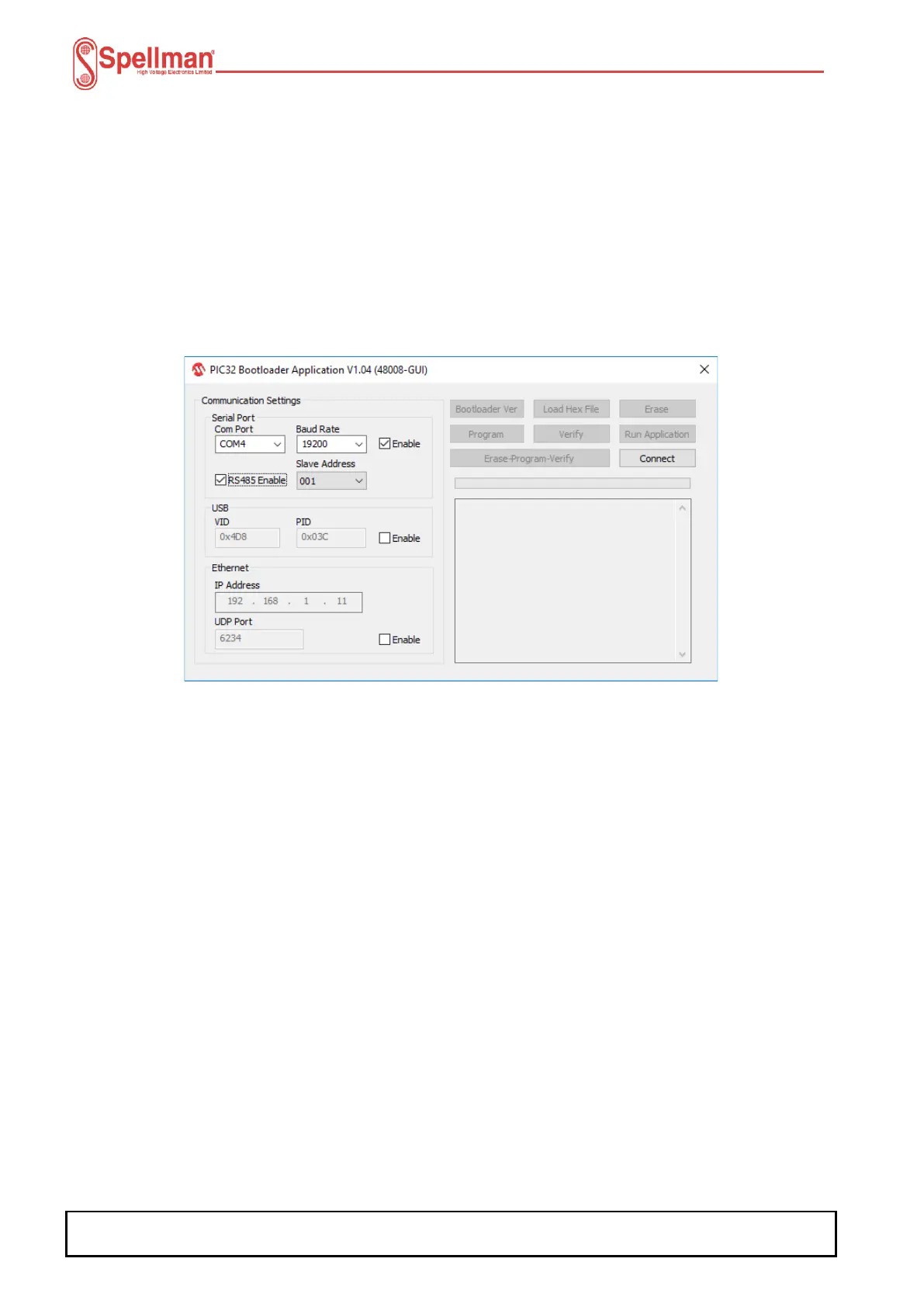
Configure the PIC32UBL programming GUI as below:
i) Select the Serial ‘Com Port’ to be used.
ii) Set the ‘Baud Rate’ to ‘19200’ Baud.
iii) Check the ‘RS485 Enable’ checkbox.
iv) Select the ‘Slave Address’ of the unit to be programmed.
Note:
• Select the slave address the module has been programmed with.
Click the ‘Connect’ button.
Click the ‘Load Hex File’ button, browse to and select the MPD firmware (48113-14).
The inactive buttons are now active.
Click the ‘Erase-Program-Verify’ button and the code is sent to the hardware. Wait for
programming to finish. This will take some time.
Once finished click the ‘Run Application’ button.
Close the application.
Power cycle the unit.


 To Next Page