Spellman High Voltage Electronics Limited - Company Confidential
This document must not be copied or distributed without express permission from Spellman High Voltage Electronics Limited
Programming the Comms Slave Address
Prerequisites;
i) Connect serial comms to and power up the unit.
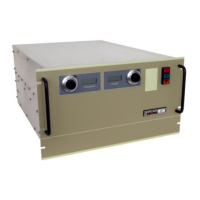
Run the MPD GUI (48113-GUI).
Click the ‘Single Unit’ tab. The GUI will look similar to the image below.
Click the ‘Get Address’ button. The GUI data fields will start to be populated.
Press the ‘CTRL+A’ keyboard buttons together.
Answer ‘Yes’ to the prompt. Some additional controls will be displayed.
Enter the address the unit is to be set to and click the ‘Set Address’ button.
When prompted click the ‘Yes’ button.
After a short time comms with the unit will stop. (The RX data will not be updated)
Re-click the ‘Get Address’ button, will be re-established.


 To Previous Page