6.8.1 Gear Profiles (Alt 1)
6.8.2 Line Pressure (Alt 2)
6.8.3 Real-Time Data and Bars
6.8.1 Gear Profiles (Alt 1)
These profiles are used to set up each gear to shift on its own pattern and according to certain
criteria. It is important not to set weird patterns outside the ability of the automatic transmission.
See the precautions for the tune-up settings to prevent damage to the TCU.
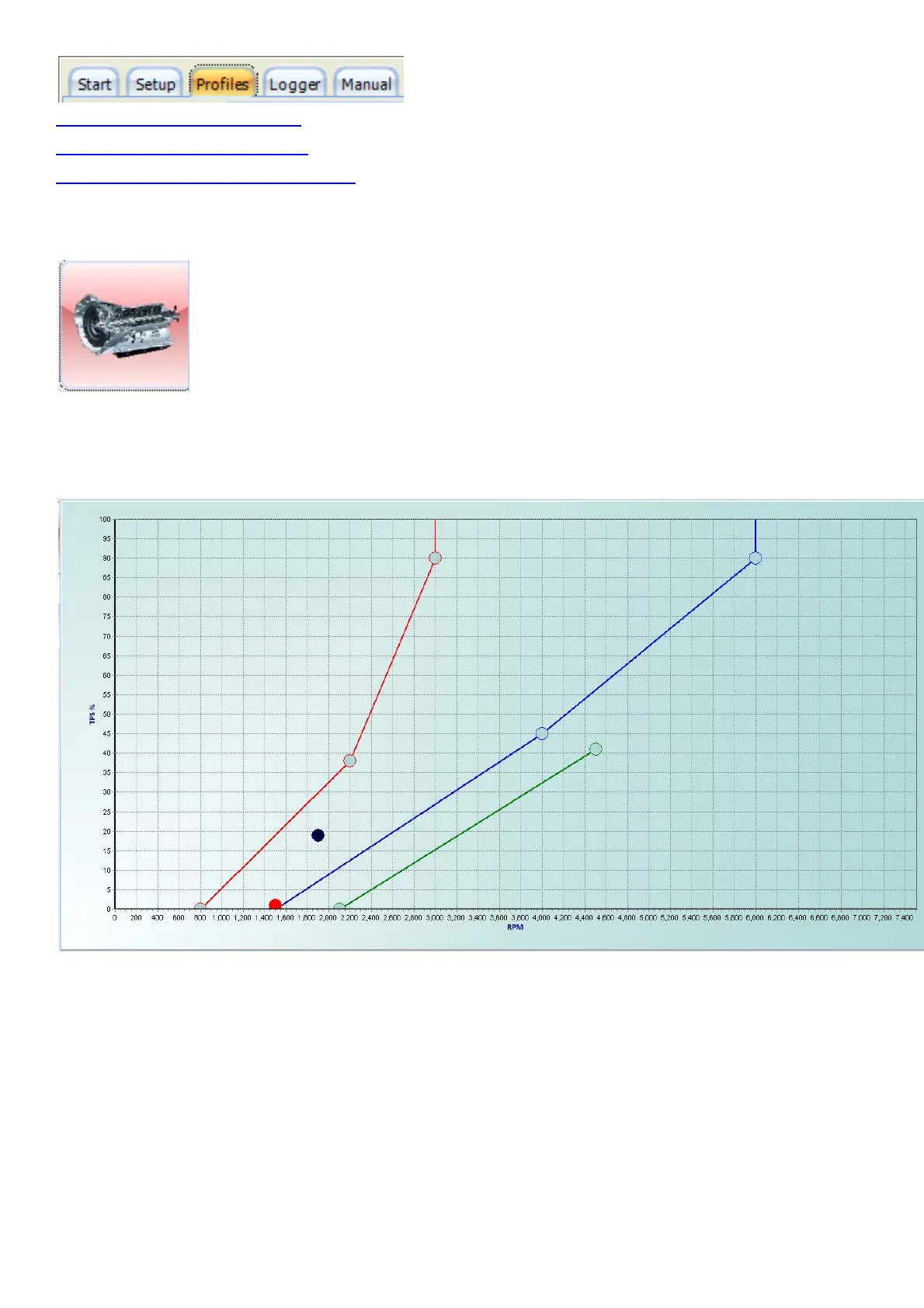
The dark blue dot is called the Marker and is a representation of TPS position (up & down) versus
engine RPM (left & right). This Marker will move freely over the page.
The red line is the Down Shift Line and has three dots called High Dot, Middle Dot and Low Dot.
When the marker moves to the left of the Down Shift Line, the lower gear will be selected.
The blue line is the UP Shift Line and has three dots called High Dot, Middle Dot and Low Dot.
When the marker moves to the right of the UP Shift Line, the higher gear will be selected.
The green line is the Lockup Line and has two dots called High Dot and Low Dot. When the
marker moves to the right of the Lockup Line, and the Marker is below the High Dot TPS %
position, the Lockup clutch will be engaged.
To change the position of these Dots, click on the Dot, it will become Red, and move it with the
cursors to the required positions.



 To Next Page