16
Phonitor 2
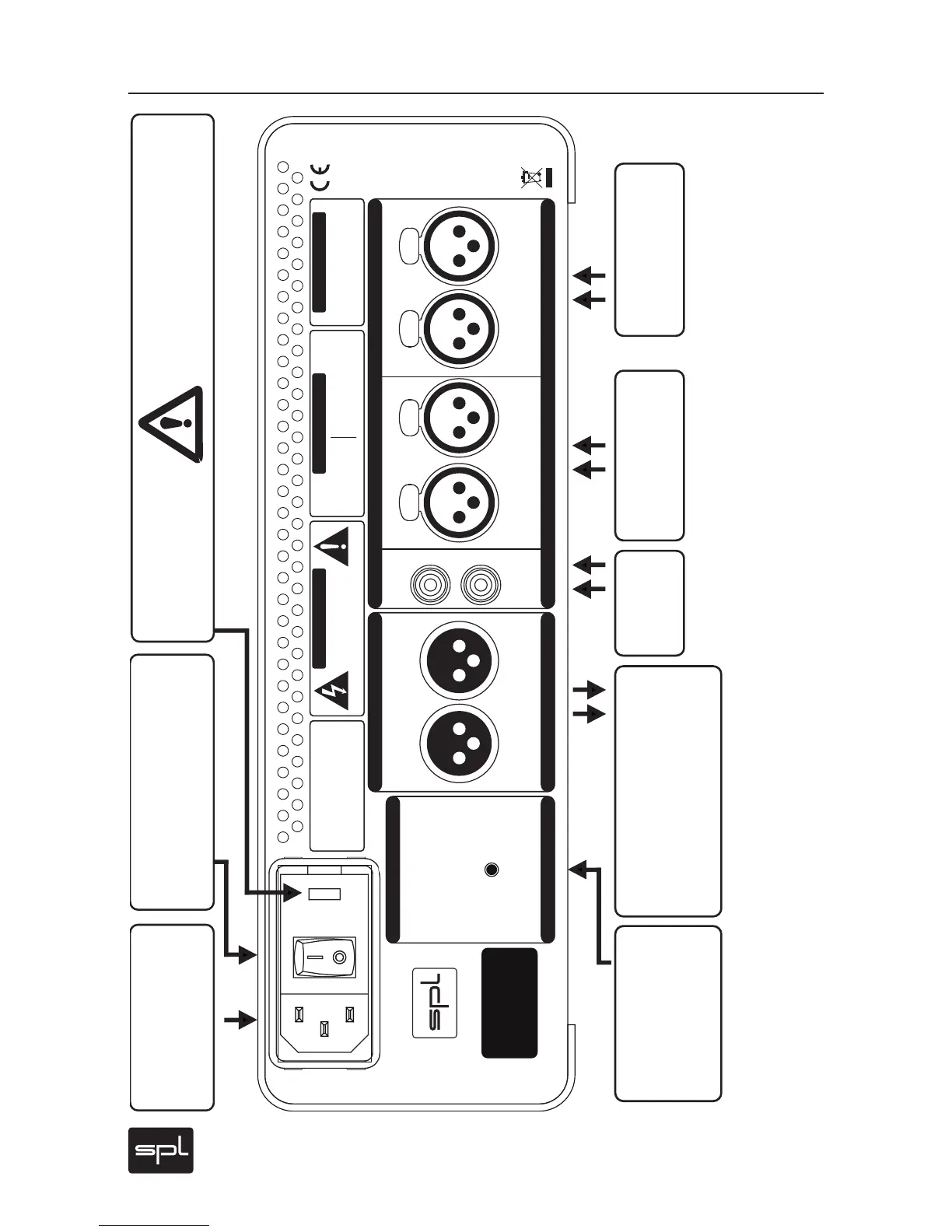
Rear Panel: Wiring
Wiring
IR REMOTE
IR REMOTE
OUTPUT
OUTPUT
L
R
R
L
LEARN
RLRLRL
SOURCES
SOURCES
2
2
LR
1
LR
Learning Volume Up/Down:
1. Press LEARN button below
2. Point your remote at VUs
and press a button for
VOLUME DOWN (LEDs flash 1x)
3. Repeat until LEDs flash 3x
4. Press a button for
VOLUME UP (LEDs flash 1x)
5. Repeat until LEDs flash 3x
XLRs: balanced, Pin 2 = Hot (+)
For unbalanced operation
bridge Pin 3 to GND.
RCAs: Unbalanced, Tip = Hot (+)
AVIS: RISQUE DE CHOC ÉLECTRIQUE • NE PAS OUVRIR
RISK OF ELECTRIC SHOCK
DO NOT OPEN
CAUTION
Serial
Number
Made in Germany
ON BOTTOM SIDE:
DIP SWITCH WIRING
Output is DC coupled and can drive balanced
headphones (Gender changer may be required).
3
3
Phonitor
2
~ 115V AC / ~230V AC
50 Hz / 60 Hz, P max. 35 W
Fuses:
Voltage Selection:
115V AC: T 1 A L 250 V
230V AC: T 500 mA L 250 V
1. Remove Fuse Holder
2. Flip Over 3. Reinstall
1 ON: Output +12dB
2 ON: Output +22dB
3 ON: RCA -10dBV to +4dBu
4 ON: Sources 1:1 to Output
5 ON: Matrix on rear Output
230
1
1
2
3
1
2
3
1
2
3
1
2
3
1 2
3
1 2
3
NOTE ON XLR SOCKETS: You can establish unbalanced connections
easily and without adaptors e. g. from and to RCA sockets. In any case we
recommend readily configured cables from XLR to RCA or TS/TRS connector
to dispense with adaptors. Ask your dealer for configured cables and
forward the XLR pin wiring of the Phonitor 2 (refer to page 17).
Source 1
D/A Converter, Player
Source 2
D/A Converter, Player
Source 3
Players
Output
Aktive Speakers, Power Amps,
Balanced Headphones,
Amps for Electrostatic HP
Learn Mode for
Refer to page 16
Power
Connection
Make sure that the voltage
switch setting reflects the
correct local power line voltage.
Voltage
Selector
Power
Switch



 To Next Page