ENGLISH
5
FOR BEST RESULTS AND NO LEAKAGE
• Use only new lithium or alkaline batteries.
• Do not mix old and new batteries.
• Do not use rechargeable AA batteries
(their lower voltage can generate operational issues).
HOW TO INSTALL AA BATTERIES PROPERLY
• Unlock and open the CELL-LINK door.
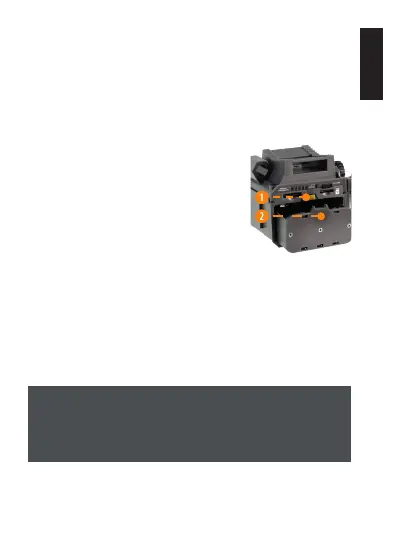
• Eject the battery holder by pushing
the latch (1) forward and pressing
down on the battery holder (2).
The battery holder will be unlocked
and you will be able to remove it.
• Insert 8 AA batteries following the
(+) and (-) polarity indicators.
• Place the battery holder back into the battery compartment,
an audible click should be heard.
FORMATTING YOUR MICROSD CARD
Before inserting the microSD card into your CELL-LINK, you must
reformat it using a computer to ensure proper functionality. Go
to our website: www.spypoint.com, if you need help formating
your microSD card.
The memory card is sold separately. Therefore, you must
rst purchase a class 10 microSD card, between 2 and 32 GB
of memory.














 To Next Page