• Set the date (DD/JJ/YYYY or DD/MM/YYYY)
• Set the time (12 h or 24 h)
• Set the temperature (°F/ °C)
ADJUST THE SETTINGS FOR THE 3 MODES OF OPERATION PHOTO MODE
Delay: This allows you to select the time elapsed before the camera can detect again and take the next photo.
If you want to capture multiple photos, use a shorter delay.
Once you have selected the delay, press OK.
Quality: This allows you to select a resolution of 20 MP or 3 MP. Once you have made your selection, press OK.
Multi: This allows you to select the number of photos to be taken per shot (from 1 to 5 photos). Once you have made
your selection, press OK.
Detect: This allows you to set motion-detector sensitivity (LOW, NORMAL, HIGH, AUTO). Once you have made your
selection, press OK.
VIDEO MODE
Delay: This allows you to select the time elapsed before the camera can detect again and take the next video.
Quality: Allows you to choose between HD and VGA. Once you have made your selection, press OK.
Length: This allows the user to choose the video length (10 to 60 s). Once you have made your selection, press OK.
Detection: This allows you to set motion-detector sensitivity (LOW, NORMAL, HIGH, AUTO). Once you have made
your selection, press OK.
TIME-LAPSE MODE
Allows you to take photos at regular predefined intervals without necessarily detecting a movement.
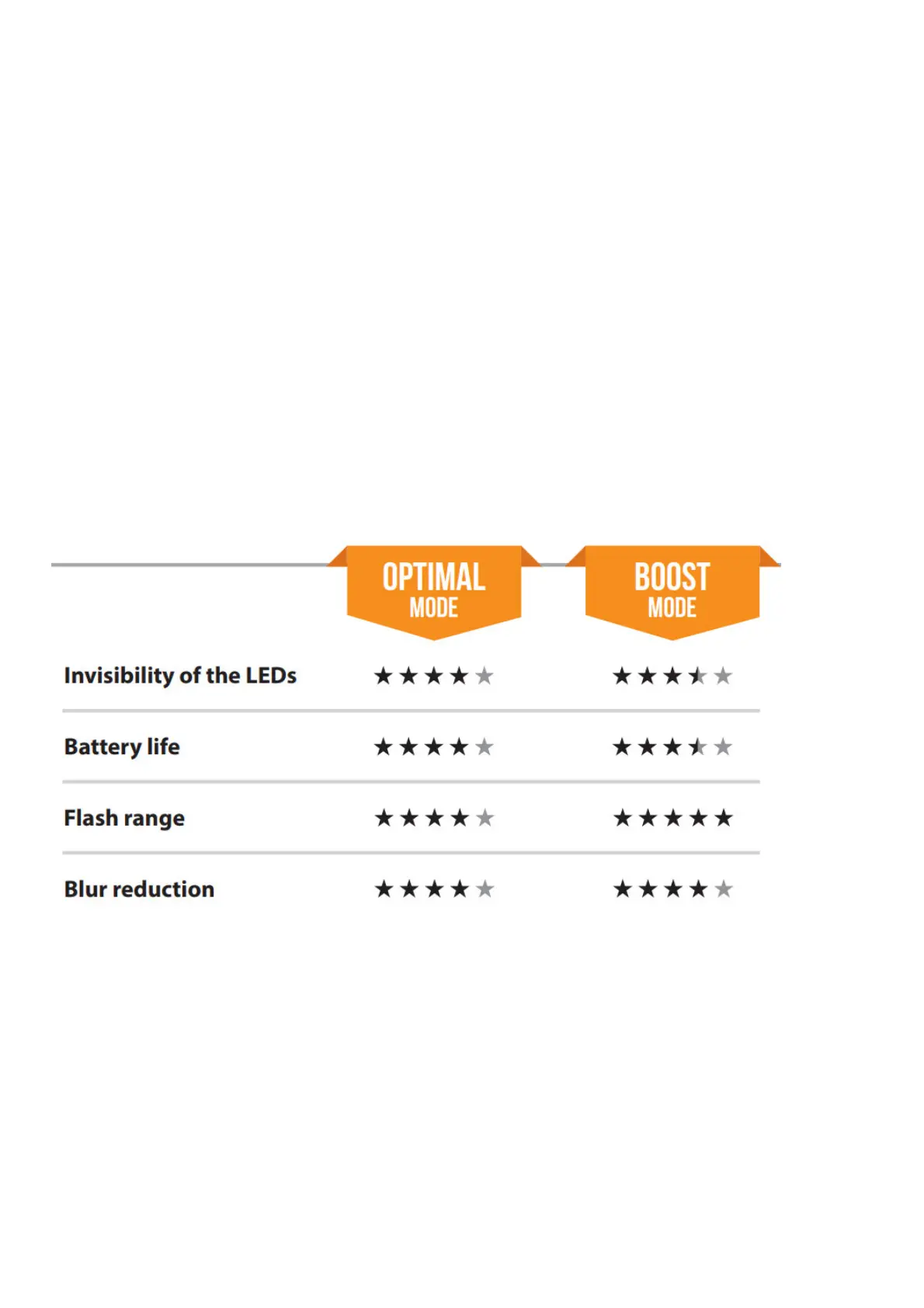
Night: Choose the BOOST option for maximum brightness for night vision. Select the OPTIMAL to reduce fuzziness
at night. Once you have made your selection, press OK.
OTHER OPTIONS
Name: Allows to give a name to your camera.
About: Indicates the software version.
Default: Resets all default settings.
Format: This allows the camera to format the SD card the next time it is used. (Reformatting the SD card will delete
all photos and videos on the card. Only format the card if you are sure you want to delete everything on it. Transfer
all data to your computer beforehand).
OPERATION
Once the setup is complete, turn the button from SETUP to ON.
You may also switch from SETUP to OFF and turn the device ON later.
RED LIGHT ON THE FRONT OF THE CAMERA
When the switch is in the SETUP position, the red light will flash to confirm a motion detection once you have
adjusted your settings.
When you move the switch to the ON position, the red light at the front of the camera will flash for 30 seconds to















 To Next Page