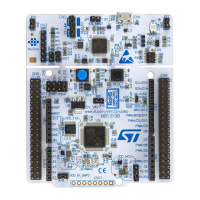
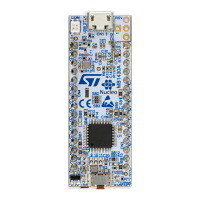
The STM32G4 Nucleo-32 board (MB1430), specifically the NUCLEO-G431KB model, is a cost-effective and adaptable development kit designed for users to explore new concepts and build prototypes. It leverages the STM32G4 Series microcontrollers, offering a range of performance, power consumption, and feature combinations.
Function Description
The board serves as an open development platform, allowing for easy expansion of functionality through its ARDUINO® Nano V3 connectivity, which supports a wide array of specialized shields. A key feature is the integrated STLINK-V3E debugger/programmer, eliminating the need for a separate probe. This integration simplifies the development process, making it more convenient for users. The board comes with comprehensive free software libraries and examples, accessible through the STM32CubeG4 MCU Package, facilitating rapid development and evaluation.
Important Technical Specifications
The core of the NUCLEO-G431KB board is an STM32G4 microcontroller, specifically the STM32G431KBT6, housed in a UFQFPN32 package. This microcontroller features an Arm® Cortex®-M4 core operating at 170 MHz, complemented by 128 Kbytes of Flash memory and 32 Kbytes of SRAM.
Connectivity and Peripherals:
- USB Micro-B connector (CN1): Used for STLINK-V3E debugging/programming and power supply.
- ARDUINO® Nano V3 expansion connectors (CN3, CN4): Male connectors compatible with the ARDUINO® standard, allowing for shield integration.
- SWD connector (CN2): Not fitted by default, but available for Serial Wire Debugging.
- Oscillators: Includes a 24 MHz HSE crystal oscillator (X2) for the main CPU and a 25 MHz crystal oscillator (X1) for the STLINK-V3E.
Power Supply Options:
The board offers flexible power supply options, including:
- ST-LINK USB VBUS: Default power source when connected to a host PC via USB.
- External sources: Can be powered by an external 5V USB charger, an external 7V-12V (VIN) power supply, an external 3.3V power supply, or an external 5V power supply via the ARDUINO® Nano connectors.
On-board Debugger/Programmer (STLINK-V3E):
The integrated STLINK-V3E supports SWD and VCP for STM32 devices. Its features include:
- 5V power supply from the USB connector (CN1).
- USB 2.0 high-speed compatible interface.
- 3V to 3.6V application voltage on the SWD interface with 5V tolerant inputs.
- Serial Wire Viewer (SWV) communication.
- USB re-enumeration capabilities: virtual COM port, mass storage, and debug port.
- 5V / 300 mA output power supply capability (U4) with current limitation.
LED Indicators:
- LD1 (COM): Bicolor LED (green, red) indicating STLINK-V3E communication status.
- LD2 (USER): Green LED connected to STM32G4 I/O (PB8 or PB3), also connected to ARDUINO® D13 signal.
- LD3 (OC): Red LED indicating USB power fault (overcurrent).
- LD4 (5V_PWR): Green LED indicating that the STM32G4 part is powered and 5V is available on CN3 pin 4.
Push Button:
- B1 (RESET): Connected to NRST (PG10-NRST) for resetting the STM32G4 microcontroller.
Solder Bridges:
The board features 16 solder bridges on the bottom layer, allowing for various configurations, including:
- T_VCP_TX (SB1) and T_VCP_RX (SB12): Connects USART2 (PA2/PA3) to STLINK-V3E Virtual COM port.
- 3.3 LDO output (SB15): Controls the U9 LDO output for 3.3V supply.
- SMD ferrite bead L1 (SB5): Shunts the ferrite bead for VDDA connection.
- LD2 (SB7, SB6): Configures LD2 connection to PB8 or PB3.
- AGND (SB16): Connects AGND to GND (reserved, not to be modified).
- I2C SCL/SDA support (SB3, SB2): Configures STM32 PA15/PB7 for I2C SCL/SDA on ARDUINO® Nano A5/A4.
- ARD_A2 (SB14): Connects ARDUINO® Nano A2 (CN3, pin 10) to STM32G4 I/O PA3.
- T_SWO on PB3 (SB4): Connects/disconnects T_SWO to PB3.
- HSE CLK selection (SB9, SB10, SB11, SB8, SB13): Configures the high-speed clock source (HSI, HSE bypass from ST-LINK, HSE bypass from ARDUINO® D7, or HSE oscillator).
Usage Features
Getting Started:
- Jumper Configuration: Verify jumper positions, especially JP1 for IDD measurement (default ON for STM32G4 current measurements).
- USB Driver Installation: Install Nucleo USB drivers from www.st.com/stm32nucleo for proper device interface identification on the host PC (not required for Windows 10).
- Powering the Board: Connect the board to a PC via a USB cable (Type-A to Micro-B) through CN1.
- LED Indicators: Observe LD1 (COM) and LD4 (5V_PWR) light up, and LD2 blink.
- Demonstration Application: Remove the jumper between D2 (CN4 pin 5) and GND (CN4 pin 4) to observe changes in LD2 blinking, indicating the demonstration application's response.
- Software Examples: Download software demonstration and examples from the NUCLEO-G431KB webpage to utilize STM32 Nucleo features.
- Application Development: Develop custom applications using the provided examples.
Power Supply Management:
- USB Power (Default): The board and shields can be powered from the STLINK-V3E connector CN1 (5V). The STMPS2151STR (U7) power switch protects the PC from overcurrent. If overcurrent (over 500 mA) occurs, LD3 (red) lights up.
- External Power (VIN, 5V, 3V3): External power sources can be used, especially if USB power is insufficient.
- VIN (7V-12V): Connect to CN3 pin 1. Current capability varies with voltage (800 mA at 7V, 250 mA at 12V).
- External 5V: Connect to CN3 pin 4. Provides 4.75V-5.25V with 500 mA max current.
- External 3.3V: Connect to CN3 pin 14. Provides 3V-3.6V with 1.3A max current.
- Debugging with External Power: When using VIN or external 5V, ST-LINK can still be used for programming/debugging. The board must be powered externally first, then connected to the PC via USB.
Clock Configuration:
The high-speed clock can be configured in four ways using solder bridges:
- HSI (Default): Internal clock from the STLM32G4 microcontroller.
- HSE Bypass (ST-LINK): Uses ST-LINK MCO output (25 MHz) connected to PF0-OSC_IN.
- HSE Bypass (ARDUINO® D7): Uses an external oscillator through PF0 (ARDUINO® D7 pin 10 of CN4).
- HSE Oscillator: Uses the on-board 24 MHz crystal (X2).
Maintenance Features
STLINK-V3E Firmware Upgrade:
The STLINK-V3E includes a firmware upgrade mechanism via the USB port. Users are advised to periodically check www.st.com for the latest firmware versions to ensure access to new functionalities, bug fixes, and support for new microcontrollers.
Current Consumption Measurement (IDD):
Jumper JP1 (labeled IDD) allows for measuring the STM32G4 microcontroller's current consumption. By removing the jumper and connecting an ammeter, users can monitor the device's power usage. If no ammeter is connected, the STM32G4 will not be powered.
System Requirements for Development:
- Operating Systems: Windows® OS (7, 8, 10), Linux® 64-bit, or macOS®.
- Cable: USB Type-A to Micro-B cable.
- Toolchains: Compatible with Keil® MDK-ARM, IAR™ EWARM (Windows® only), and GCC-based IDEs.
Demonstration Software:
The STM32Cube MCU Package includes preloaded demonstration software in the STM32 Flash memory, allowing for easy demonstration of device peripherals in standalone mode. Source code and documentation are available for download from www.st.com.
Driver Installation:
For Windows PCs (excluding Windows 10), a specific driver for the STLINK-V3E must be installed from www.st.com before connecting the board via USB. This ensures proper recognition of the device interfaces.

 Need help?
 General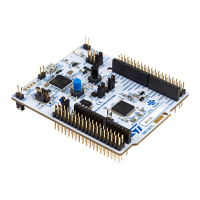






 To Next Page