40260-1202
12
2
Repeat scanning the same nger while listening for the single “beep” for
each successful scan. As you continue to scan, the scanner is “learning” your
ngerprint. Aer a minimum of 5 scans and possibly many more, the safe
will eventually “beep” 2 times indicating the ngerprint has successfully
been recorded.
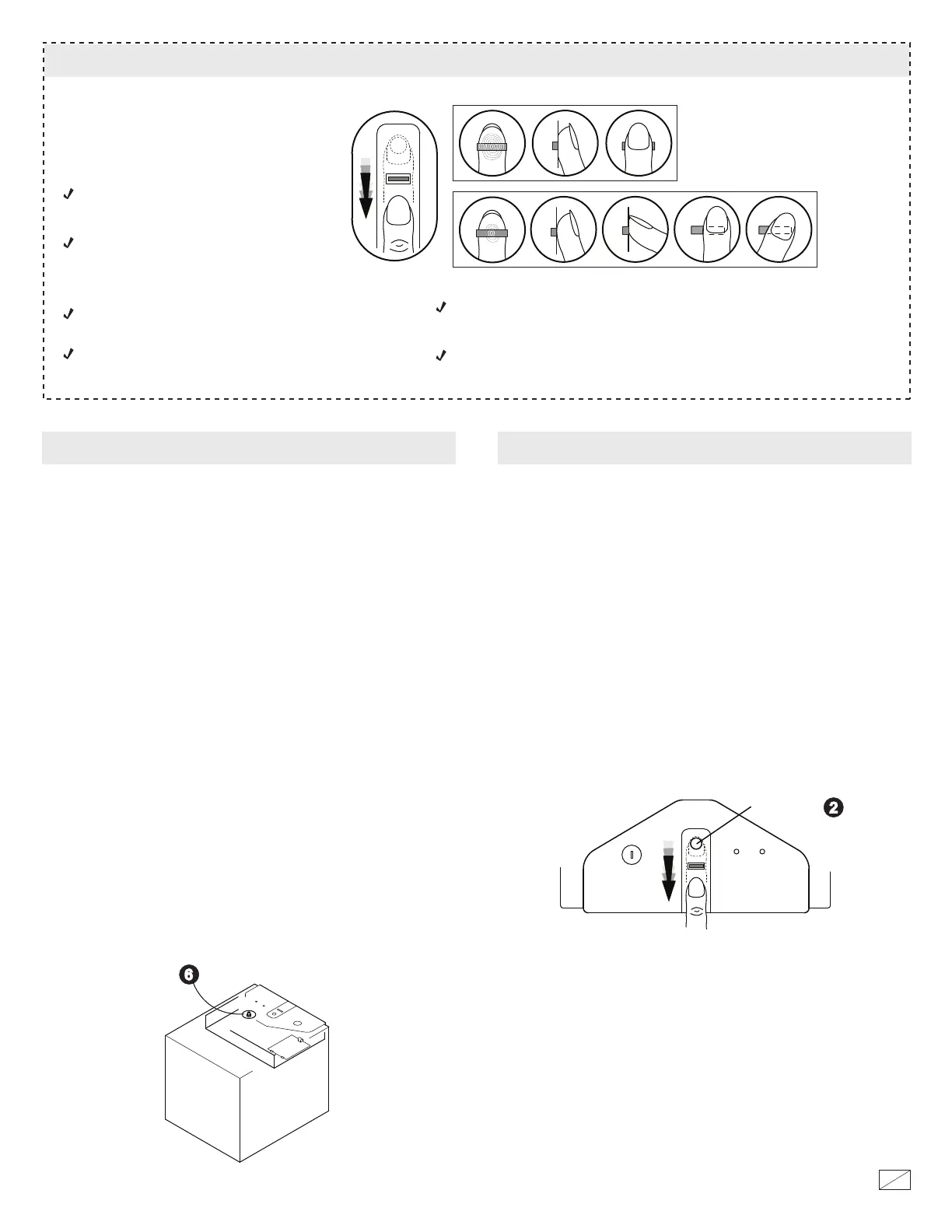
1. To record a ngerprint, press the Reset Buon (6) on the inside of the
safe. One “beep” will sound and the green light will start to ash.
If the nger scan happens to fail, the red light will ash and there will be 4
“beeps”. Continue to scan aer the green light goes on but be aware that 3
failed scans will result in the termination of the recording session. You will
then have to start over from step 1.
2. While the green light is ashing, slide a nger across the scanner. When
you hear a single “beep”, the scan has been successful.
3. Repeat steps 1 and 2 to record up to 28 ngerprints. If you try to record
more than 28 ngerprints, the red light will ash and there will be 4 “beeps”.
For security you must record your ngerprint.
You can record up to 28 ngerprints
RECORDING FINGERPRINTS
Locate the safe at a height that allows easy
access to the ngerprint scanner.
Record several of your ngerprints in case you sustain a cut or an injury to a
nger you have scanned.
Make sure your entire ngerprint crosses the scanner.
Use a similar scanning motion when opening the safe.
If your hands have oil, lotion or are dirty the ngerprints may not scan
correctly.
In order to improve the rate of ngerprint
identication please follow these suggestions:
TIPS FOR RECORDING FINGERPRINTS
Scan your nger by sliding it over the scanner
in a straight and even manner from back to
front taking 1 to 2 seconds to make the scan.
Correct
Incorrect
Reset Button
OPENING THE SAFE USING A RECORDED FINGERPRINT
e scan has been successful if there are 2 “beep” and the green light ashes.
e safe door will open.
1. Press the START buon (2). ere will be a one “beep” and the green
light will go on.
2. Slide a recorded nger across the scanner while the green is on.
To close the safe, push the door closed until locked.
START button
If the nger scan happens to fail, the red light will ash and there will 4
“beeps”. Try to scan your nger again aer the green light goes on but be
aware that 3 failed scans will result in the scanner shuing down. You will
then have to start over from step 1.



 To Next Page