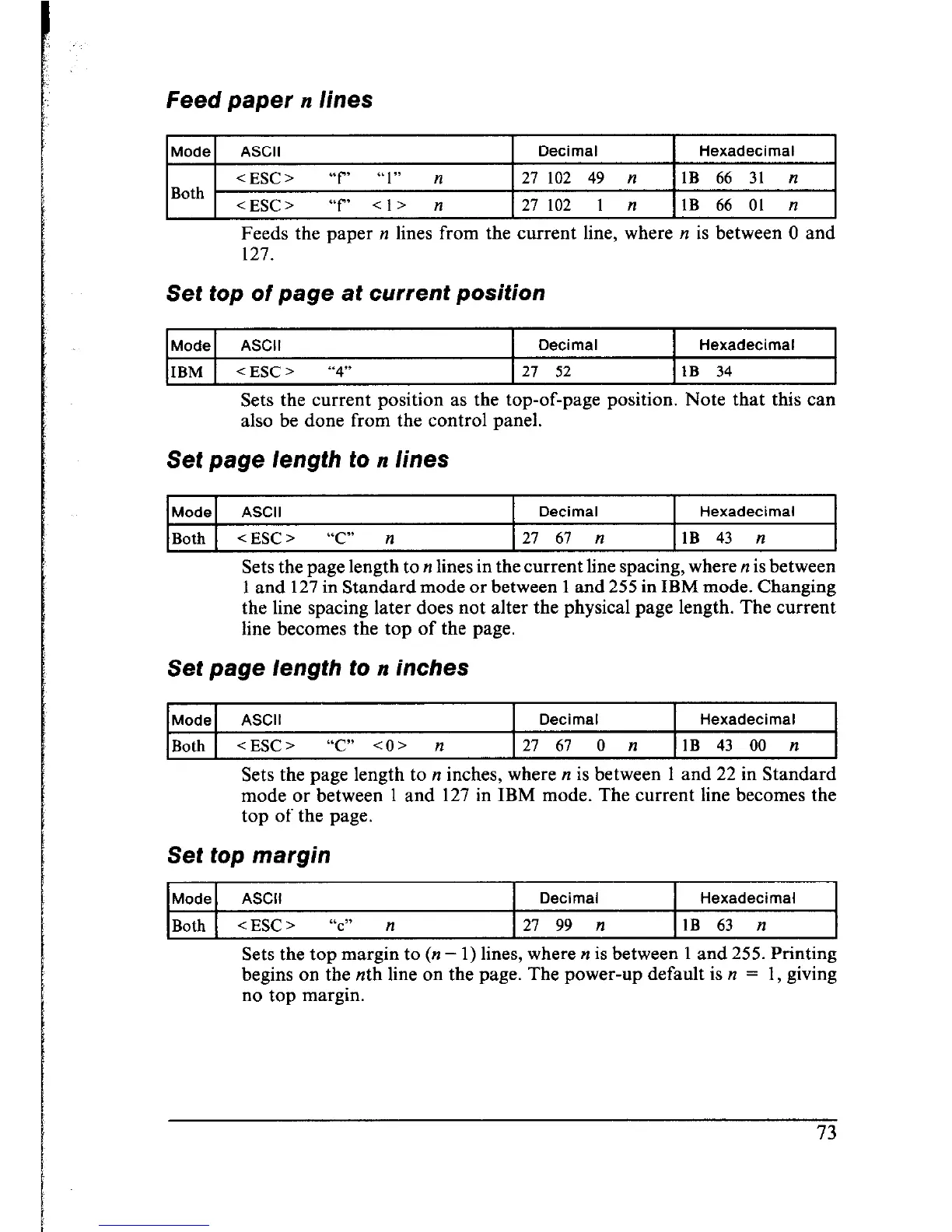
Feed paper n lines
Mode
ASCII Decimal Hexadecimal
<ESC> “f’ “1” n 27
102 49 n 1B 66 31 n
Both
<ESC> “f Cl> n 27
102 1 n 1B 66 01 n
Feeds the paper n lines from the current line, where n is between 0 and
127.
Set top of page at current position
Mode ASCII
Decimal Hexadecimal
IBM 1 <ESC>
“4” I 21 52 IlB 34
I
Sets the current position as the top-of-page position. Note that this can
also be done from the control panel.
Set page length to n lines
IModel ASCII I Decimal I Hexadecimal I
I
I
I
Both I
<ESC> “C” n
I 27 67 n
IlB 43 n
Sets the page length to n lines in the current line spacing, where n is between
1 and 127 in Standard mode or between 1 and 255 in IBM mode. Changing
the line spacing later does not alter the physical page length. The current
line becomes the top of the page.
Set page length to n inches
Mode ASCII Decimal
Hexadecimal
Both <ESC>
-2” CO> n
27 61 0 n
1B 43 00 n
Sets the page length to n inches, where n is between 1 and 22 in Standard
mode or between 1 and 127 in IBM mode. The current line becomes the
top of the page.
Set top margin
Mode ASCII
Decimal Hexadecimal
Both
< ESC z “c” n
27 99 n
1B 63 n
Sets the top margin to (n - 1) lines, where n is between 1 and 255. Printing
begins on the nth line on the page. The power-up default is n = 1, giving
no top margin.











 To Next Page