RDCM V03-101510
User manual Starline Roldeck
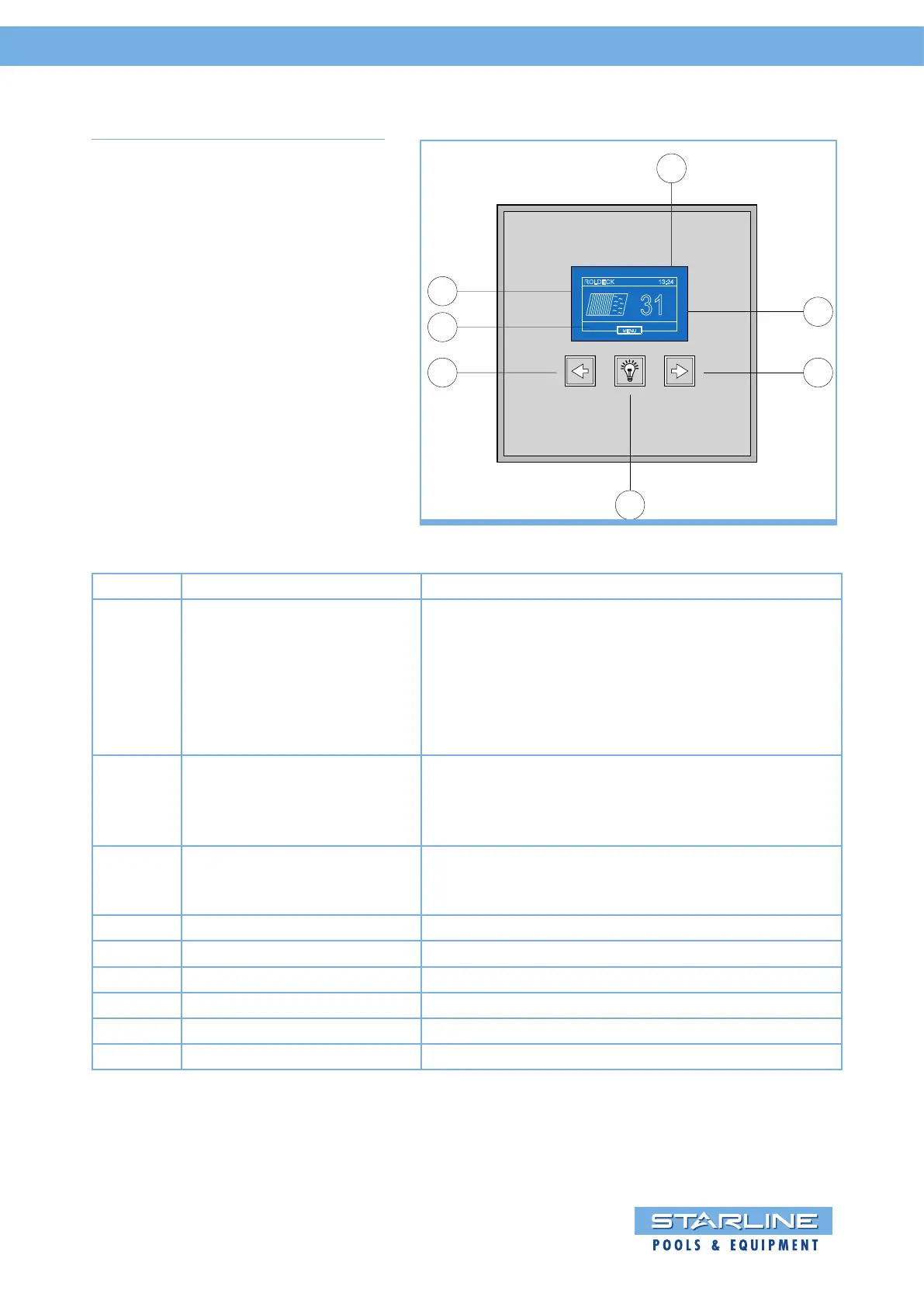
4.4 S-Switch control panel
E
F
D
A
B C
ROLDECK
13:24
31
O
C
MENU
G
Function Description
A “Mode” – key By pressing this key for more then 3 seconds,will
direct you in the set-up menu. For example you
can see:
• Information of the controlbox
• Calibrate temperature
• Programming extra remote controls
• Setup time and date
By pressing this key one time short, will set your
pool lights on or off.
When on and pressing the key twice will switch
between the color by LED RGB.
Auto Lock function: After 15 minutes “locked”
unlock the S-switch by pressing the menu key a
few seconds.
B Key “Open” / “Close” By pressing this key the Roldeck will run.
C Key “Open” / “Close” By pressing this key the Roldeck will run.
D Control – “Open” / “Close” Status reading the Roldeck and other functions.
E Time Time indication
F Temperature Water temperature reading (optional)
G Indicator symbols Indicates for example lights or jetstream are on.
With the arrow keys of the Roldeck
can be “opened” or “closed”.
By touching one of the three keys when
opening or closing the Roldeck, the
Roldeck stops.


 To Next Page