- 5 -
STC8H Series Manual
3.1 Install U8W/U8W-Mini driver
The U8W/U8W-Mini download board uses a CH340 USB-to-serial universal chip. This saves the trouble that some
computers without a serial port must buy a USB to serial port tool to download. But CH340 is the same as other
USB-to-serial tools, the driver must be installed before use.
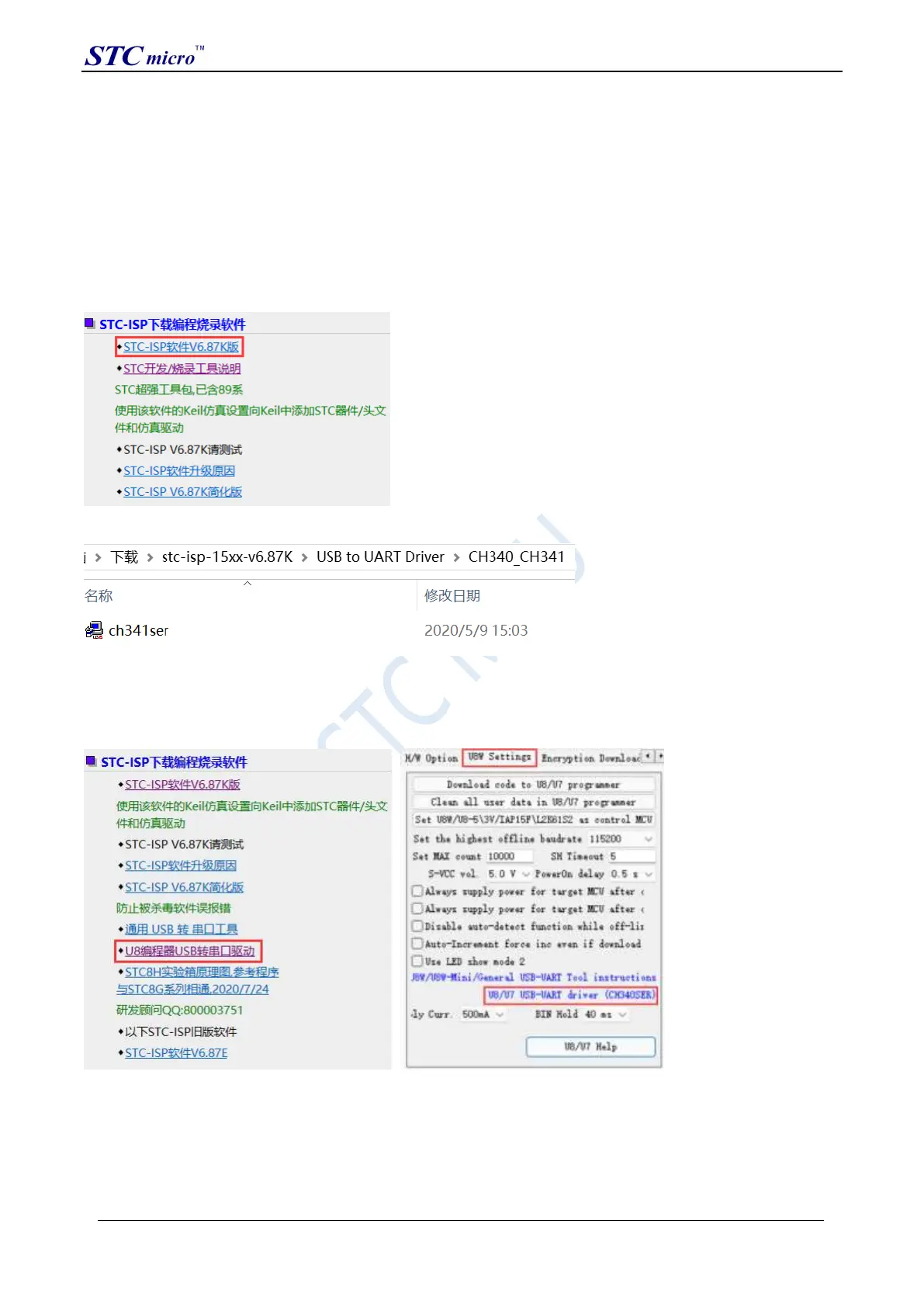
Obtain the driver by downloading the STC-ISP software package
The following is the download location of the STC-ISP software package provided on the STC official website
(www.STCMCUDATA.com):
After downloading, decompress, the path of CH340 driver installation package is stc-isp-15xx-v6.87K\USB to UART
Driver\CH340_CH341:
Download the driver manually through STC's official website or in the latest STC-ISP download software
Download the driver manually on the official website of STC or in the latest STC-ISP download software. The
download link of the driver is: U8 programmer USB to serial port driver
(http://www.stcmcu.com/STCISP/CH341SER.exe ). The driver address on the website and STC-ISP download
software is shown in the figure below:
Install U8W/U8W-Mini driver
After the driver is downloaded to the machine, double-click the executable program and run it. The interface shown
in the figure below appears, click the "Install" button to start the automatic driver installation:
STC Tool Instruction Manual



 To Next Page