22
Getting started
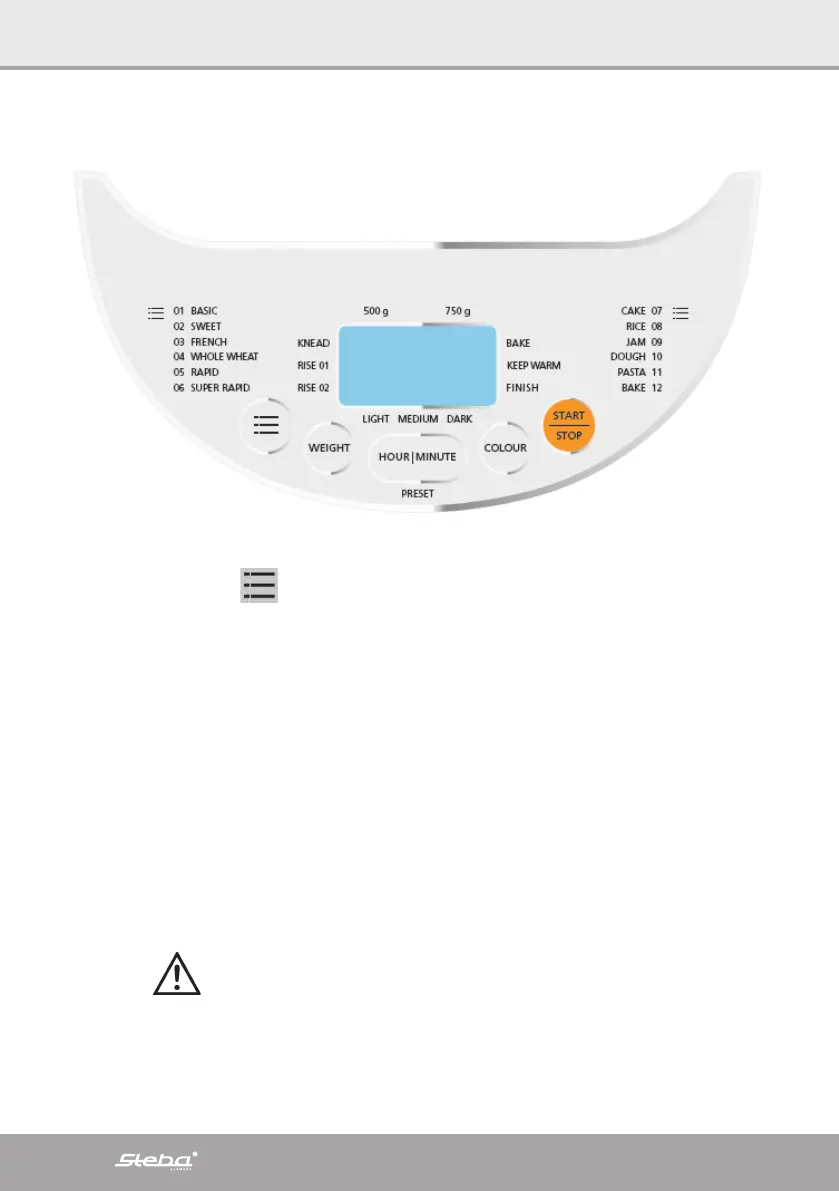
∙ Connect the device, a signal sounds and the display lights up: Time 3:21 with pro-
gram “1”
∙ Program button :
o Select the desired program 1 to 12.
∙ Weight:
o Select the desired bread weight 500g or 750g.
∙ Color:
o Select the desired degree of browning light, medium or dark.
∙ Start / Stop:
o The device starts to work and the time runs out.
o To cancel a program, press and hold the button for 3 seconds. The device
switches back to the starting mode.
∙ Pre-Set:
o With this button you can choose the time when the bread should be ready.
E.g. “10:30” - in 10 hours and 30 minutes.
o Select the program, weight and degree of browning and then press “HOUR
/ MINUTE” to set the pre-set time. Press and hold “HOUR / MINUTE” to se-
lect the hour. Press the button again to set the minutes.
o Start the device. After the selected time, the bread is ready.
o
If the pre-set time is used, no perishable food should be used in the
device!
∙ Keeping warm:
o After each baking process, the device automatically switches to keeping
warm for 1 hour. Keeping warm can be interrupted at any time with “Stop”.


 To Next Page