9 Operation
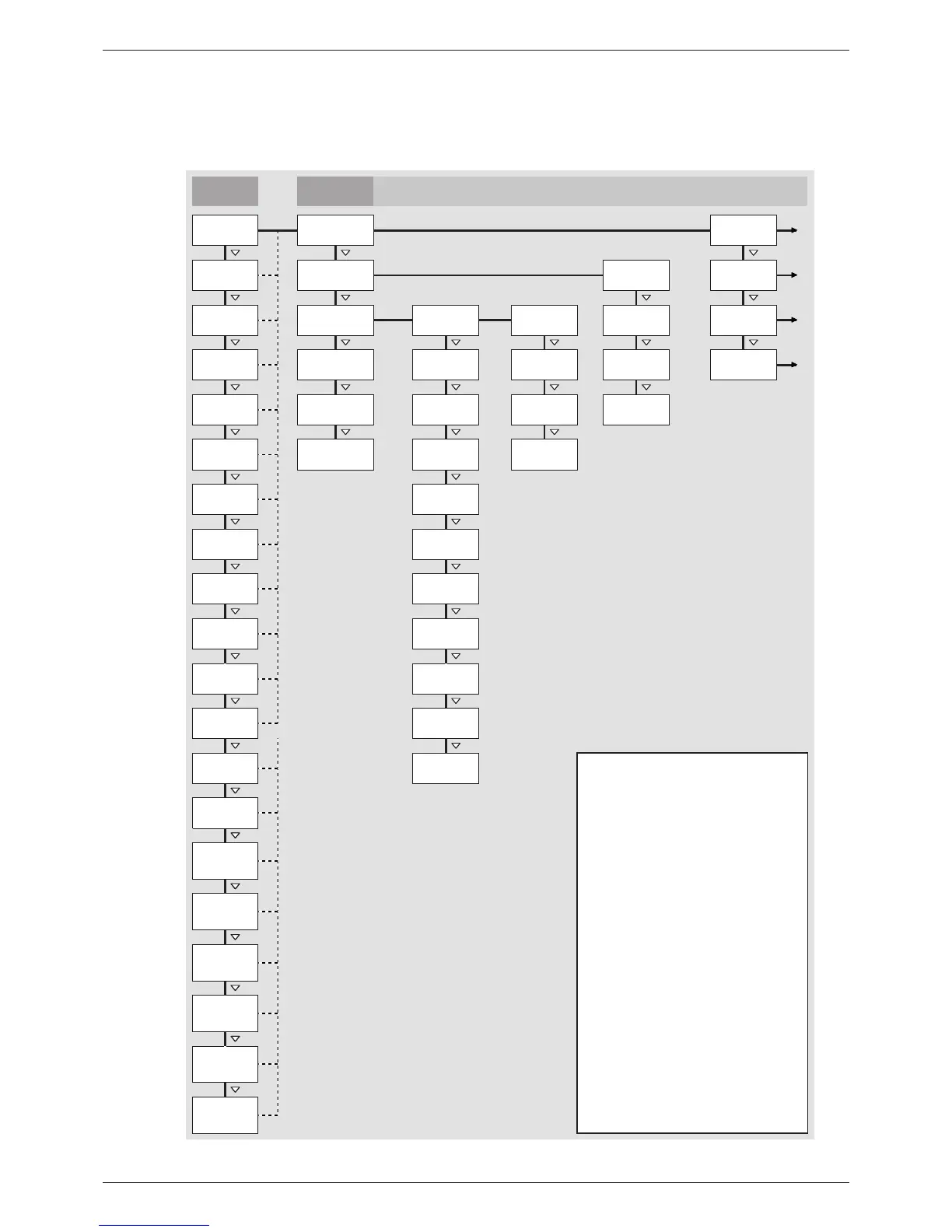
9.1 Overview of operating functions
The following overview describes the operating functions on the inverter display. For the sake of
clarity, only the operating buttons and SET are illustrated.
SET SET SET
SET SET SET
SET SET SET SET
SET SET
SET
SET
SET
SET
SET
SET
SET
SET
SET
1)
SET
2)
SET
3)
SET
4)
SET
SET
5)
SET
SET
Backlight
Service
5)
Grid current L3
1)
Internal
temperature
1)
Grid frequency
1)
Alarm
(acoustic alarm)
Grid current L2
1)
Grid voltage L3
1)
Grid current L1
1)
Grid voltage L2
1)
Language
(display)
Total yield
Date
Time format
Day yield
Status display Main menu
PV current 1)
Reactive power
1)
Current day
yield
1)
PV voltage 1)
ield
(energy fed into
grid)
Event log
Remuneration
(amount of money)
Settings
Submenus
Monthly yield
Annual yield
Time/date
Remuneration
(currency and
amount/kWh)
Time
2
)
Monthly yield
Self test
3)
2)
2)
2)
Day yield
Annual yield
Total yield
Output power
Only shown when Measurements is selected in the menu.
CO
2
saving 1)
Date format
Address
(inverter
address)
Max. daily
yield
1)
Total yield 1)
In Section Main operating functions is described how to
operate the service menu.
Operating
hours
1)
Measurements
(shown in status
display)
Reset max.
vals.
Contrast
(display)
Information
4)Grid voltage L1
Clear event log
Press SET to display the values in a list. Press SET again
to graphically display the value selected in the list.
Appears only when the selected country is Italy .
Press SET and select one of the following submenu items:
• Contact info
• System info
• Country parameters
• React. pwr. char. curve
• Self test
Max. daily
power
1)
Abs. max.
power
1)
Derating 1)
Fig. 13: Overview of operating functions on the display
67
744.378 | 12.13
EN








 To Next Page