11
PLAYING CASSETTE TAPES
Note: Before inserting a cassette tape in the player, ensure there is no excess
slack in the tape that could become jammed in the mechanism. *Refer to the
CARE AND MAINTENANCE section on how to remove excess slack from the
cassette before inserting it into the slot..
1) Rotate the OFF/VOLUME control knob (27) in a clockwise direction
until a click is heard - set the Function Selector (AM/FM/PH/CD/TAPE) (8)
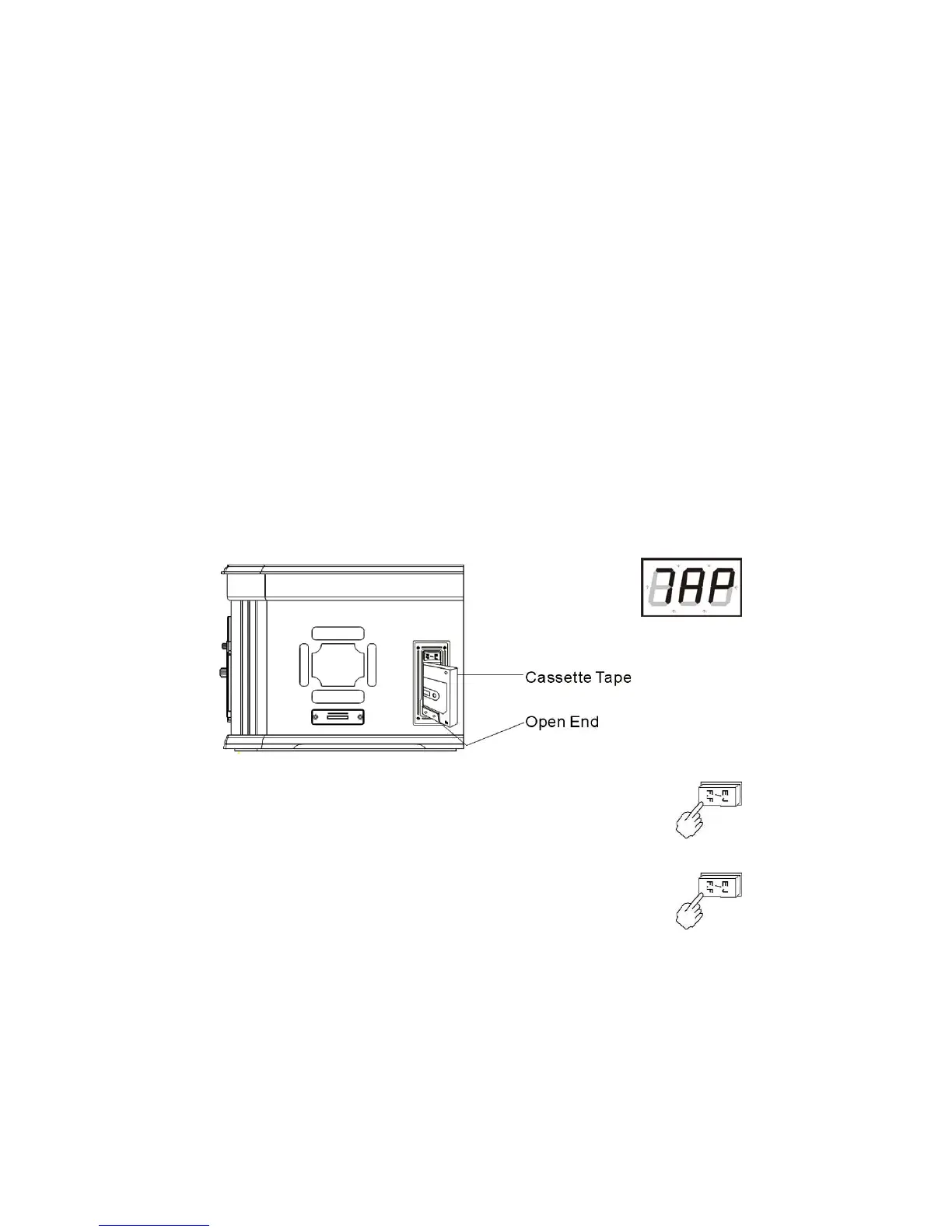
to TAPE and the display lights up and shows “7AP” (fig 1).
Set the Volume to a medium level. Fig 1
2) Insert your cassette into the slot*, as shown in the illustration.
Cassette playback begins as soon as the tape is inserted.
3) Adjust the volume by turning the OFF/VOLUME control knob (27).
4) To advance the tape rapidly, depress the EJ/FF (Eject/Fast
Forward) button (24) approximately half way. The tape will move
forward rapidly as long as the button is depressed.
Normal playback will resume when the button is released.
5) When the tape ends, the player stops automatically. Depress the
EJ/FF (Eject/Fast Forward) (24) button completely to eject and
remove the cassette from the player. You may press the EJ/FF
(Eject/Fast Forward) button to stop playback at any time during play.
6) To turn the system off, rotate the OFF/VOLUME control (27)
anti-clockwise until a “click” is heard.
b) In CD Playback Mode - ‘current song number - - Cd’shows on the display
alternately and 2 seconds apart.
c) In Stop Mode, the ’disc’s total track number - - Cd’ shows on the display
alternately and 2 seconds apart.
b) In MP3 Playback Mode - ‘current song number - - Cd - - Folder number’
shows alternately on the display 2 seconds apart. In Stop Mode, the disc`s
total track number - - Cd’ shows on the display alternately 2 seconds apart.


 To Next Page