when the vehicle category T3b is stopped. Shifting
vehicle category T3b breakdown.
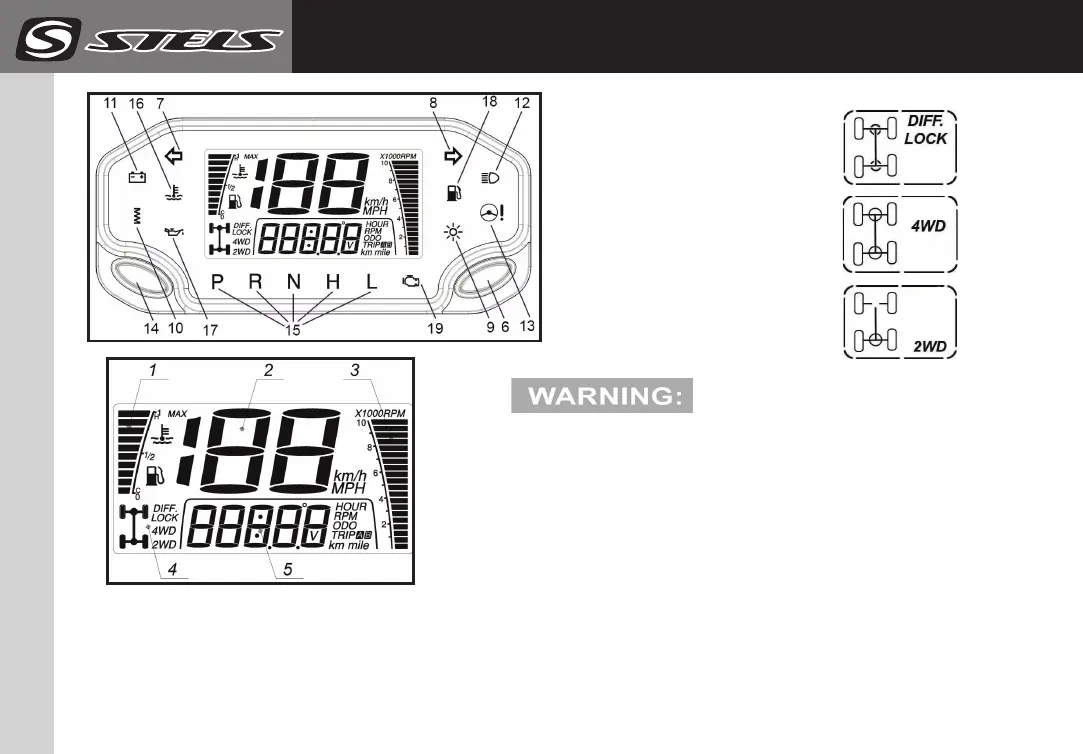
5. Multifunctional digital indicator. Display modes:
- Current time (hours / minutes).
1. Scale of fuel level / coolant temperature
by pushing the button (14).
2. Speedometer. Displays the speed in km
3. The scale of the tachometer indication.
4. Transmission mode indicator :
DASHBOARD
(parameter settings)
650/800/850 GUEPARD
21
13. Electric power steering malfunction (yellow).
14. Button switch mode panel. Select the display
mode for the fuel level or coolant temperature
on the display.
15. Gear indicator shows the engaged gear:
low gear « L »
high gear « Н »
neutral gear « N »
reverse gear « R »
parking « Р »
16. Engine overheating indicator. Flashes red if
the cooling agent temperature exceeds 115°С.
17. Engine oil incident pressure indicator (red).
18. Low fuel tank level (yellow)
19. Engine control system fault indicator (yellow).
Dashboard parameter settings:
To access the dashboard setting mode push
left (14) and right (6) buttons simultaneously
and hold them for >3 sec. After that:
Left button (14) – Option parameters adjustment.
Right button (6) – Option adjustment recording.
1. Setting the brightness of the display.
Variation range 0, 1, 2, 3, 4.
2. Setting hours/minutes.
Setting hours. Range is 0–23 hours.
Setting minutes. Range is 00–59 minutes.
6. Dashboard mode switching button. Switches the
following modes:
- General engine hours from the beginning of operation;
- Engine speed;
- Total odometer from the beginning of operation;
- Distance traveled from the beginning of the current trip A;
- Distance traveled from the beginning of the current trip B;
- Battery voltage;
- Coolant temperature;
- Current time (hours / minutes).
In order to set to zero user meters press and hold
buttons (6) for 3 sec. respectively in TRIP A, TRIP B
modes.Total HOUR and odometer can’t be be set to
zero. TIME mode sets to zero at accumulator removal.
7. Left turn indicator (green).
8. Right turn indicator (green).
9. Position lights (green).
10. Steering wheel handle heating (green). If available)
11. Low/high car system voltage indicator (red).
Flashes on when the car system voltage is
under 11.5 V or above 15.5 V.
Your the vehicle category T3b
is not equipped with manual start system.
If the engine is stopped when the accumulator
is discharged, it will not restart.
12. Headlamp high beam indicator (blue).
manufacture website : stelsoffroad.com



 To Next Page