M2B+ Controller
2-5 Panel Layout and Keypad
See
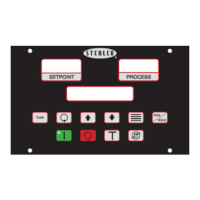
Figure 1 on page 15 for an illustration of the control panel and its buttons. The LCD backlight
lights up whenever any key is pressed. The backlight turns off after five minutes if no other
key activity occurs.
LED Indicator Lights
The M2B+ has one LED that will light up to indicate the control process has been started.
This LED is located inside the Start button of the controller’s front panel. When power is
applied, the LED will remain off until the Start button is pushed. The LED will then
illuminate green.
LCD Display
A 4-line by 20-character liquid crystal display (LCD) will show operational status, alarms
and programming menus.
1st Line. The first line of the LCD continuously displays the ‘To Process’ temperature.
2nd Line. The second line of the LCD continuously displays the ‘Setpoint’ temperature.
3rd Line. The third line of the LCD continuously displays the ‘From Process’ temperature;
the delta temperature of the ‘To Process’ and the ‘From Process’; and the flow in GPM or
LPM, if applicable.
4th Line. The fourth line of the LCD will display all menu items used in the controller setup.
Also displayed are the status of the pump, outputs for the heater, as well as cooling and
elapsed time for the vent cycle. The fourth line will also explain all alarm conditions and
operating status.
12 of 65 Chapter 2: Functional Description


 To Next Page