M2B+ Controller
5-10 Programming Ramp/Soak
The controller has a 16-segment, front-face programmable Ramp/Soak feature. Unused
alarms can be programmed as a segment.
Caution! Do not attempt to auto-tune the controller during a ramp/soak program. The
Tune button will not function during this process.
Instead of requiring the operator to calculate an approach rate, the controller does the
calculation automatically. The operator needs to program the target setpoint and the time
desired to reach that setpoint. When the controller executes the ramp segment, it calculates
the ramp required to reach the process temperature from starting setpoint to the programmed
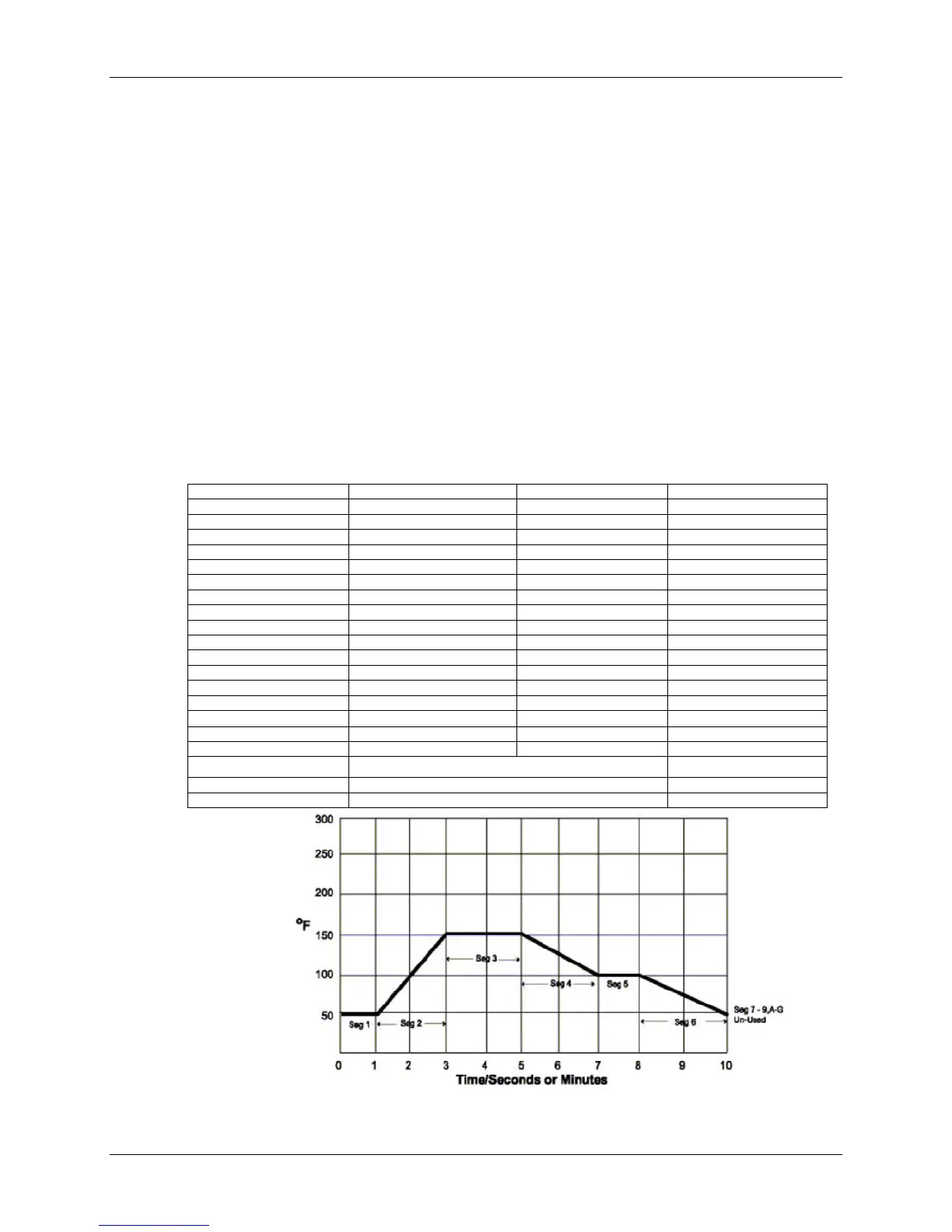
setpoint in the time allowed. (See Figure 2 for sample ramp/soak program.)
Dwells (or soaks) are ramp segments with target setpoint equal to starting process
temperature. This allows for multistage ramps without wasting intermediate soak steps.
Note: Before programming Ramp/Soak, evaluate your program on paper.
Test any program for best results before running production material.
Caution! Make sure to run auto-tune before operating Ramp/soak because Ramp
functions will interfere with the operation of the auto-tune
Segment Prompt Function Time (min.) Setpoint, ºF
1TI 1st Event 1
1SP 50
2TI 2nd Event 2
2SP 150
3TI 3rd Event 2
3SP 150
4TI 4th Event 2
4SP 100
5TI 5th Event 1
5SP 100
6TI 6th Event 2
5SP 50
7TI Un-Used 0
7SP Hold Last Setpoint 50
↓
Un-Used
GTI Un-Used 0
GSP 50
END Stay at present setpoint (GSP) HOLD
END Revert to SP1 value SETP
END Repeat program at 1TI LOOP
Figure 2: Sample Ramp Soak Program
Chapter 5: Advanced Operation 39 of 65


 To Next Page