M2B+ Controller
Button Function
Vent
• When the system is first powered-on and the “Power Available - System Off”
message is displayed, pressing the VENT key will turn on the Vent Output for a
period of 8 seconds. The message “VENT” will be displayed during this period.
• When the system is running, pressing the VENT key shall manually turn on the
Vent Output for as long as the key is held down, provided the ‘To Process’
temperature is below 150
o
F (65.5
o
C) for a water unit and 250
o
F (121
o
C) for an Oil
unit. The message “Vent Time = MANUAL” will be displayed while the key is held
down.
Alarm
Silence
• Turns off the Alarm 1 Output. The cause of the alarm will continue to appear in LCD
until the fault is cleared.
• Used to immediately terminate any of the three Setup modes without having to
cycle through to the end of the menu items. Note that the current displayed
parameter value is not saved to EEPROM when this key is pressed.
• Can be used as a means of turning on the LCD backlight without affecting any
operation.
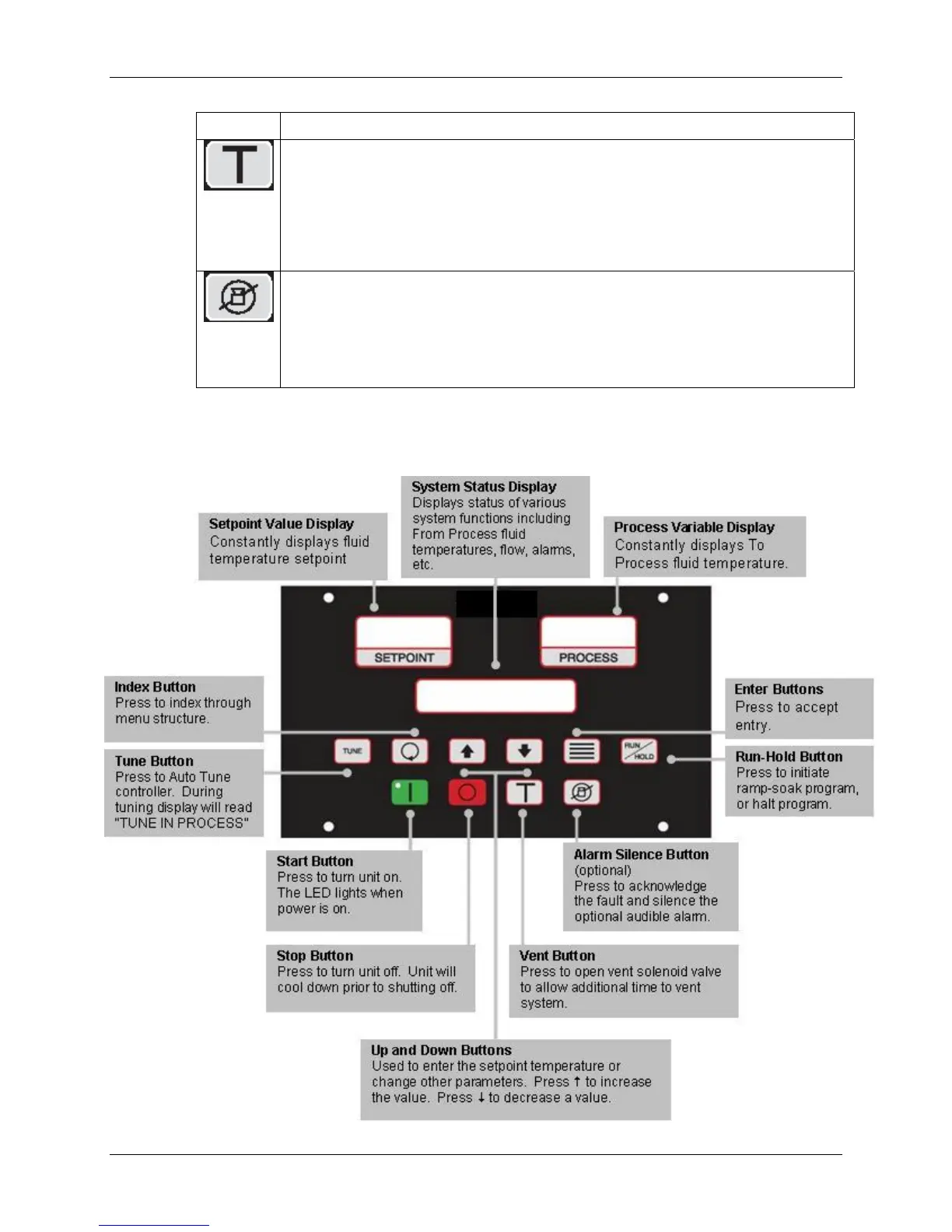
Figure 1: Panel Layout
2-6
Chapter 2: Functional Description 15 of 65


 To Next Page