_____________________________________________________________________________________
STI S.r.l. – Via Dei Caravaggi 15, 24040 Levate (BG) – ITALY www.imi-critical.com
Manual 4054 – rev.00 02/2021 – DT2 - 16 -
5.3.3 Manual tuning
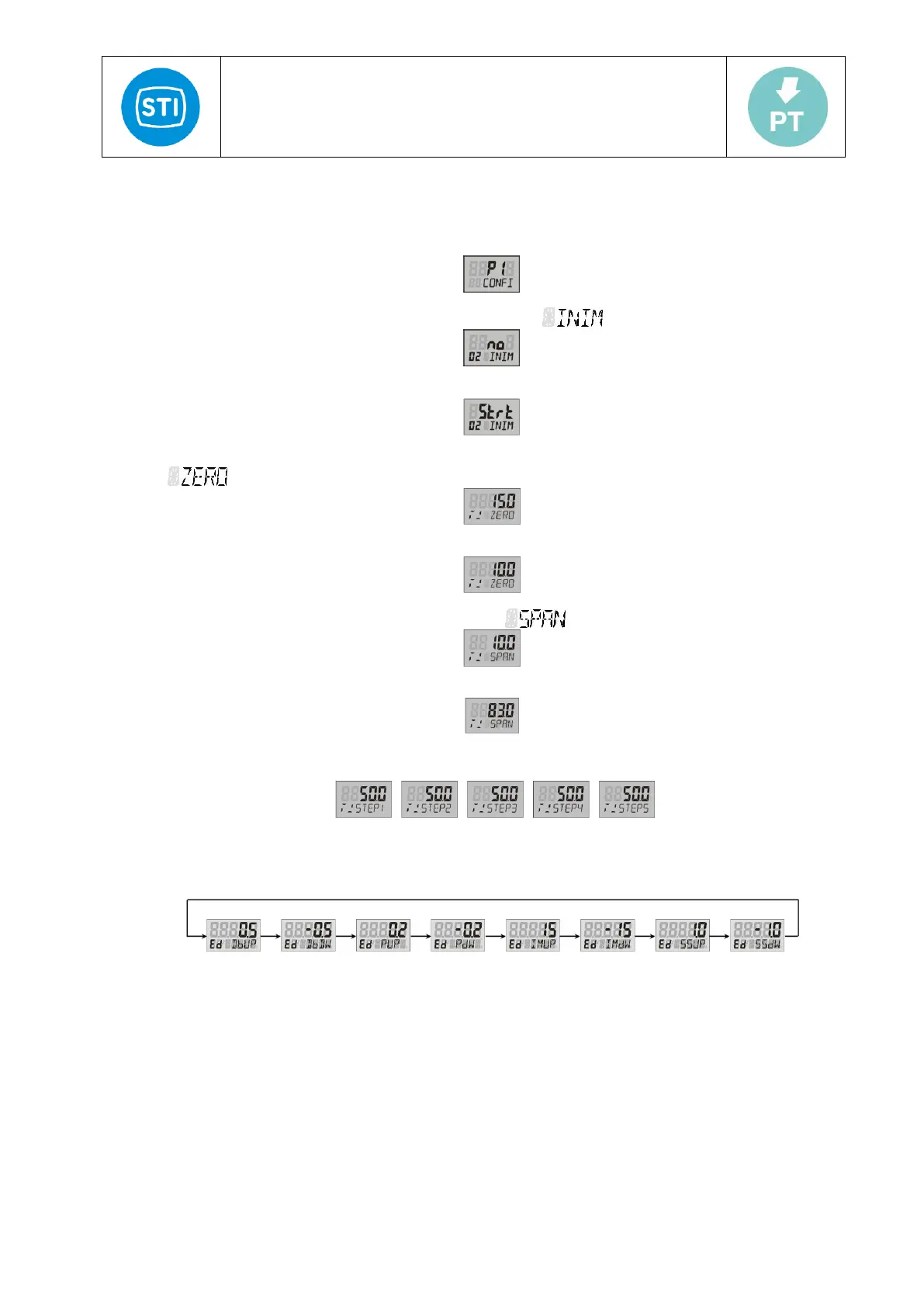
1) Positioner is in normal mode after power-on. Press and hold A/M for more than 3 seconds to enter the user
menu state.
2) Press to choose the parameter, till the second row shows " ".
3) Press the button A/M, the down line will be blinking, enter the parameter amending state.
4) Press for more than 3 seconds, up shows "STRT", then it enters the manual tuning. Down shows
" ",
5) Press or to choose the start point.
6) Press A/M to confirm, At this time, the down line shows " "
7) Press or to choose the end point
8) Press A/M to continue the procedure. The whole procedure is according to the "STEP1" to "STEP5” and shows
the current steps on the down line.
In the process of tuning, press the function key A/M for more than 3 seconds to exit tuning state and enter
automatic state.
9) After tuning, up shows parameters value; the down shows the "ED XXXX", XXXX means the relevant tuned
parameters.
10) Press A/M for 3 seconds to return the normal state.



 To Next Page