40 EN
5. OPERATION
NOTE: this mode may not guarantee adequate coverage of the garden, both in terms of time
required and in terms of uniformity of the cutting result, especially if the garden has an irregular
out programming (see Par. 4.7).
NOTE: If after pressing the "CONFIRMSELECT MODE" button (F) is pressed,
selected function. Press the “CONFIRM
steady glow.
NOTE: if the cover (B) is opened, either during work or with the robot in the base, the icons
before closing the cover again. If the cover is closed without pressing the The "CONFIRM"
5.2.
The robot lawn mower can be used without performing the programming procedure described in Par. 4.7.
In this mode the robot lawn mower carries out a work cycle, returns to the charging base and remains
there until the next manual start.
1. Place the robot mower on the charging base or within the perimeter of the installation.
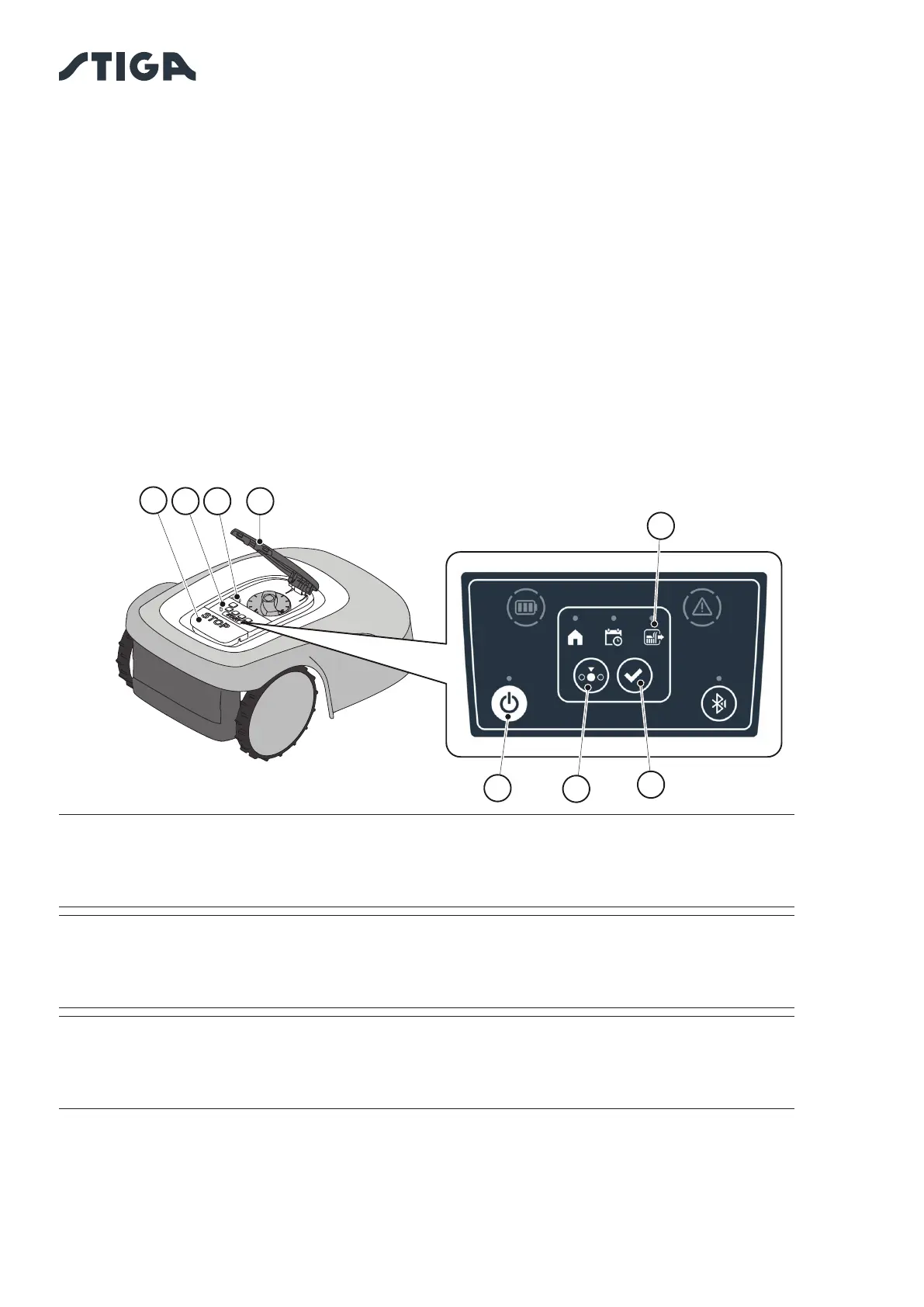
2. Press the “STOP” button (A) to open the cover (B) and access the control console (C).
3. Press the “” button (E) for 3 seconds to switch on the robot lawn mower.
4. Press the “SELECT MODE”
5. Press the “CONFIRM
operation.
6. Close the cover (B).
7. The robot lawn mower will start operating.
B
C
A
L
D
G


 To Next Page