41EN
5. OPERATION
5.3.
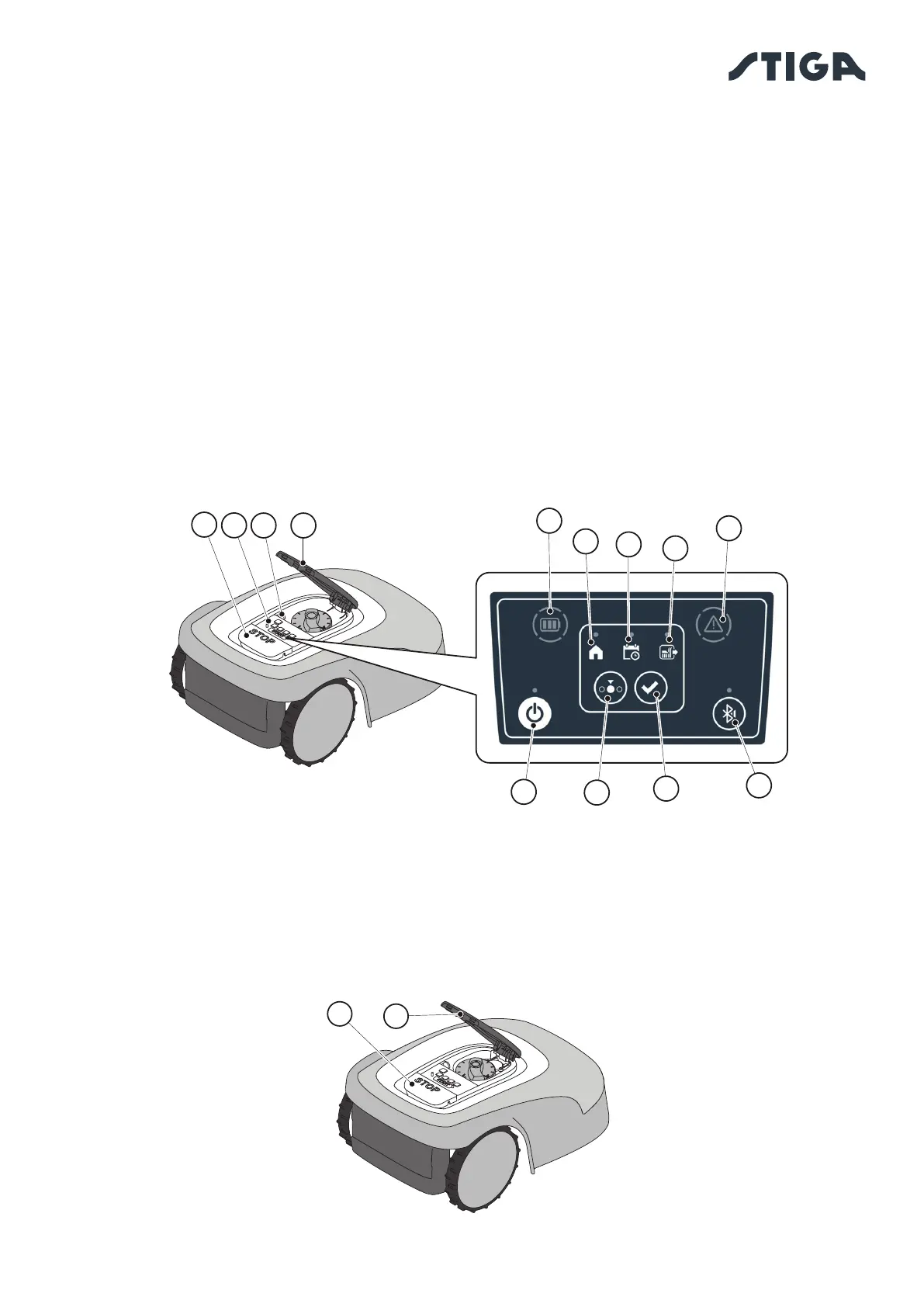
List of controls, indicators and their function:
• The “STOP” button (A): is used to safely stop the robot mower.
• The “SAFETY KEY” (D): is used for the safety shut-down of the robot lawn mower.
• The “
alarms.
• The “MODE SELECTION" button (F): is used to select the operating mode of the robot lawn
mower and to force it to return to the charging base.
• The “CONFIRM"
• The light icon (I): is used to display the scheduled program settings.
• The light icon (.L): is used to display the single work cycle settings.
• The light icon (H): is used to display the forced return-to-base setting of the
robot lawn mower.
• The “” button (H): is used to display the bluetooth status and disconnection.
• The “ALARM” light icon (I): is used to display the alarms status.
• The “” light icon (F): is used to display the battery charging.
5.3.1.
The “STOP” button (A) is a control that stops the robot lawn mower in safety conditions, whatever its
operating condition is.
1. Press the "STOP" button (A) while the robot lawn mower is moving or already still.
2. When the "STOP" button (A) is pressed, the robot lawn mower stops and the cover (B) opens, allowing
access to the other robot controls.
B
C
A
I
H
L
D
N
G
FE
M
B
A


 To Next Page