EasyManua.ls Logo

Stiga Stig 300 - Robot Controls Overview

Stiga Stig 300
204 pages
Print Icon
To Next Page IconTo Next Page
To Previous Page IconTo Previous Page
Loading...
42 EN
5. OPERATION
5.3.2. 





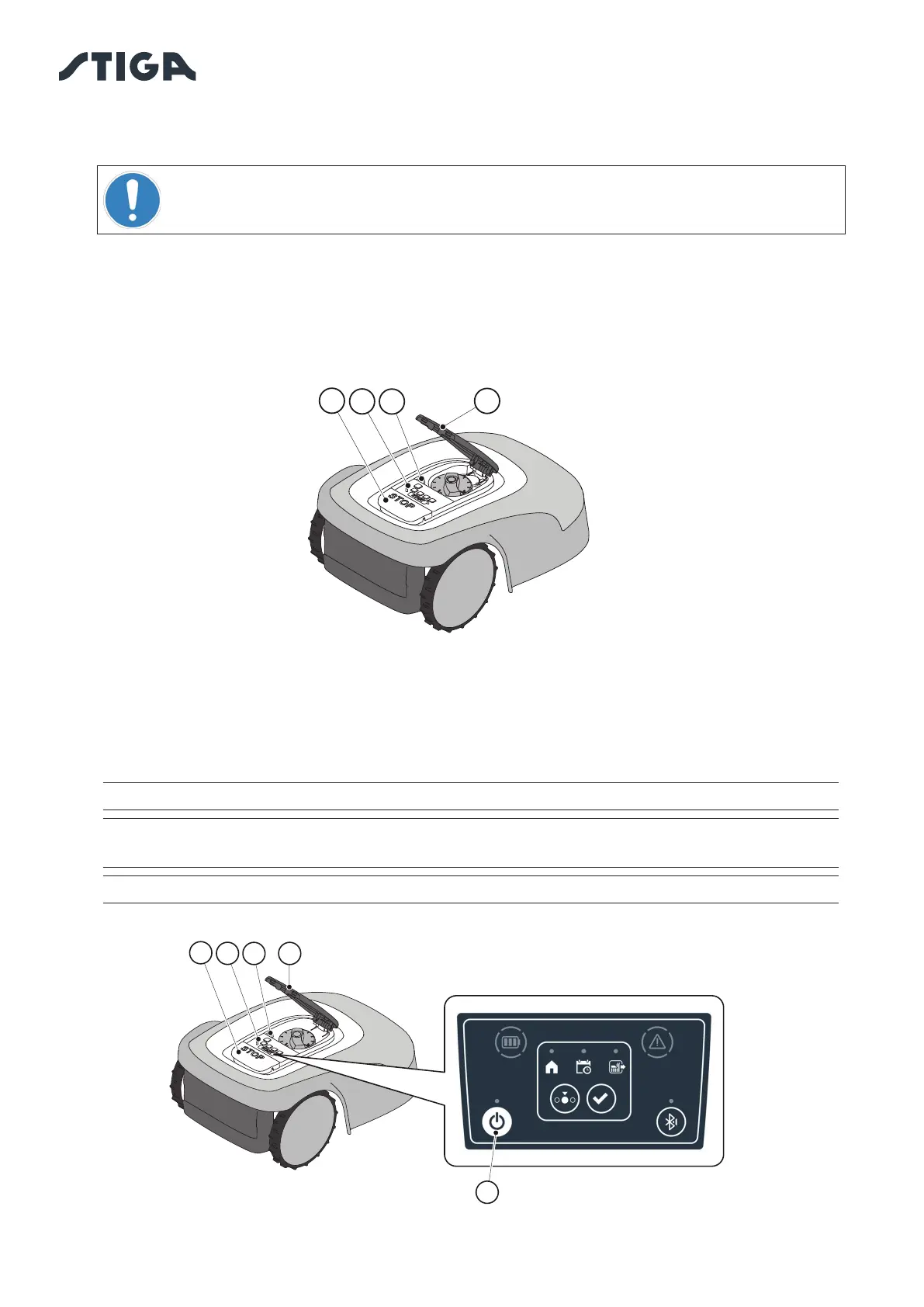
1. Press the button “STOP” (A) to open the cover (B) and access the control console (C).
2. Remove the safety key (D) and keep it in a safe place.
3. After carrying out the maintenance operations, insert the safety key to be able to switch on the robot
lawn mower.
5.3.3. 
The "

1. Press the button “STOP” (A) to open the cover (B) and access the control console (C).
2. Press the “
NOTE: To switch on the robot lawn mower, the safety key (D) must be inserted.
NOTE: Removing the safety key (D) shuts down the robot lawn mower, even if it was not
” button.
NOTE: In case of active alarms, a double press of the “” button will reset the alarms.
B
D
C
A
B
C
A
D
E

Table of Contents