Home
STONEX
Receiver
S9III GNSS
Page 40
STONEX S9III GNSS - Page 40
75 pages
Manual
Save Page as PDF
To Next Page
To Next Page
To Previous Page
To Previous Page
Loading...
40
Chapter V
: St
onex Assist
ant for S9III
DefR
ad
S
et
t
in
g
s
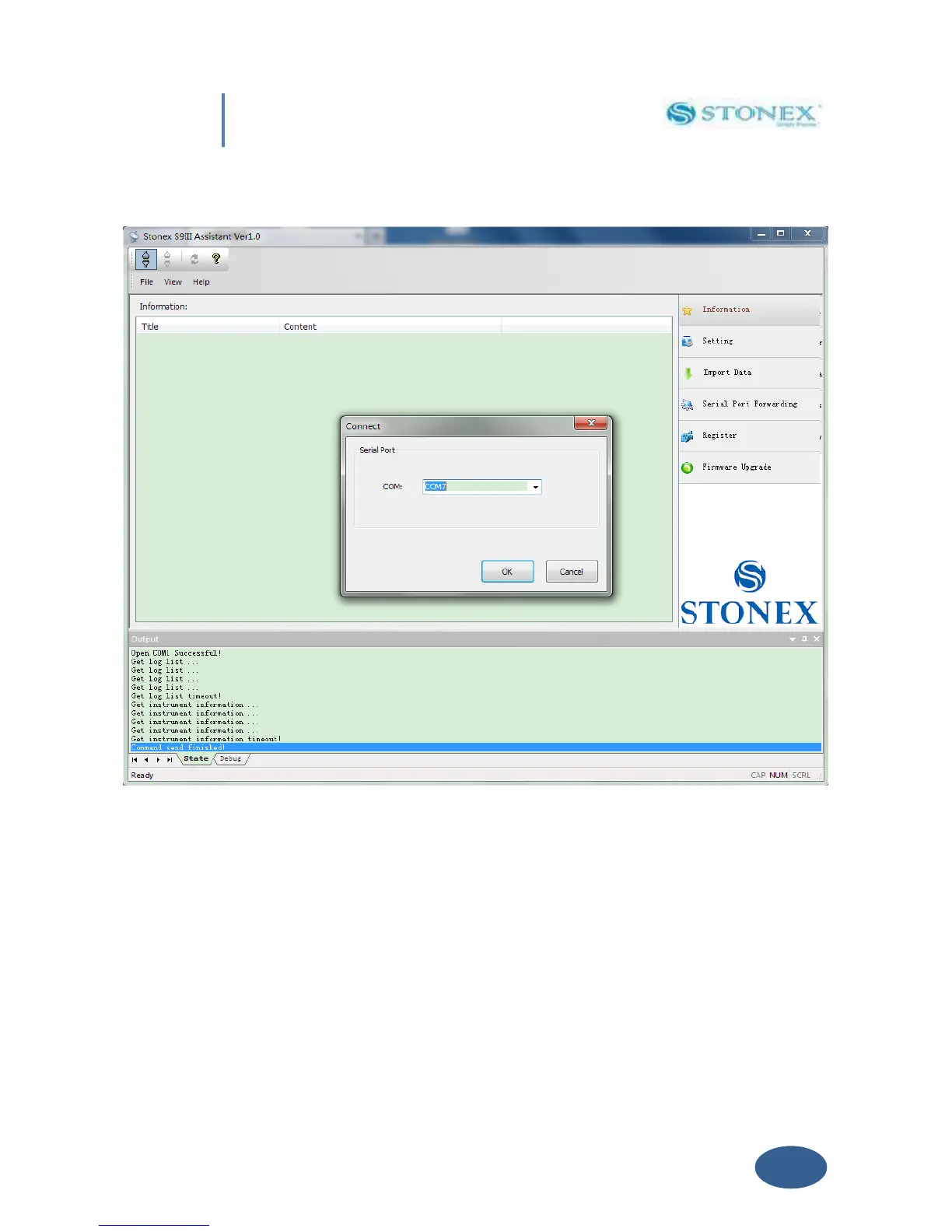
Fig. 5.2-Opening COM
port
T
ry
to
get
connect
ion
insert
ing
d
ifferent
C
OM
numbe
r
(lik
e
COM1,
COM2,
etc),
and
then
se
l
ect
“OK”
but
to
n
.
When
you
hav
e
find
the
right
COM
port
,
y
ou
shoul
d
see
the
screen
shown
in
Fig
5.1 (sy
stem informat
ion).
39
41
Table of Contents
Main Page
Default Chapter
2
Table of Contents
2
Chapter I : a Brief Introduction of S9III
4
Chapter II: S9III Mainframe
7
II.1 the Outlook of Mainframe
7
II.2 Interfaces
9
II.3 the Installation of Battery
11
II.4 Indicator Leds and Instrument Setup
12
Chapter III: S9III Standard Accessories
20
III.1 the Case of S9III
20
III.2 Power Supply
22
III.3 the Antennas
24
III.4 Cables
25
III.5 Other Accessories
27
III.6 Controller Getac PS236
28
Chapter IV: S9III Operations
30
IV.1 the Installation of Base and Rover
30
IV.2 the Operation of Keys
31
IV.3 Instrument Settings
31
IV.4 Operation of Lights
33
IV.5 How to Measure the Antenna Height
33
IV.6 How to Download Static Data
35
IV.7 Registration of the Receiver
36
Chapter V: STONEX Assistant for S9III
38
Start Stonex Assistant on Your PC
39
Import Data
41
Settings
42
Static Data Survey
43
Dynamic
45
Automatic Start up by Single Position
47
Start up by a Specific Position
48
Data Link
49
Network
49
UHF Radio
51
Extend
53
Bluetooth
54
NMEA Output String
55
Register the Receiver
56
Firmware Update
57
Serial Port Forwarding
58
Appendix 1: Default Radio Settings
60
Appendix 2: Frequently Asked Questions
62
Appendix 3: Technical Specifications
63
GNSS Module Specifications
63
Receiver Accuracy
64
Connection Devices and Protocols
64
Radio Module
65
GPRS/GSM Module
65
Power Supply
65
Physical Specification
66
Appendix 4: Copyrights, Warranty and Environmental Recycling
67
Copyrights and Trademarks
67
Release Notice
67
Standard Limited Warranty
67
Shipping Policy
68
Return Policy Dead on Arrival Instruments
69
Firmware/Software Warranty
69
Over Warranty Repair(S) Policy
69
Disclaimer and Limitation of Remedy
70
Instruments
71
Accessories
71
Restriction for GPS Boards
71
Service Procedure
71
Environmental Recycling
72
For Countries in the European Union (Eu)
72
For Countries Outside European Union (Eu)
73
Certification Information
73
Related product manuals
STONEX S9III Plus
73 pages
STONEX S9IIIN GNSS
75 pages
STONEX S9 GNSS
69 pages
STONEX S9i
49 pages
STONEX S900
34 pages
STONEX S900A
49 pages
STONEX S900+
51 pages
STONEX S980A
66 pages
STONEX S900T
33 pages
STONEX S990A
66 pages
STONEX S10
63 pages
STONEX S800A
43 pages



 To Next Page