User Manual for X7-E1608
For more information, please visit our website www.en.streamaxtech.com
1) User can enter the operation interface if entering the right password;
2) User must enter the right password again if entering the wrong ones;
3) Click cancel to exit the login interface;
1) Support the language switch. "language" (Lang) means the current interface adopts Chinese;
2) It will automatically switch once Selecting the language.
3) Currently, it supports Chinese and English;
4) After switching languages, it will not restore language option when user restores the factory
Default password and permission table is as follows::
Default Password Related User Related Authority
admin admin All Authorities
User user Search and playback
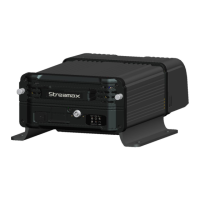
The password input Instruction:
1. If the password are numbers, user can enter it by remote control directly.
2. User can click 【ENTER】 or the left click mouse on the remote control.
a. Move the cursor to the number position, press 【 Enter 】 or left click mouse button to select the
b. Move the cursor to 【123】, press 【Enter】or mouse to choose input type, such as
the Numbers, letters, or special characters.
【ab】means lower case letters,【123】means numbers,【AB】means capital letters; the highlighted
place of background refers to the current cursor position.
, Press【Enter】or left click mouse to move between the contents that have
, Press 【Enter】or left click mouse to delete the previous input contents.
, Press 【Enter】or the left click mouse to exit the keypad, the entered
contents will be written to the edit box.



 To Next Page